4 Easy Ways to Watch Netflix Offline on Laptop (2026 Guide)
 Ashley Wood
- 26 September, 2026
- Blog
Offline downloads are no longer available on Netflix’s Windows laptop app. But if you want to watch Netflix movies and shows on laptops without internet, don't worry — we round up 4 practical ways to download Netflix movies on laptops, working for Windows, Mac, and ChromeOS systems. We outline all step-by-step instructions and safety tips, so you can pick the perfect method for your needs. Keep scrolling!
Can You Download Netflix on a Laptop in 2026?
If you are trying to watch Netflix offline on a laptop, here are the most common questions users ask:
- ❓ Can you download Netflix movies on a laptop?
- ❓ Why did Netflix remove downloads from Windows and Mac apps?
- ❓ What is the safest way to download Netflix on a laptop?
In 2026, Netflix officially only supports downloads on mobile devices and Chromebooks. Windows and Mac laptops no longer have native offline download support, so users need alternative methods depending on their device.
2026 Up-To-Date Comparison: According to the latest feature update on Netflix's official site, the rules for downloading Netflix videos on laptops have changed.
| Platform | Support Netflix Downloads? | Notes |
| Chrome OS (Chromebook) | ✅ YES | Only laptops with native downloads |
| Netflix Website (Browser) | ❌ NO | Need official app for offline downloads |
| Official Windows App | ❌ NO | 2024 update: download feature removed |
| macOS (MacBook) | ❌ NO | No download app for macOS |
For the latest and most accurate comparison, visit the Netflix official page.
Method 1: Download Netflix Movies on Laptop with FlixiCam
Netflix has stopped offline downloads on its Windows laptop app (now a PWA web-shell). To fix this, the workaround is to use a reliable third-party downloader like FlixiCam — the dedicated Netflix downloader for laptops, works on both Windows (10/11) and Mac (macOS 11+).
FlixiCam allows you to download Netflix movies and shows as MP4 or MKV files in 1080p HD quality, and your Netflix downloads are saved forever — you can keep and watch them even after canceling your Netflix subscription.
What Make FlixiCam the Top Choice:
- Built-in Netflix web player for direct search & playback.
- Download Netflix videos (up to 1080 p) in MP4 or MKV format.
- Keep Netflix downloads forever — even if you cancel Netflix subscription.
- Support batch download Netflix videos in 10x speed.
- Transfer Netflix downloads to any device for flexible viewing.
- Keep multiple language tracks and subtitle options.
- Ad-free Netflix downloads (Basic/ad-supported plans included).
Compatibility: Windows 10/11, macOS 11 and above.
 Download Win
 Download Mac
📍 If you're looking for a tool to download any streaming video (including Netflix, Disney+, Amazon Prime Video, Hulu, HBO Max, Paramount+, Peacock, Apple TV+ …) to MP4, Flixicam Stream One is the top pick.
Tutorial: Netflix Movie Download with FlixiCam
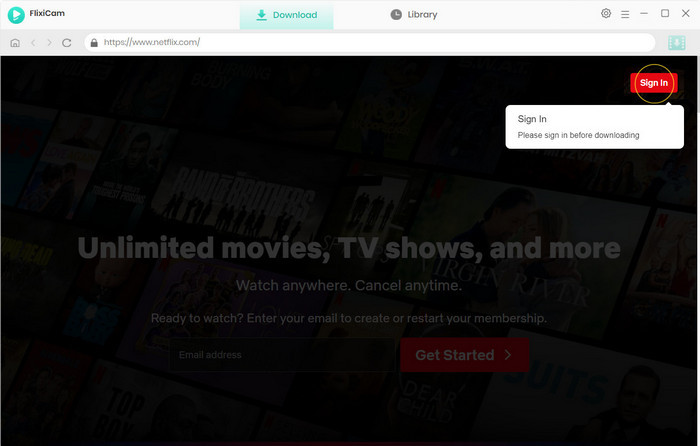
Step 1. Sign in with Netflix Account to Access Your Library
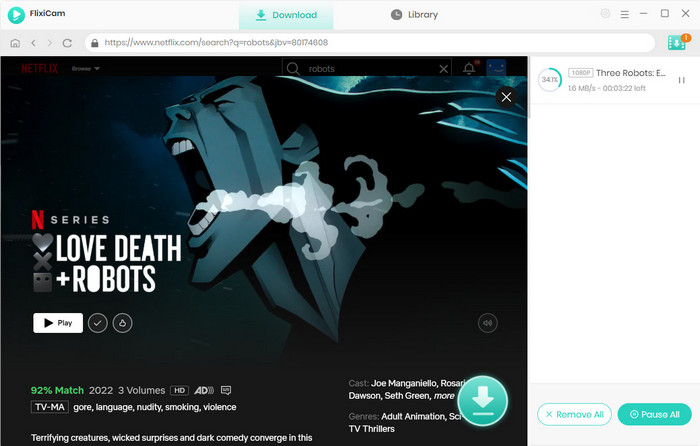
Launch FlixiCam, and you will access Netflix in the built-in player. The program will provide a user experience similar to using the Netflix app. Click on "Sign In" to log into your Netflix account.
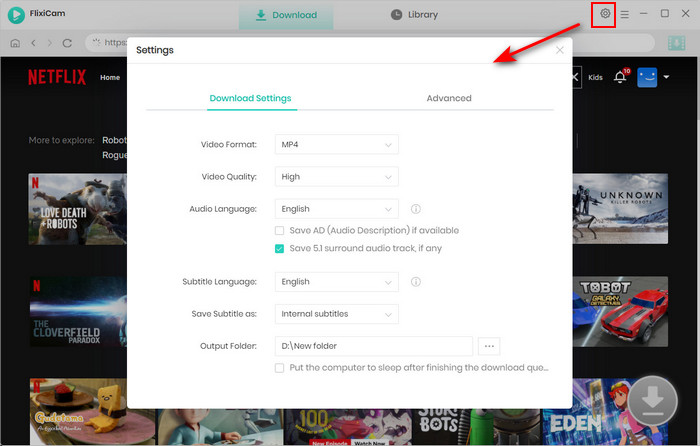
Step 2. Choose Format
Navigate to the General Settings window by clicking the Gear icon in the upper-right corner. Here, you can customize the format, output quality, output path, and other settings to suit your preferences.
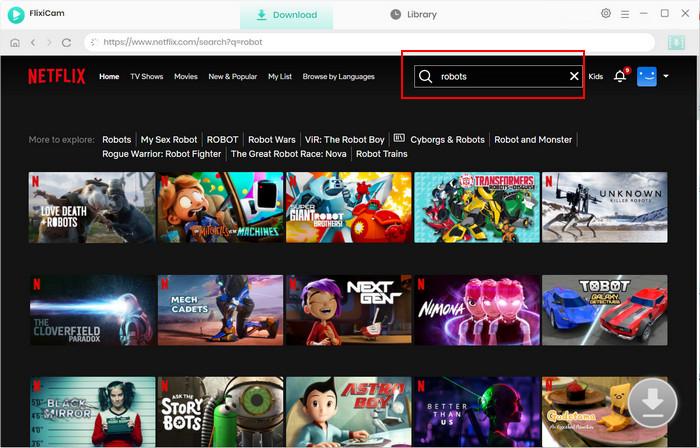
Step 3. Search Videos on FlixiCam
Enter the video's name or keywords into the search bar, and all related videos will be displayed. Simply click on the movie or TV show you want to download, and the Download icon in the lower right corner will be activated.
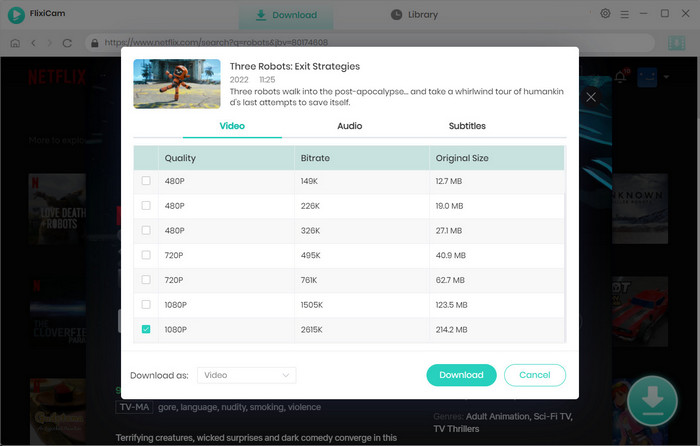
Step 4. Choose File Size, Video Quality, Audio Tracks
FlixiCam provides advanced options for selecting video quality, file size, bitrate, audio tracks (including 5.1 audio), and subtitles in various formats. If you are downloading TV shows, you need to choose seasons and episodes, and then click Advanced Download to customize settings for specific videos.
Step 5. Download Netflix Videos
Tap the Download button to start the download process for saving selected Netflix videos to your laptop. It is available to add extra titles to the download queue for downloading Netflix videos in batches.
Is it Legal and Safe to Use FlixiCam?
Compared with many “free Netflix downloader” online websites filled with pop-ups, fake buttons, and malware risks, FlixiCam offers a cleaner and safer experience. As a desktop application, it provides an ad-free environment without annoying redirects or suspicious ads, making video downloads more reliable.
We recommend using FlixiCam only with your own Netflix subscription for personal offline viewing, such as watching content while traveling or in areas with limited internet access. Sharing downloaded files, uploading content to piracy platforms, or distributing Netflix videos to others may violate copyright laws and platform terms.
Why Choose FlixiCam?
| With Netflix App | With FlixiCam Netflix Downloader | |
|---|---|---|
| Compatibility | Android, iOS, Amazon Fire Tablet, Chromebook | Windows & Mac computers |
| Supported OS | Limited support for older device versions | Windows 11/10 macOS 11 or later |
| Watch Offline | ✔️ | ✔️ |
| Download Resolution | 1080p / 4K streaming | Up to 1080p |
| Watch on Mac | ❌ | ✔️ |
| Download on Multiple Devices | ❌ Limited by account restrictions |
✔️ Transfer downloads freely |
| Unlimited Downloads | ❌ Ad plans have download limits |
✔️ No download limits |
| Keep Downloads Forever | ❌ Downloads expire by title |
✔️ No expiration |
| Play on Any Device | ❌ Netflix app only |
✔️ Play anywhere |
| Transferable | ❌ Locked in Netflix app |
✔️ MP4 / MKV supported |
| Access After Subscription Ends | ❌ Re-download required after renewal |
✔️ Always accessible |
| How to Access | Go to Netflix | Get FlixiCam Netflix Downloader |
Method 2: Official Netflix Downloads on Chromebooks
To download Netflix movies for offline watching, you need a supported device: iPhone, iPad, Android phone or tablet, Amazon Fire tablet, or a Chromebook with Google Play Store access. Among laptops, only Chromebooks let you download Netflix officially on laptops.
Learn More: Netflix Help Center
Chromebooks work great for cloud use, but internet cuts out sometimes. By downloading Netflix episodes locally, you can get smooth HD playback just like on your phone.
How to Download Netflix Videos on a Chromebook
If you are using a Chromebook that supports the Google Play Store (ChromeOS 64 or newer), follow these steps to download Netflix titles for offline use:
- Download the Netflix app from Google Play Store on your Chromebook.
- Open the Netflix app and sign in using your username and password.
- Head to "My Netflix" → "Downloads" → "Find More to Download".
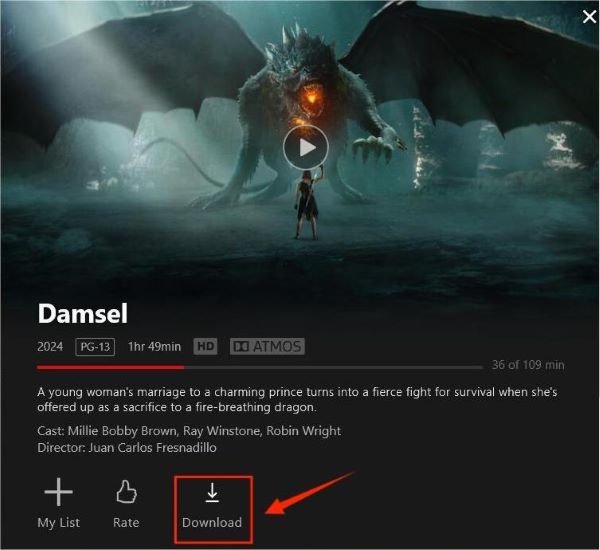
- Hit the downward-arrow icon on any Netflix show or movie that allows it.
- Your offline Netflix videos will be waiting in the "Downloads" tab whenever you're ready to watch.
📍Still want to download Netflix on Windows/macOS laptops? Use FlixiCam to download Netflix movies for offline enjoyment!👇
Method 3: Using Android Emulators for Netflix Offline Downloads
If you want to access the official Netflix download feature on a Windows PC or Mac, you can use an Android emulator. This software creates a virtual Android environment on your computer, allowing you to run the mobile version of the Netflix app directly on your desktop.
BlueStacks 5 lets you use Android apps on your PC, including Netflix. You can get mobile-only features like Netflix’s offline mode on any desktop or laptop.
Step-by-Step Setup for Netflix Download
- Download and install BlueStacks 5.
- Go to the emulator settings and allocate at least 4GB of RAM and 4 CPU cores to ensure smooth video playback.
- Head to "My Netflix" → "Downloads" → "Find More to Download".
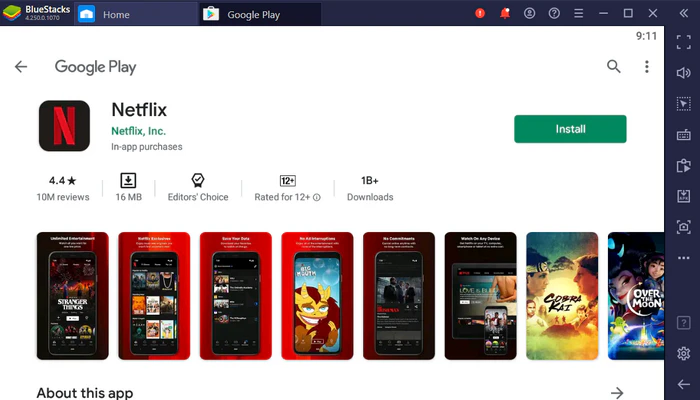
- Sign in to your Google account within the emulator and install the official Netflix app.
- Sign in to Netflix, find your desired movie or show, and click the Download icon. The files will be saved to the emulator's virtual internal storage.
Tested: 5 Best Netflix Downloaders for PC, Mac, Android & iPhone
We tested 5 Netflix downloaders for PC, Mac, Android, and iPhone to find the best option to download Netflix movies. Compare free trials, features, and performance in this review.More > >
The Catch: Using the emulator to download Netflix app consumes a lot of CPU power. It works fine for downloading a few Netflix episodes, but it’s too slow and heavy if you want to save a lot of shows for offline watching.
Method 4: Restoring the Legacy Windows App for Native Netflix Downloads
For Windows users who prefer a native desktop experience to download Netflix movies, there is a technical workaround: rolling back to a "Legacy" version of the Netflix app. By manually installing a specific older version (v6.99.5 or earlier), you can temporarily download Netflix movies directly to your hard drive.
Step-by-Step Guide to Set Up Legacy Netflix App for Downloads
- Uninstall your current Netflix app completely.
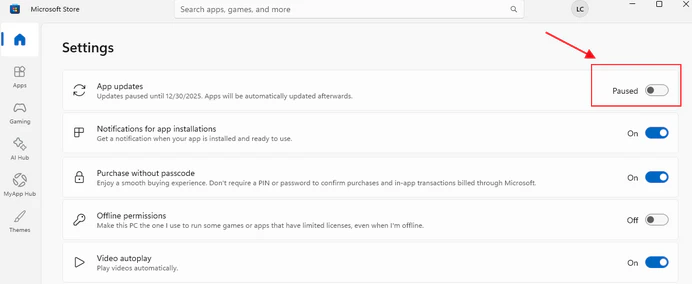
- Disable Microsoft Store auto-updates (Store > Profile > Settings > App Updates: OFF)
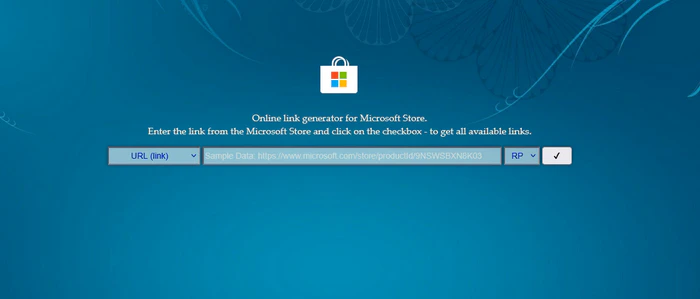
- Download the 6.99.5 package from Microsoft's historical archive via store.rg-adguard.net.
- Install via PowerShell: `Add-AppxPackage .\Downloads\Netflix_6.99.5.0_neutral.appx`
The Catch: Netflix can cut off sign-ins for old app versions whenever it wants, so Netflix downloads and playback may suddenly stop. Already, some users report intermittent download failures. The legacy Netflix app gets no security updates and could break after the next Windows patch.
FAQs about Downloading Netflix Movies on Laptop
1. Can you download movies on Netflix on a laptop Mac?
Officially, Netflix does not offer a desktop app for Mac, so you can’t download Netflix directly on your Mac laptop. The perfect solution is FlixiCam Netflix Downloader. If you are looking for a reliable way to download Netflix movies on laptop, click the download button below to get FlixiCam! 👇
2. How long do official Netflix downloads last before they expire?
Netflix downloads expire fast: 1-4 weeks auto-delete, 48 hours to finish once played. Cancel subscription, all gone instantly. To keep a Netflix download permanently, use FlixiCam to download Netflix movies as MP4 files.
3. Can I use Netflix download tools on both Windows and Mac laptops?
Netflix doesn’t let you download on Windows/Mac apps directly, but third-party tools or emulators work for it. Tools like Flixicam Netflix Downloader support both Windows (10/11) and macOS (11+) for downloading Netflix movies.
4. Can I transfer Netflix downloads to other devices (e.g., phones, smart TVs)?
With the official Netflix app, the files are locked to the Netflix app and impossible to move. However, Netflix downloads from tools like Flixicam are saved as MP4/MKV files, which can be transferred to any device for flexible playback.
5. Can I download Netflix to external drive?
No, you can't download Netflix to an external drive with the Netflix app. However, you can download Netflix to a external drive with the help of FlixiCam Netflix Downloader. Simply visit Download Netflix Movies to External Hard Drive to know how it works.
Conclusion: Choosing the Best Way to Download Netflix Videos
For occasional access to your Netflix movies, the legacy app or BlueStacks might suffice, but if you want permanent, flexible ownership of your Netflix videos, FlixiCam Netflix Downloader is the robust go-to solution — it downloads Netflix videos into 1080p MP4s on Windows or Mac for you to watch Netflix offline anytime, anywhere.

The Most Professional Video Enhancer
Looking for a tool to improve the look of your old low-resolution videos? AVCLabs Video Enhancer AI is a great option. It is a powerful video-editing software that allows you to enhance the quality of your video files. Whether you originally made them or you downloaded them off the internet, you can edit your video to look better on screen. Learn More >>
📢 Disclaimer
All tutorials here are for personal entertainment & education only. Please ensure you have a valid legal account on the relevant platforms. We do not support commercial distribution or piracy — always respect content creators' copyrights.
Ashley Wood | Senior Writer