Free Download Part of YouTube Video - 100% Working in 2026
 Ashley Wood
- 14 September, 2026
- Blog
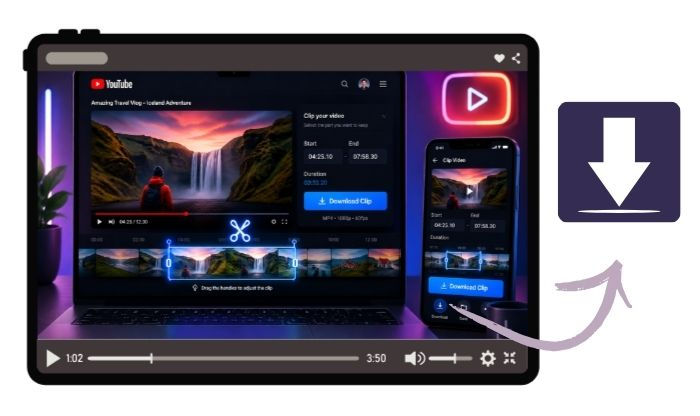
These days, with so many 4K YouTube videos, it can be really frustrating when you want to download an entire two-hour video but only need a 30-second YouTube clip. So now, a YouTube Video Downloader that supports downloading part of video matters to you, like FlixiCam. Read on and get 3 free ways to clip and download YouTube video moments.
Why Download Only Part of YouTube Video?
If you exact part of YouTube videos, you can:
- You can save storage space and internet data when you download only 30 seconds or a couple of minutes of videos instead of the entire one.
- You can download only the useful part of YouTube video, especially the Tutorials, memes, highlights, speeches, or podcasts.
- Download a small YouTube video file, so you can edit it faster and easier.
- You can build your own collection of highlights easily.
Method 1. Use Online YouTube Video Cutters
If you're just starting out or only need a YouTube clip once in a while, online YouTube cutters are the most popular choice. Tools like Kapwing, YT Cutter, Clideo, and 123Apps let you paste a YouTube link and pick your start and end times right in your browser — no software to install to get a portion of YouTube video downloaded.
Many users recommend these online YouTube trimmers only for "quick and dirty" clips, not for serious projects. If you want better quality, they usually suggest switching to desktop tools or dedicated downloaders, like FlixiCam YouTube Downloader.
 DOWNLOAD WIN
 DOWNLOAD MAC
| Feature | Kapwing | YT Cutter | Clideo | 123Apps |
| Download Part of YouTube | ✅ | ✅ | ✅ | ✅ |
| Free to Use | ✅ | ✅ | ✅ | ✅ |
| Free Limits | Include watermark. Export videos up to about 4 mins. Limited projects and storage space. | Limits when processing long YouTube videos. | Include watermark. Take time to process. | 5 files/day. |
| Video Resolution | 720p (free) 1080p (paid) | Up to 1080p | 720p/1080p (free) higher with premium | 720p (free) 1080p or higher with premium |
| Fast Download | ✅ | ✅ | ❌ (Slow on free tier) |
❌ (Slow on free tier) |
| Ads-Free | ❌ | ❌ | ❌ | ❌ |
| Safe to Use | ❌ | ❌ | ❌ | ❌ |
✅ Pros
- You can use these YouTube trim tools on any device that has a browser, whether it's your phone, tablet, or computer.
- Great for making short memes, social media clips, or sharing highlights instantly.
🔴 Cons
- Most free versions only go up to 720p or 1080p.
- During busy times, you could end up waiting a long time.
- Your privacy is at risk.
Method 2. Use Official YouTube Clip Feature
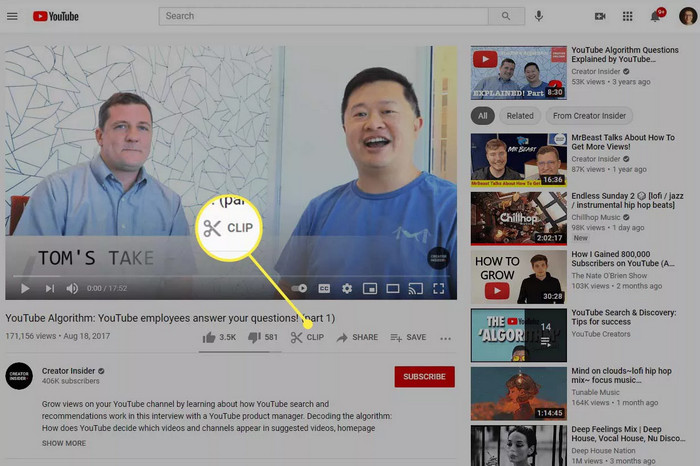
YouTube has a built-in Clip button. Usually, it looks like a pair of scissors and sits right below the YouTube video player. It lets you create and share short pieces of video, usually between 5 and 60 seconds long.
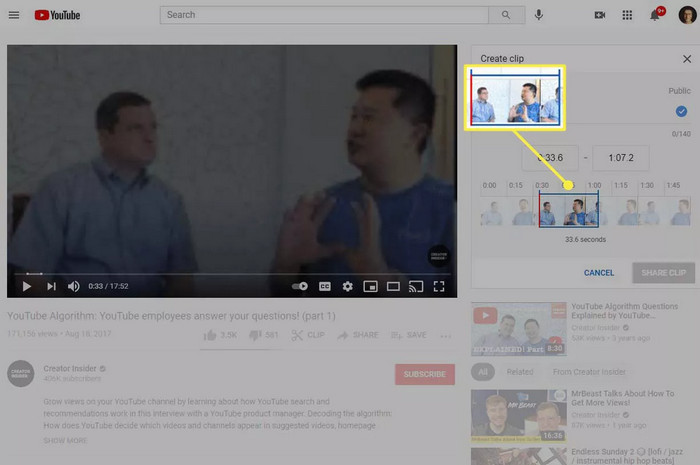
How to Clip YouTube Video Online:
Step 1 Click the scissors icon under the YouTube video.
Step 2 Drag the slider to pick your start and end times.
Step 3 Add a custom title for your part of YouTube video.
Step 4 Click "Share Clip" to get a YouTube link.
⚠️ IMPORTANT
This feature does not download or save an actual video file (like MP4) to your device. Instead, it creates a shareable link that plays the video clip on YouTube's servers. The clip is tied to the original video. So if the uploader deletes it, makes it private, or if YouTube removes it, your clip disappears too.
It's great for temporary sharing (like pointing out a funny moment or key point on social media), but it won't work if you need a permanent copy saved on your device. Keep reading, the following method suits you most.
What's happening in 2026:
YouTube has been significantly changing the inside Clip feature this year. They're replacing it with simpler timestamp sharing links and better creator tools in YouTube Studio. Many users have reported that the official YouTube Clip button is disappearing.
Method 3. FlixiCam YouTube Video Downloader - Download Part of YouTube Video Easily
If you care about saving time and extracting part of a YouTube video in high quality, a dedicated desktop app like FlixiCam YouTube Video Downloader is your best option.
FlixiCam can only download the whole video from YouTube or from other 1000+ video sites, but also supports to capture any part of YouTube videos - no matter where you move the progress bar in a YouTube video, FlixiCam can automatically record and download that exact part for you. 100% safe, clean, and no watermark.
Main Features:
- Download part of YouTube video to MP4/MKV.
- Download Streaming Videos from 1000+ sites.
- Customize Your Downloads by Selecting Video Quality, File Size, Bitrate, etc.
- Up to 8K Resolution is Supported.
- 10X Download Speed to Save Video.
- Support Batch-Download Mode.
Compatibility: Windows 10/11, macOS 11 and above.
How to Download YouTube Video Moments with FlixiCam
Step 1 Open FlixiCam, and go to Record tab.
Step 2 Go to the YouTube video and copy the full link, paste to FlixiCam's search bar, and start playing that video.
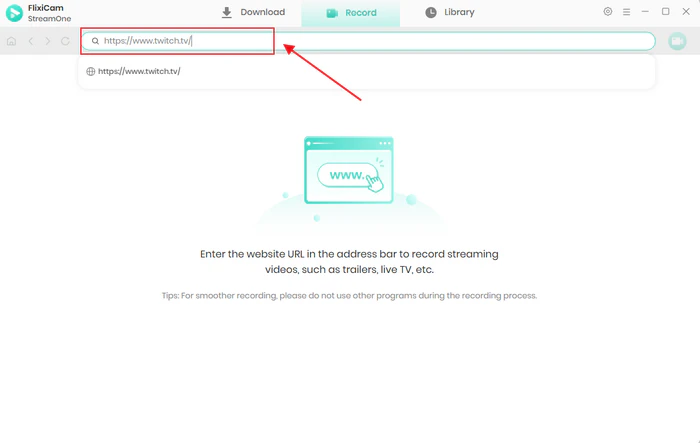
Step 3 Hit the Record tag at the upper right corner, and FlixiCam supports to download the playing part of YouTube content at up to 8X faster speed.
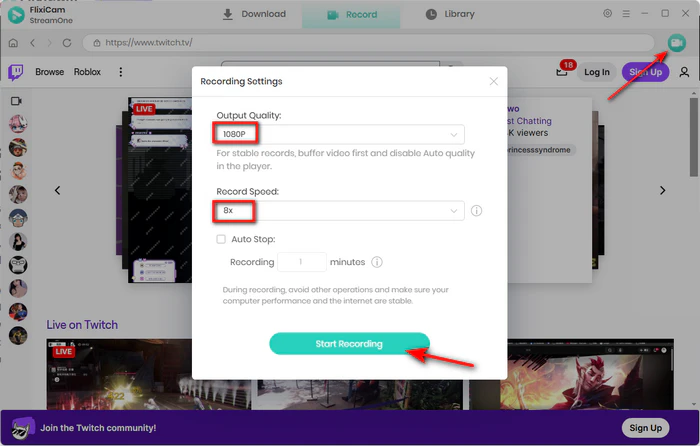
Step 4 Once finished, all YouTube videos will be saved in MP4/MKV format.
Real User Reviews on FlixiCam:
Most users consistently praise FlixiCam's clean interface, fast downloads, high-quality output (especially 4K/8K on YouTube), and reliable trimming feature. Many appreciate the ad-free experience and good support for multiple platforms beyond just YouTube.
And Trustpilot ratings hover around 4.8/5, with compliments on ease of use for both beginners and power users.
Download YouTube Clip: Download Only the Part You Need (2026 Guide)
Learn how to download YouTube clips easily in 2026. Get the best online and desktop YouTube clip download tools in HD without watermarks. Learn More > >
Comparison: Which Is Best to Download a Clip from YouTube
| Feature | Online YouTube Converters | Official YouTube Clip | FlixiCam YouTube Downloader 👍 |
| Drag to Any Point to Record Clips | ❌ | ❌ | ✅ |
| Download as MP4/MKV | ✅ | ❌ | ✅ |
| Max Resolution | 720p / 1080p | N/A | 1080p / 4K / 8K |
| YouTube to MP3 | ❌ | ❌ | ✅ |
| Fast Download | ❌ | ❌ | ✅ |
| Ads-Free | ❌ | ❌ | ✅ |
| Safe to Use | ❌ | ❌ | ✅ |
If you want to extract part of a YouTube video precisely and in high quality, FlixiCam is the best. You can download any part of YouTube videos while dragging to the desired timeline - all clips will be recorded smartly. And of course, all downloaded YouTube videos are without watermarks and quality drops.
10 Free Ways to Record YouTube Live Stream on Laptop/Mobile/Online Web
Wanna capture live stream on YouTube freely? Here's all you need to record YouTube Live on Windows, Mac, Android, iPhone, or online webpage. Learn More > >
The End
In 2026, downloading just a part of a YouTube video is easier than ever. You can use online free YouTube cutters for quick clips, and YouTube's own Clip feature works well for sharing short moments.
But if you want exact trimming YouTube videos, high-quality MP4 downloads, no ads, and YouTube video files that stay on your device permanently, then FlixiCam YouTube Video Downloader is the most reliable choice for you.

The Best Tool to Convert YouTube Music
Want to enjoy your YouTube Music for offline playback? TuneMobie Music Converter is definitely worth a try. This tool can convert music from 17+ platforms (Spotify, Apple Music, YouTube Music, Amazon Music, etc.) to universal formats (MP3, M4A, FLAC, etc.) with original sound quality and complete ID3 tags kept. Learn More >>
📢 Disclaimer
All tutorials here are for personal entertainment & education only. Please ensure you have a valid legal account on the relevant platforms. We do not support commercial distribution or piracy — always respect content creators' copyrights.
Ashley Wood | Senior Writer