How to Download HBO Max on Laptop for Offline Viewing
 Ashley Wood
- 28 September, 2026
- Blog
It's so frustrating when you have no internet and realize you can't watch your favorite HBO Max shows offline, or find your Max downloads have disappeared after just a few days. If you want to watch HBO Max offline anywhere, this guide breaks down the simple official download method, and then shows how to keep Max downloads forever with the tool Flixicam. Just keep Reading!
- 1. HBO Max Download Offline: Official Rules & Hidden Limitations
- 2. How to Download HBO Max Video Officially (Mobile Only)
- 3. Download HBO Max to MP4 with Flixicam HBO Max Downloader👍
- 4. Comparison Table: Flixicam HBO Max Downloader vs. Official HBO Max Download
- 5. FAQ: HBO Max Download Offline Common Questions
1. HBO Max Download Offline: Official Rules & Hidden Limitations
1.1 Which HBO Max Plans Support Offline Downloads?
Not all HBO Max plans offer the download feature. To download HBO Max Video officially, you must subscribe to either the Standard or Premium plan. The Basic with Ads plan doesn't let you download HBO Max videos for offline viewing at all, even for purchased videos.
| Features | Basic with Ads Plan | Standard Plan | Premium Plan |
| Price (USD, Monthly) | $10.99 | $18.49 | $22.99 |
| Offline Downloads | ❌ | ✔ (Up to 30 total) | ✔ (Up to 100 total) |
| Video Quality | Full HD 1080p | Full HD 1080p | 4K Ultra HD |
| Simultaneous Streams | 2 devices | 2 devices | 4 devices |
| CNN Max Access | ✔ | ✔ | ✔ |
| Live Sports Access | ✔ | ✔ | ✔ |
| Ad-free | ❌ | ✔ | ✔ |
| Dolby Atmos | ❌ | ❌ | ✔ |
Disclaimer: Plan features are subject to change. For the latest and most accurate comparison, visit the official HBO Max product page.
Learn More: HBO Max Official Plan Details
📍Basic with Ads Plan doesn't support offline downloads - skip directly to Part 3 to download HBO Max videos using FlixiCam, regardless of your subscription tier.
 DOWNLOAD WIN FOR FREE
 DOWNLOAD MAC FOR FREE
1.2 Where Can You Download HBO Max Video?
HBO Max strictly limits official downloads to mobile devices only: iOS (iPhone, iPad, iPod Touch), Android phones/tablets, and Amazon Fire tablets.
Laptops (Windows/Mac), smart TVs, gaming consoles, and desktops are excluded entirely. There's no official desktop app for HBO Max, and browser-based streaming offers no download button.
Learn More: HBO Max Help Center
📍If you want to download HBO Max on your computer, skip directly to Part 3 to download HBO Max videos using FlixiCam, and you can play HBO Max on any device.
DOWNLOAD WIN FOR FREE
DOWNLOAD MAC FOR FREE
1.3 Why Your HBO Max Downloads Disappear?
Even if you're on an eligible plan, HBO Max download offline comes with ticking clocks and storage headaches:
- Unwatched HBO Max downloads expire after 30 days, while started video vanishes after 48 hours.
- All HBO Max downloads are stored in app-specific cache, so you can't transfer Max downloads to other devices or play them with third-party players.
- Some HBO Max titles (especially new releases or third-party video) are unavailable for download entirely.
2. How to Download HBO Max Video Officially (Mobile Only)
If you're okay with mobile-only access and temporary downloads, follow these steps to download HBO Max natively. Remember: This only works for Standard/Premium plan subscribers.
2.1 How to download from HBO Max officially?
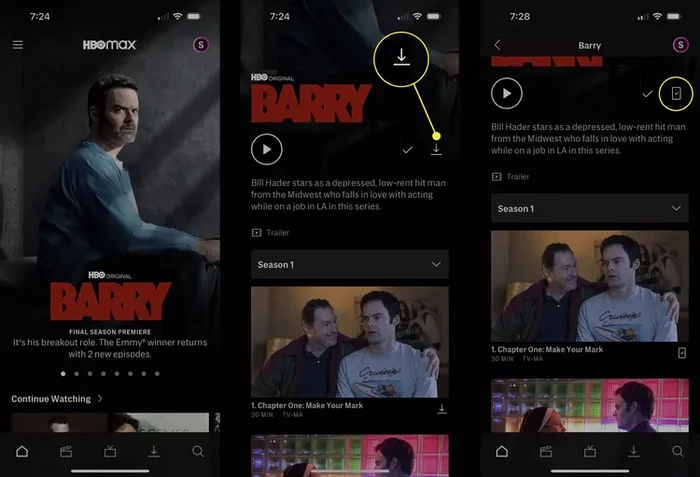
- Open the HBO Max app on your iOS/Android device and log in with your ad-free plan credentials.
- Search for the HBO Max show/movie you want to download. Look for the downward arrow icon, missing icons mean the title is not downloadable due to licensing.
- Tap the download icon next to the title or episode. For multi-episode series, select individual episodes or use the "download all" option.
- Once complete, the download icon changes to a checkmark.
- To watch offline, open the Downloads tab. Delete old downloads by tapping the edit icon and selecting items to remove (critical for staying under your plan's download limit).
2.2 Troubleshooting Common Official HBO Max Download Issues
🛠️ HBO Max No Download Icon
Confirm you're on an ad-free plan, using a supported mobile device, and the title is available for download in your region.
🛠️ HBO Max Downloads Failing
Check device storage, update the HBO Max app to the latest version, or switch to a stable Wi-Fi connection.
🛠️ HBO Max Expired Downloads
Renew downloads by tapping the expired icon in the Downloads tab.
3. Download HBO Max to MP4 with Flixicam HBO Max Downloader
While the official HBO Max download feature works for basic offline viewing on mobile devices, it comes with notable drawbacks: it's restricted exclusively to mobile devices (no support for laptops or desktops), downloads expire after 30 days (or 48 hours once playback starts), and downloads can't be transferred or played on other devices.
To fix these issues, the optimal solution is to download HBO Max videos as MP4 files - this lets you watch HBO Max on any device, get rid of expiration problems, and share or move files easily.
FlixiCam HBO Max Downloader a reliable tool specifically designed to download HBO Max movies and TV shows in MP4/MKV for cross-device offline watch. It delivers good video quality, retains complete multi-language audio tracks and subtitle options, and enables 10x accelerated batch downloads for Windows and Mac users.
What Make FlixiCam the Top Choice:
- Download videos from over 1000 sites including Netflix, Amazon Prime, HBO Max, Disney+, OnlyFans and HdToday in MP4/MKV format.
- Built-in HBO Max web player for direct search & playback.
- Keep HBO Max downloads forever for offline access even after subscription ends.
- Support batch download HBO Max videos in 10x speed.
- Transfer MP4 files to any devices such as TVs, tablets, USB drives, and more.
- Remove ads from downloads regardless of your plan.
- Comes with multilingual subtitles support for flexible viewing.
Compatibility: Windows 10/11, macOS 11 and above.
Tutorial: Step-by-Step Guide to Download HBO Max to MP4 with Flixicam HBO Max Downloader
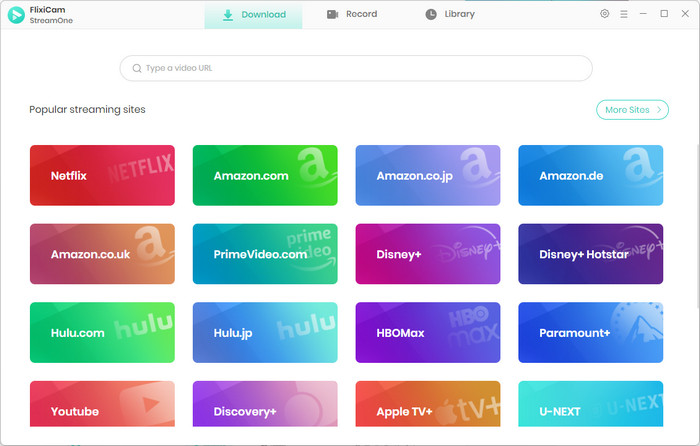
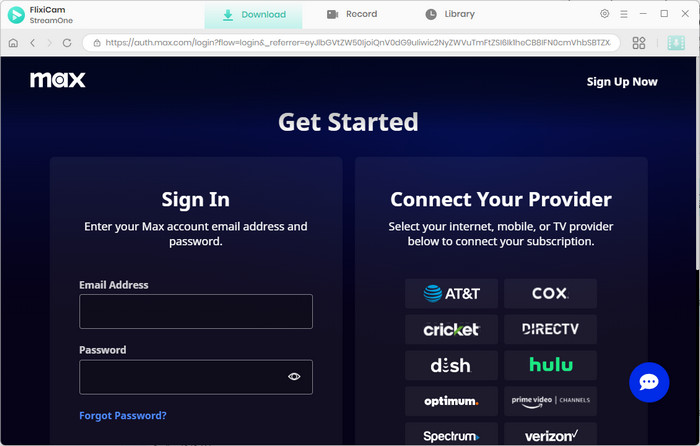
Step 1.Open FlixiCam Flixicam HBO Max Downloader and Select the HBO Max site
Running FlixiCam on your desktop and choosing the HBO Max site in the major interface. Then log in to your HBO account on the built-in web page.
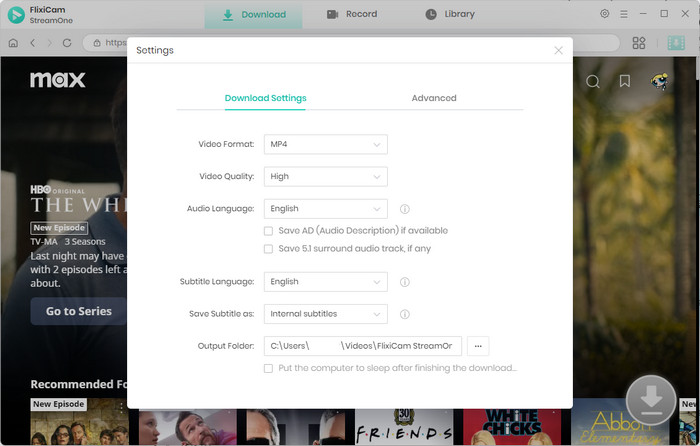
Step 2.Customize Download Settings (MP4 & Quality)
Click the setting icon in the upper right corner of the screen, and you have access to personalize the output format (select MP4), the video quality and the output folder.
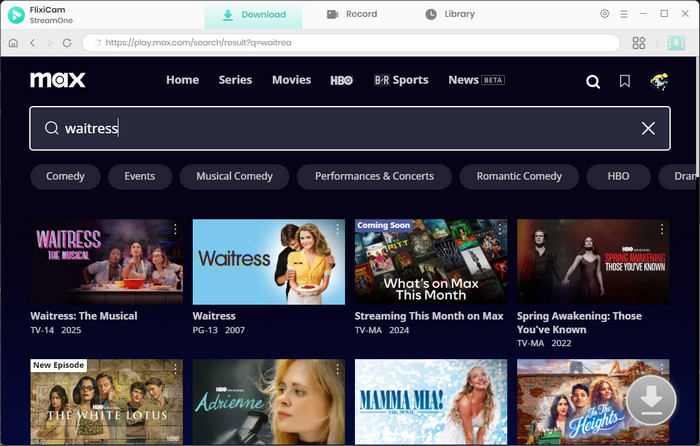
Step 3.Search for HBO Max video to Download
In the search bar, enter the title of the show/movie you want to download, or paste the direct URL from HBO Max, all the related videos will be listed. Simply click the HBO Max video you want to download and there is the add button will light up.
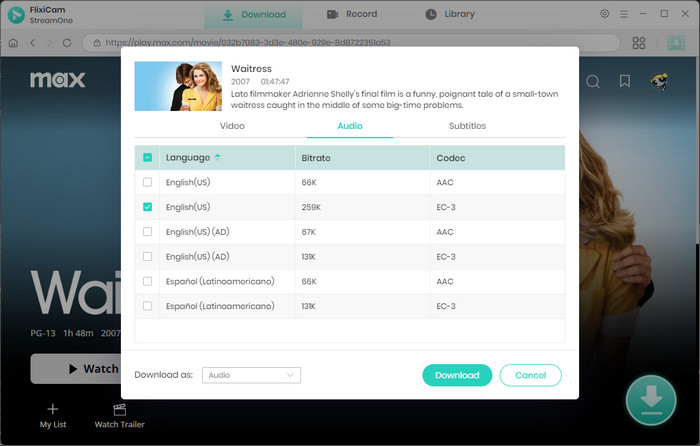
Step 4.Fine-Tune Selected HBO Max Download Settings
Click the add button and you can make further selections. You can select the video quality, bitrate, and tracks of the videos, and choose the subtitles and audio tracks. Besides, you can download multiple episodes at once.
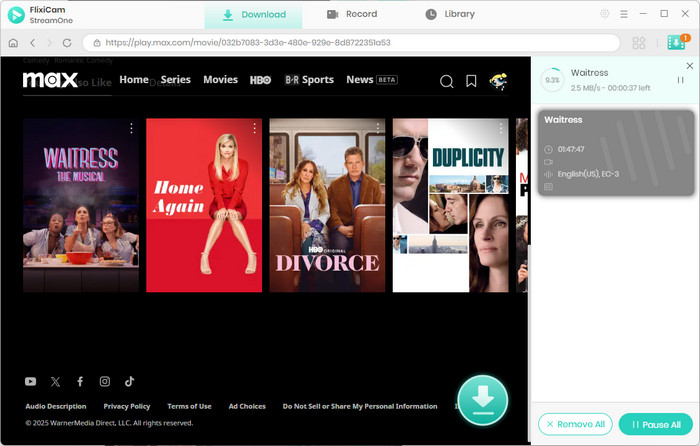
Step 5.Start Downloading HBO Max video
Once you complete the settings, just click the Download button to save HBO Max shows or movies directly to your Windows or Mac computer. After the download is complete, head to the Library tab to enjoy your favorite shows offline.
4. Comparison Table: Flixicam HBO Max Downloader vs. Official HBO Max Download
| Feature | Official HBO Max Download | Flixicam HBO Max Downloader |
|---|---|---|
| Supported Devices | Mobile only | Windows/Mac + all devices👍 |
| Expiry | 30/48 days | Permanent (Save forever)👍 |
| Ad Removal | √ (Ad-free plans only) | √ (All plans) |
| Batch Downloads | √ (30/100 cap) | √ (Unlimited) |
| Subscription Requirement | Ad-free plans | Any plan |
5. FAQ: HBO Max Download Offline Common Questions
Why can't I find the download button for HBO Max on my laptop?
HBO Max's official download feature is restricted to mobile devices (iOS/Android/Fire tablets) only. Laptops, desktops, and TVs don't support it via the official app or browser. This means you can't download HBO Max directly to your computer natively. You can use Flixicam to download HBO Max to Windows/Mac laptops in MP4 format effortlessly.
How long do HBO Max downloads stay available for offline viewing?
Official HBO Max offline downloads expire after 30 days if unwatched and 48 hours once playback starts. You can use Flixicam to download HBO Max as permanent MP4 files that never expire, even if your subscription ends or the title is removed from the platform.
Can I download HBO Max for offline viewing with the basic plan?
The basic ad-supported HBO Max plan doesn't offer official download. You need to upgrade to an ad-free Standard or Premium plan to access mobile-only downloads. You can use Flixicam with your existing ad-supported plan to download HBO Max, and it even automatically removes ads from the downloaded MP4 files.
Is it possible to transfer official HBO Max downloads to other devices for offline use?
Official HBO Max downloads are stored as app-specific cache files, so you can't transfer Max downloads to other devices or play them outside the HBO Max app. You can use Flixicam to download HBO Max videos as MP4 files, which are compatible with any device (TV, USB drive, gaming console) and easy to transfer.
Final Thoughts: Unlock HBO Max Offline Viewing with Flixicam
The official HBO Max download method is simple to use but held back by strict limitations, including mobile-only access, expiring files, download caps, and plan restrictions. Flixicam HBO Max Downloader resolves these issues by offering device flexibility, permanent downloads, ad removal for all plans, and unlimited batch downloads. Whether you want to watch on a laptop, keep downloads long-term, or avoid constant re-downloads, Flixicam bridges the gaps of the official option.
📢 Disclaimer
All tutorials here are for personal entertainment & education only. Please ensure you have a valid legal account on the relevant platforms. We do not support commercial distribution or piracy — always respect content creators' copyrights.
Ashley Wood | Senior Writer