F.A.Q (StreamOne All-in-one Video Downloader)
Open the program, and click the  icon or the "
 " icon (on the upper right) > Register. You can copy and paste the license code and registration email in the registration popup dialog. If copy and paste doesn't work, simply try drag and drop.
The license key will be sent to the email address you provided during the checkout process, as soon as the order has been validated. If you do not receive the license key within a few minutes of purchasing, please check your Spam or Promotion E-mail folder. Please contact us for assistance if you still cannot find the email.
- Please make sure that the installed program matches the product and version you purchased.
- Please check that the registration code exactly matches the code you received in your purchase confirmation email. Make sure there are no extra spaces or incorrect characters.
- One registration code can only be used on one device at a time. If the code has already been activated on another device, please log out of or deactivate the previous device before trying to activate it on your current device.
- If the issue persists after trying the above solutions, please contact us for further assistance.
StreamOne is able to download videos from 1000+ sites in MP4 and MKV for offline playback. The supported sites include popular streaming services such as Netflix, Amazon Prime, Disney+, Disney+ Hostar, Hulu, HBO Max, Paramount+, Discovery+, Apple TV+, U-Next, Peacock, DMM, NHK+, Crunchyroll, and Abema.
Besides, downloading from YouTube and Abema is totally free.
If the update fails, you can uninstall the app, and reinstall it. Simply download the latest version of the program from the Download Center.
For the paid service, StreamOne enables you to download the first 5 mins of each video in HD quality with the free trial version. To unlock the full-length video, please purchase a license.
StreamOne supports downloading YouTube and Abema videos for free, and the maximum output quality for YouTube is 8K.
You can directly purchase the right program if your order is within the refund period, then contact our support team with the order IDs. We will refund you as soon as possible.
Please contact us via support@flixicam.com to get a discount.
A license can only be used on one device, so using StreamOne on more than one devices is not allowed. If the license you purchased works for the Windows computer, it can't work normally on a Mac device.
If you need to switch your computer to a different one, you can contact us, and then we will reset your information so that you can use the license on your new device. Please note that we can only assist you in resetting the information if the operating system of your new computer is the same as the old one.
We don't support upgrading to StreamOne by paying the difference. However, if you are still within the money-back guarantee period, you can purchase StreamOne, and contact us with the two order IDs via email: support@flixicam.com. We will refund the FlixiCam order as soon as possible.
External subtitles: You can store subtitles as separate files by using the "External subtitles" feature.
Internal subtitles: It enables you to store several language subtitles and switch between them while watching the video on certain players, such as VLC Media player.
Hardcode subtitles: The subtitles will be burned onto your video if you choose Hardcode subtitles. Only one language can be saved to the video at a time with this mode.
StreamOne supports hardware acceleration with Intel/NVIDIA/AMD graphics cards, enhancing program performance and accelrating downloads. To take full advantage of hardware acceleration, it's essential to have the latest graphics card drivers installed on your computer; Here's how to verify and update your graphics cards:
1. Upgrading graphics cards is a straightforward process. Simply right-click on the Windows Start menu and select "Device Manager." Then, locate "Display adapters," right-click on your graphics card, and choose "Update driver" from the drop-down menu.
2. In case driver updates encounter issues, you can also install the latest graphics driver directly from the manufacturer's website: Intel / NVIDIA / AMD (select the appropriate one for your computer). After updating the graphics driver, be sure to reboot your computer to apply the changes.
To help us identify and resolve the issue more efficiently, please open the program and click the Menu icon in the upper right corner, then select Feedback.
Please provide the following information in your feedback:
- A detailed description of the issue, including what happened, what troubleshooting steps you have already tried, and the results.
- Screenshots or a video showing the issue, if available.
- The URL of the video you were trying to download or process.
- Log files, which can be found by clicking the Menu icon in the upper right corner > Open Log File.
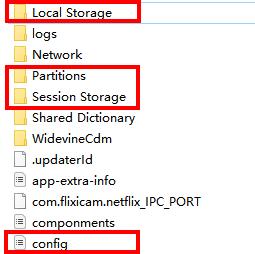
- Login cache files. Please send the relevant files located in the same folder as the log files. As these files may be large, we recommend compressing them into a ZIP file and sharing them through a file transfer service. You can use Buzzheavier to upload and share the ZIP file with us.