 DOWNLOAD Win
 DOWNLOAD Mac
How to Download Netflix Movies Forever on PC (2026 Working Methods)
 Ashley Wood
- 30 September, 2026
- Blog
Question: "What will happen if I cancel Netflix subscription? Can I still watch my downloads if I close my account?"
You might think downloading a movie on Netflix means you can keep it forever. But the reality is: once your subscription ends, all your downloads disappear.
So is there a way to download Netflix movies on PC and keep them permanently? The answer is yes — but not with the official app.
👉️ You May Also Like: How to Stream Netflix on Discord with Black Screen?
How Long Do Official Netflix Downloads Last?
Quick Answer: Netflix downloads are temporary.
Unwatched downloads usually expire within 7–30 days, and once you start watching, you often have only 48 hours to finish before the download expires.
- 📅 Up to 30 Days: Before You Start Watching
Downloaded Netflix videos can stay on your device for up to 30 days if you haven’t started watching them. However, some titles may expire sooner depending on licensing agreements. - ⚠️ Not Every Download Lasts the Same: Before You Start Watching
Some Netflix downloads expire in as little as 7 days, while others remain available for up to 30 days. The exact limit depends on content licensing and regional restrictions.
Why Do Netflix Downloads Expire?
🔒 DRM Protection: Netflix uses DRM (Digital Rights Management) to prevent unauthorized copying and sharing of downloaded content.
📺 Content Licensing: Download expiration rules are tied to agreements between Netflix and movie studios or TV networks.
💳 Subscription Retention: Temporary downloads encourage users to keep an active Netflix subscription for continued access.
Why can't I download a TV show or movie on PC? [Update in April 2026]
⚠️ The new version of the Netflix app for Windows no longer supports downloading TV shows or movies. You can only download Netflix on the following mobile devices with the Netflix app:
- Android phone or tablet
- iPhone or iPad
- Amazon Fire tablet
- Google Chromebook (with Google Play Store installed)
To download a TV show or movie on a PC or Mac, a third-party Netflix downloader: FlixiCam is required. You can download any playable show or film in MP4/MKV with this app, and the video files will be kept on your device forever.
Download Netflix Video on PC with FlixiCam
The smart tool we are taking about above is called FlixiCam Netflix Downloader. This software allows you to download any video from Netflix and save it on your computer for offline viewing. With a few simple steps, you can have your favorite movies and TV shows stored indefinitely, even if you cancel your subscription. The Netflix Video Downloader supports downloading videos in high quality, including HD resolution, and preserves all subtitles and audio tracks.
Learn more about FlixiCam >>
A magic tool that is devoted to downloading films or series from Netflix with great speed.
Here is a detailed tutorial on how to download Netflix movies and TV shows on your computer using FlixiCam. Before we begin, please make sure to download the FlixiCam program.
Tutorial: How to Save Netflix Video to PC with FlixiCam
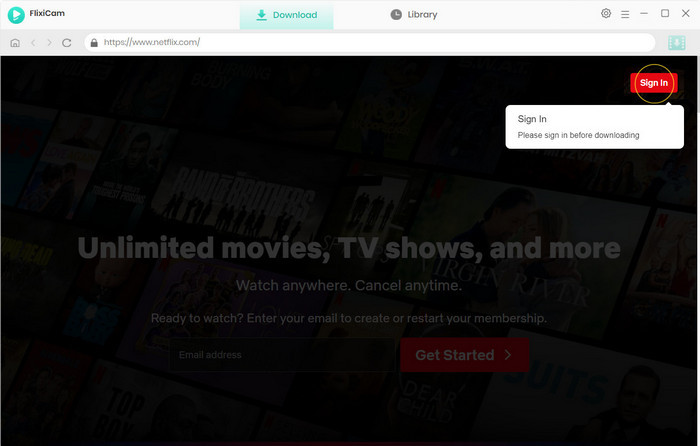
Step 1. Run FlixiCam on Windows and Log in to Netflix Account
Open FlixiCam on your computer and log in to your Netflix account using your account.
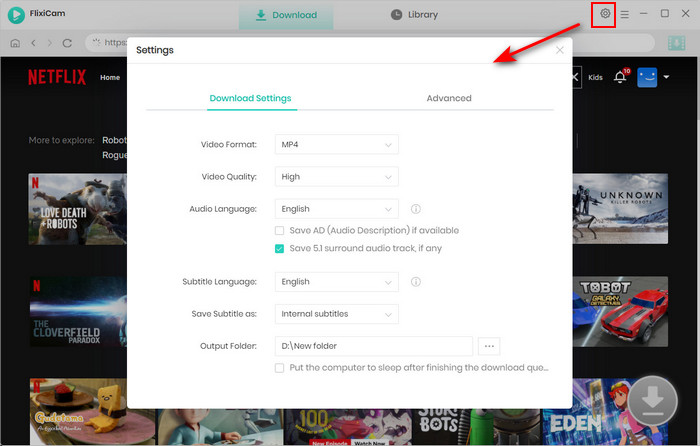
Step 2. Customize the Output Settings
Access customization features by clicking on the Setting button positioned in the upper right corner. From there, you can adjust the output format (MP4 or MKV), output quality (High, Medium, Low), output path, audio, and subtitles language.
Step 3. Search Videos on FlixiCam
With FlixiCam, you can easily search for videos on the Netflix website. Simply enter the name of the video, and the program will generate a list of either that particular video or all the related videos.
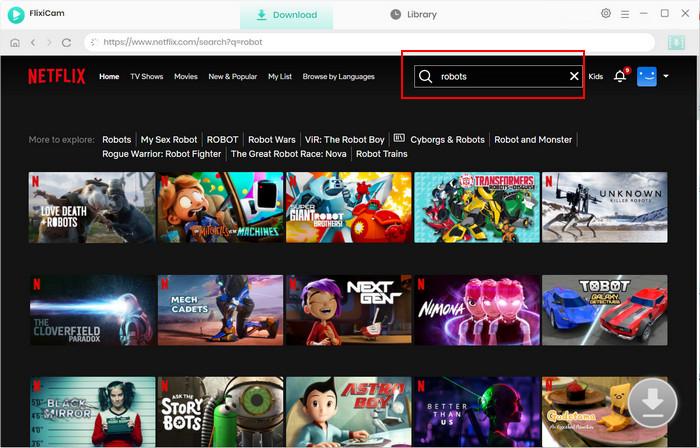
Step 4. Select Audio Track and Subtitle
Click on the desired video to begin the download process. As a result, the gray Download icon at the bottom right will transform into a green color. Simply tap on the green icon and you'll have the option to select the season, titles, video quality, audio track, and subtitles.
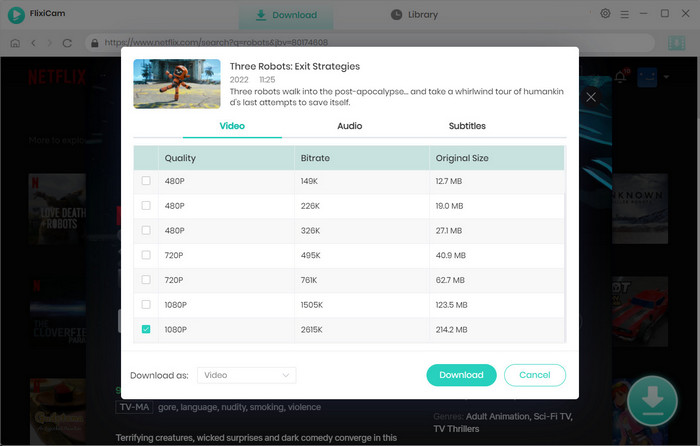
Step 5. Start to Download Netflix Videos
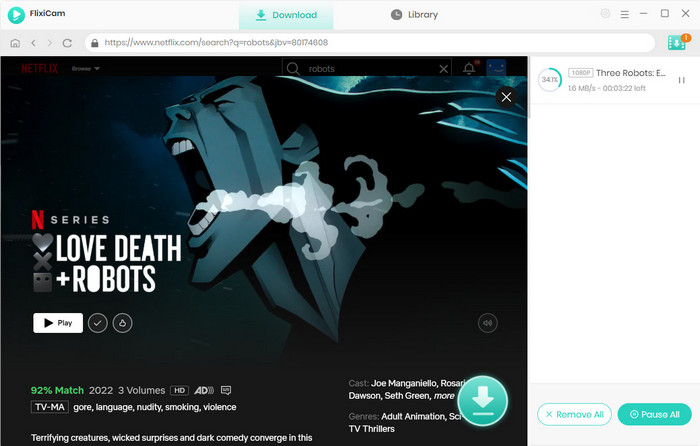
Click the Download button to initiate the downloading process. FlixiCam will start downloading the Netflix videos. Once the download is complete, you can find the downloaded Netflix videos in the Library section, located on your local drive.
By following these steps, you can easily download and save Netflix videos on your computer using FlixiCam. Enjoy your favorite Netflix content offline, anytime and anywhere!
Is It Legal to Download Netflix Movies Permanently?
Downloading movies or TV shows from Netflix permanently may raise legal concerns. According to its Terms of Service, content is not meant to be stored or shared outside the official app, meaning saving videos on a PC could go beyond intended use.
However, there is an important distinction between personal use and commercial use. In many regions, saving content strictly for personal offline viewing may be tolerated in practice, but redistributing, sharing, or uploading downloaded videos to other platforms can lead to legal issues. If you choose to use third-party tools to download Netflix content, it is strongly recommended to:
- Use the videos for personal viewing only
- Avoid any form of public distribution or resale
- Respect copyright laws and local regulations

If you want to ensure long-term storage of your Netflix videos, consider using external storage devices such as external hard drives or USB flash drives. Once you have downloaded the videos using the Netflix Video Downloader or converted them into compatible formats, you can transfer them to these devices. This way, you can have a physical copy of your favorite Netflix content that can be accessed anytime, regardless of your Netflix subscription status.
FAQs About Downloading Netflix on Mac
1. Can I Keep Netflix Downloads Forever?
Not with the official Netflix app. Netflix downloads are protected by DRM and usually expire within 7 to 30 days. Once you start watching a downloaded video, you may only have 48 hours to finish it. To keep Netflix downloads permanently, you need to save videos as local MP4 or MKV files using a Netflix downloader and store them on your device, USB drive, or external storage.
2. Can I Permanently Save Netflix Downloads to My iPhone or Android?
Official Netflix downloads on iPhone and Android cannot be permanently saved because they are encrypted and tied to your Netflix subscription. However, if you download Netflix videos as local files on a computer, you can transfer them to your iPhone, iPad, Android phone, or tablet for long-term offline playback.
3. Can I Watch Netflix Downloads After My Subscription Ends?
No. Netflix downloads created through the official app will stop working once your subscription expires. Even if the files remain on your device, Netflix requires an active subscription to verify and decrypt the content before playback.
4. Why Did My Netflix Download Disappear Automatically?
Netflix downloads usually disappear because they have expired or the content license has changed. Most unwatched downloads expire within 7–30 days, while watched downloads often expire within 48 hours. In some cases, titles removed from Netflix will also disappear from your downloads automatically.
5. How Can I Check When My Netflix Download Expires?
You can check the expiration date of downloaded Netflix videos in the Downloads section of the Netflix app. Netflix normally displays the remaining time next to each title. You may also see an expiration warning while playing the video or on the content details page.
6. Is There a Limit to How Many Netflix Videos I Can Download?
Yes. Netflix limits the number of downloads depending on your subscription plan and device. Standard and Premium users can typically have up to 100 active downloads, while users on the Standard with Ads plan may face additional monthly download limits.
7. What Is the Best Way to Avoid Netflix Download Expiration?
The easiest way to avoid Netflix download expiration is to save videos as permanent local files instead of relying on Netflix’s temporary downloads. Local video files can be stored forever, transferred to other devices, and watched offline without expiration limits.
Conclusion
While Netflix offers a vast library of content for streaming, the inability to save videos permanently can be a drawback for many users. However, with the solutions mentioned above, you can overcome this limitation and save your favorite Netflix videos forever. By using FlixiCam Netflix Video Downloader, you now have the power to enjoy your favorite content even after canceling your Netflix subscription. So go ahead, follow this guide, and never miss out on your beloved shows and movies again!

StreamOne All-in-one Recorder
If you not only subscribe to Netflix, but also use Disney+, Hulu and more? Try StreamOne All-in-one Recorder. It can help you capture and save content from many popular streaming services like Netflix, Prime Video, Max, YouTube. The video quality can be up to 8K. Learn More >>
📢 Disclaimer
All tutorials here are for personal entertainment & education only. Please ensure you have a valid legal account on the relevant platforms. We do not support commercial distribution or piracy — always respect content creators' copyrights.
Ashley Wood | Senior Writer