12 Best MP4 Movie Downloader [2026]: Tools for Desktop, Mobile & Online
 Ashley Wood
- 13 September, 2026
- Blog
MP4 videos work well on all devices like phones, tablets, laptops and smart TVs, so they are the best choice for people who love watching movies offline.
If want to download MP4 movies from official streaming sites to watch offline, this guide lists the top 12 MP4 movie downloaders for desktops, mobile devices, and browsers, helping you download MP4 movies easily!
You May Be Interested: 4 Easy Ways to Watch Netflix Offline on Laptop
Which MP4 Movie Downloader Is Right for You?
| Category | Tool | Max Quality | Ad-free | Batch Download | Platform Support | Free/Paid |
|---|---|---|---|---|---|---|
| Desktop | FlixiCam 👍 | 8K | √ | √ | 1000+ sites (Netflix, Disney+ etc.) | Free for partial platforms |
| 4K Video Downloader Plus | 8K | Paid | Paid | 100+ sites | Free (limit); Pro (full features) |
|
| WinX HD Video Converter | 4K | Paid | Paid | Mainstream sites | Free (limit); Pro (full features) |
|
| Public Domain Sources | Internet Archive | 1080p | √ | × | Public domain only | Free |
| The Library of Congress | 1080p | √ | × | Public domain only | Free | |
| Online | Acethinker AI MP4 Downloader | 1080p | × | × | Mainstream sites | Free |
| Download4.cc | 4K | × | × | Mainstream sites | Free (limit); Pro (full features) |
|
| Snapfrom.com | 8K | √ | × | Mainstream sites | Free | |
| Mobile | 1DM | 4K | Paid | √ | 1000+ sites | Free (limit); Pro (full features) |
| 4K Video Downloader for Android | 4K | Paid | × | Mainstream sitess | Free (limit); Pro (full features) |
|
| Browser Extension | Video DownloadHelper | Variable | Paid | √ | Most video sites | Free (limit); Pro (full features) |
| Flash Video Downloader | Variable | × | × | Most video sites | Free |
1. Desktop MP4 Movie Downloaders
Desktop tools are ideal for downloading high-quality MP4 videos for offline playback, especially 4K and HD movies. They work fast and steadily, and have more useful functions.
1.1 FlixiCam MP4 Movie Downloader 👍
Ratings: 
Trustpilot score: 4.7 / 5
FlixiCam is the best MP4 movie downloader designed for streaming video lovers, giving you offline access to movies from over 1,000 authorized streaming platforms — including Netflix, Disney+, Amazon Prime, and many more.
It lets you download your subscribed movies to MP4 or MKV formats up to 8K quality for offline viewing, so you can play your MP4 downloads on any device. It saves original audio tracks (including Dolby 5.1) and multilingual subtitles automatically, and runs up to 10x faster than regular downloaders, so your movies are ready in no time.
What Make FlixiCam the Top Choice:
- Download videos from over 1,000 sites including Netflix, Amazon Prime, Disney+, YouTube, HBO Max, Hulu, Peacock and more in MP4/MKV format.
- Built-in web player for direct search & playback.
- Keep downloads forever for offline access.
- Support batch download in 10x speed.
- Transfer downloads to any devices.
- Comes with multilingual subtitles support for flexible viewing.
- Maximum download quality is up to 8K.
Compatibility: Windows 10/11, macOS 11 and above.
✅ Pros
- Lossless 8K/HD quality output
- Supports 1000+ streaming platforms
- Ad-free and safe
- Batch download in 10x speed
🔴 Cons
- Require installation on desktop
- Require a paid subscription for full features
Now, I will take Amazon Prime Video as an example to detail the specific steps of downloading MP4 movies using FlixiCam. You can also use similar steps for other platforms with a valid subscription.
💡 Tutorial: How to Download MP4 Movies from Amazon Prime via FlixiCam
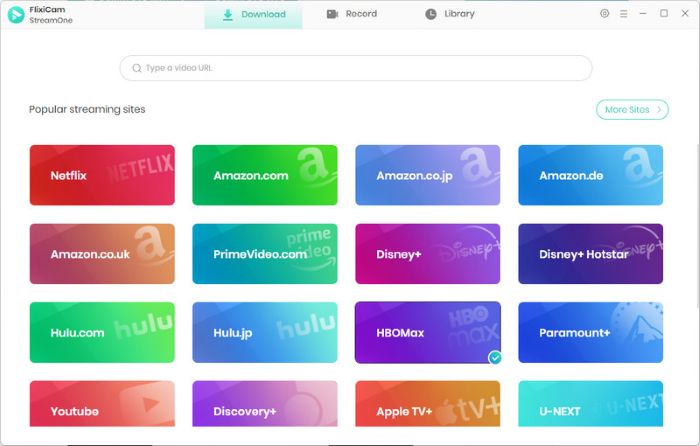
Step 1. Open FlixiCam and select the Amazon website
Open FlixiCam MP4 Movie Downloader on your computer. Select the Amazon Prime website and log into your account.
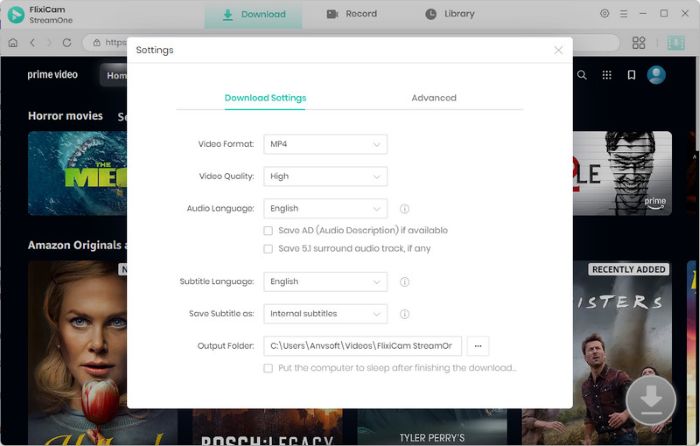
Step 2. Personalize the output settings
To customize your download preferences, click the Gear icon in the upper-right corner. The Settings panel lets you choose your preferred video quality, audio tracks, and subtitles.
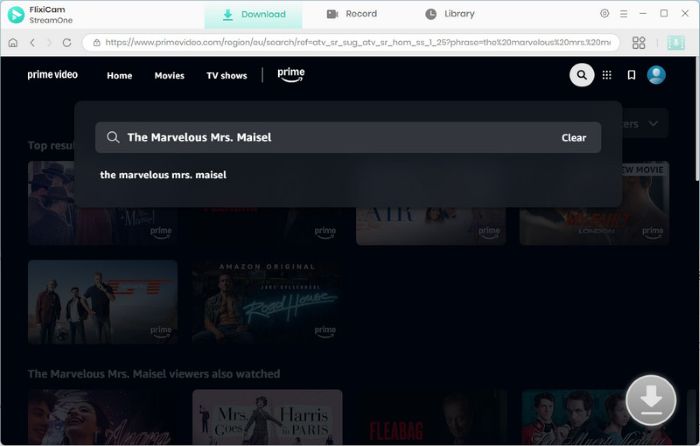
Step 3. Search Amazon Prime movies or shows
Simply enter the title or keywords in the search box and all the available videos will be displayed. Click the videos and the download button will activate (turning green) for your selection.
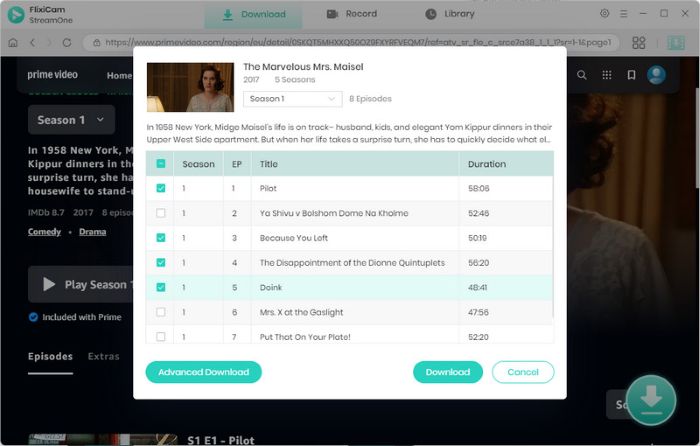
Step 4. Adjust advanced settings
In Advanced Settings you can make further selections. You can choose the video quality and the file size. You can also add subtitles in different languages.
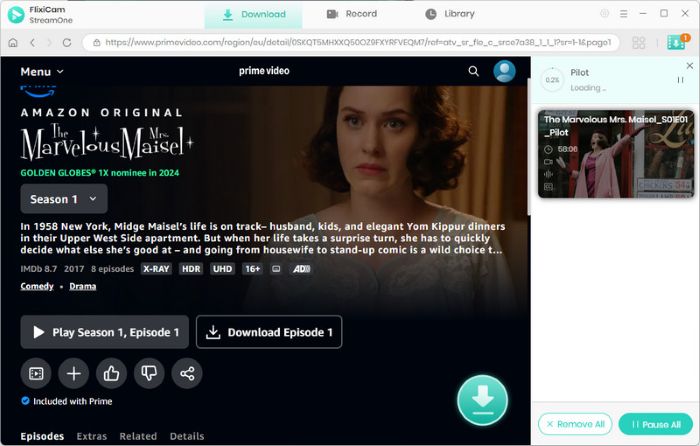
Step 5. Download the Amazon Prime movies locally
Click the Download button to download the Amazon Prime movies on your computer. After the quick and easy downloading process, tap the Library to locate where the movies are saved.
1.2 4K Video Downloader Plus
How to access: https://www.4kdownload.com/
Ratings:
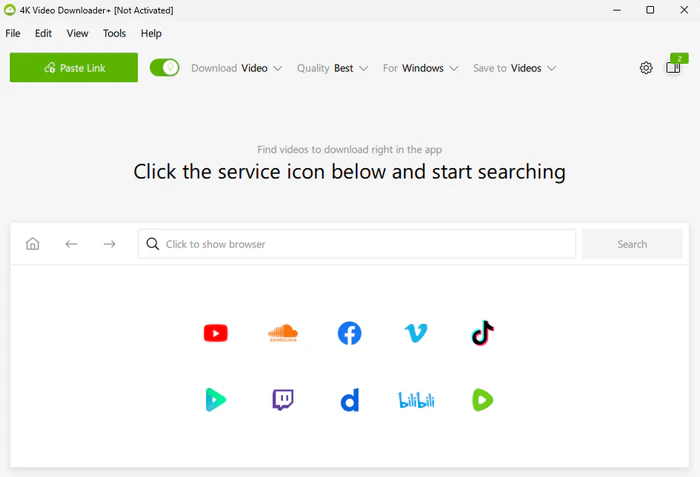
4K Video Downloader Plus is a popular desktop tool that helps you download MP4 movies from licensed video websites like YouTube, Vimeo, TikTok, Bilibili and others. It can download videos in very high quality, even up to 8K, so you can get clear MP4 movies, documentaries or music videos easily. It also has a useful "Smart Mode" that saves your favorite download settings, so you don't need to set them again every time you download a movie.
✅ Pros
- Compatible with 100+ video platforms
- Batch download for playlists and channels
- Extracts subtitles and covers
🔴 Cons
- Free version has ads and limits up to 720p
- Batch download and 8K resolution require a Pro subscription
💡 Tutorial: How to Download MP4 Movies via 4K Video Downloader Plus
Step 1: Download and install 4K Video Downloader Plus from its official website.
Step 2: Open the video platform, find the target movie, copy its URL. Then return to the tool, click "Paste Link", and it will automatically parse the movie information.
Step 3: Select MP4 as the output format and your desired resolution, then choose the save path.
Step 4: Click "Download" to start. After completion, find the downloaded MP4 files in the "Finished" tab.

5 Best Bollywood Movie Download Sites: Legal & Safe Options in 2026
Find the best Bollywood movie download sites in 2026. Compare these websites for HD movies, offline downloads, and safe viewing options. Learn More > >
1.3 WinX HD Video Converter
How to access: https://www.winxvideo.com/hd-video-converter/
Ratings:
WinX HD Video Converter is a versatile desktop tool that combines MP4 video download and video conversion functions. It supports downloading movies from official mainstream websites and converting them to MP4, MKV, AVI, and other formats. If you need both download and editing features, this tool is suitable for you. It supports up to 4K resolution and can compress large MP4 files without losing quality.
✅ Pros
- 4K resolution support
- Built-in video editing tools
- Supports batch download (Pro version)
🔴 Cons
- Free version has limited conversion time
- Require a paid subscription for full features
💡 Tutorial: How to Download MP4 Movies via WinX HD Video Converter
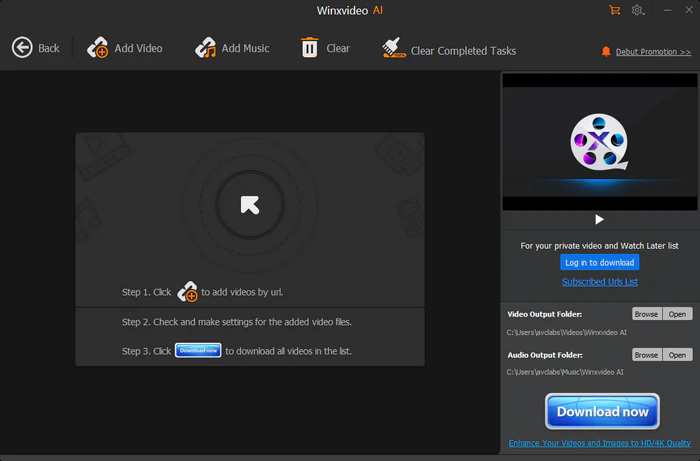
Step 1: Download and install WinX HD Video Converter from its official website.
Step 2: Launch the software, and click the "Downloader" button on the main interface to enter the download module.
Step 3: Click the "Add URL" button, paste the video URL copied from the target platform, and click "Analyze" to parse the video information.
Step 4: After parsing, select MP4 as the output format and your desired, then choose the save path.
Step 5: Click the "Download" button to start the process. After download, you can use the built-in converter to adjust the file size or cut the video if needed.
2. Legal MP4 Movie Download: Public Domain Sources
Downloading MP4 movies from public domain sources is a legal and free to use for personal viewing. Below are 2 trusted sources:
2.1 Internet Archive
How to access: https://archive.org/details/movies
Ratings:
Internet Archive is a non-profit digital library that hosts millions of public domain movies, documentaries, silent films, and TV shows, all available for free MP4 download. It is one of the most trusted legal sources for offline video viewing, with no ads or hidden fees, and all movies are copyright-free or has been authorized for free distribution.
✅ Pros
- Massive public domain library
- Legal for personal use and even non-commercial sharing
🔴 Cons
- Most movies focus on older/classic films
- Some rare or low-demand videos have poor resolution
- Search function lacks advanced filters
💡 Tutorial: How to Download MP4 Movies via Internet Archive
Step 1: Open your browser and visit Internet Archive's movie section.
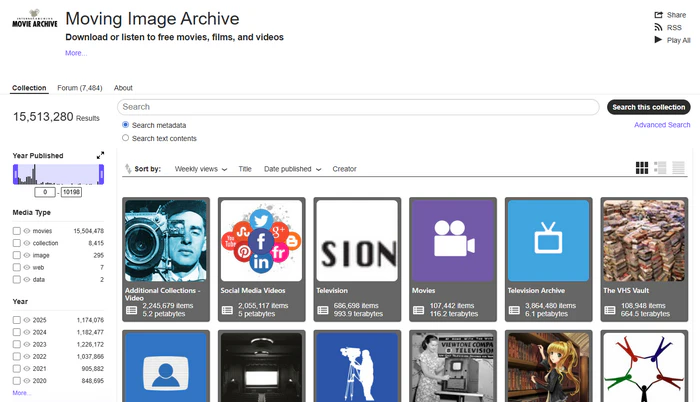
Step 2: Use the search bar to enter the name of the movie you want to download. Click on the target movie to enter its detail page.
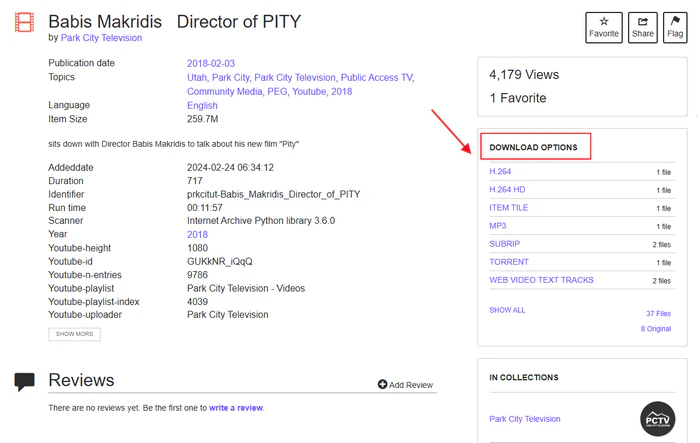
Step 3: Scroll down to the "Download Options" section, and select "MP4".
Step 4: Click the MP4 link, and the download will start automatically. After completion, the MP4 file will be saved to your device.
2.2 The Library of Congress
How to access: https://www.loc.gov/collections/national-film-registry/
Ratings:
The Library of Congress National Film Registry works to preserve America's classic films. Many of these films are in the public domain and free to download as MP4 movies. It has great films like Casablanca and The Matrix, as well as documentaries. All downloads are safe, free, and legal for your personal watching.
✅ Pros
- High-quality MP4 downloads for most titles
- Legal for personal use and even non-commercial sharing
- No ads, no sign-up, no hidden fees
🔴 Cons
- No modern movies or recent releases
- A few films are only available in the U.S.
- Films mainly focus on historical and cultural themes
💡 Tutorial: How to Download MP4 Movies via The Library of Congress
Step 1: Open your browser and visit the National Film Registry page.
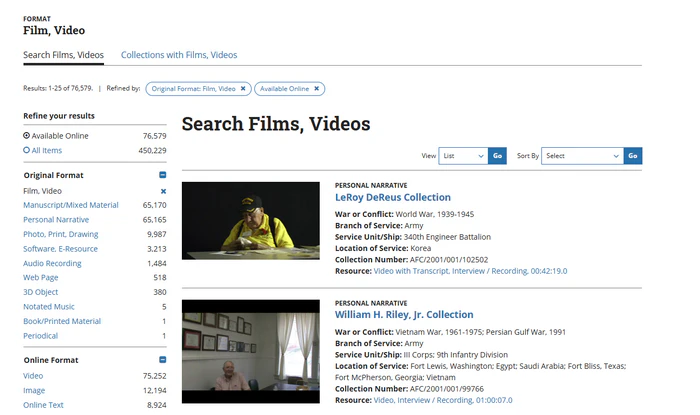
Step 2: Use the search bar to find the film you want to download. Click on the film's title to enter its detail page, then look for the "View Online" or "Download" button.
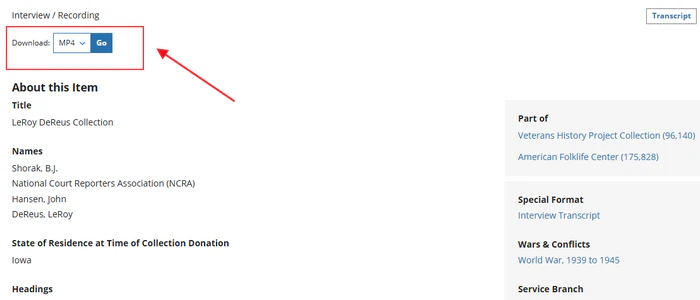
Step 3: If MP4 download is available, click the "Download MP4" link and select the desired resolution.
Step 4: The download will start automatically; after completion, save the file to your device.
3. Free Online MP4 Video Downloaders
Online MP4 Video Downloaders are perfect tools for converting and saving online movies into MP4 format. They allow quick, free MP4 downloads without installing any software. Just use your browser to download MP4 videos easily.
3.1 Acethinker AI MP4 Downloader
How to access: https://www.acethinker.ai/mp4-downloader
Ratings:
Acethinker AI MP4 Downloader is an easy-to-use online tool that uses AI to help you download authorized MP4 movies fast. It can get video links from multiple platforms and let you download free MP4 movies in 1080p quality for offline playback. You don't need to sign up or install anything. It also lets you convert videos to MP3 so you can download music at the same time.
✅ Pros
- AI-powered fast parsing
- Supports MP4/MP3 download up to 1080p
- Compatible with mainstream video platforms
🔴 Cons
- Ad-supported with occasional pop-ups
- No batch download
- Resolution capped at 1080p for some sources
💡 Tutorial: How to Download MP4 Movies via Acethinker
Step 1: Open your browser and visit Acethinker AI MP4 Downloader's official website.
Step 2: Go to the video platform, find the target movie, copy its URL.
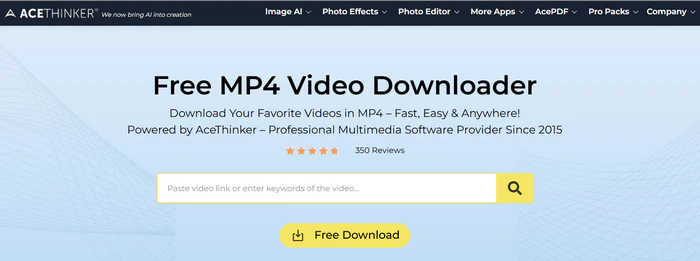
Step 3: Paste the URL into the search bar on Acethinker's homepage, then click "Download" or "Parse".
Step 4: Select MP4 and your desired resolution, then click the "Download" button next to it. The browser will automatically start downloading the MP4 file; after completion, find it in your browser's download folder.
3.2 Download4.cc
How to access: https://www.download4.cc/
Ratings:
Download4.cc is a free online tool that lets you download MP4 movies and videos from over legitimate 1,000 websites like YouTube, TikTok, Facebook, and Instagram. You can get videos without any watermarks, you don't need to sign up or log in, and it has simple, clear instructions for different devices.
✅ Pros
- Works on all devices
- Supports MP3 audio extraction
- Watermark-free MP4 downloads
🔴 Cons
- Some streaming platform videos (e.g., Netflix) are not supported
- Ad-supported with occasional pop-ups
- No batch download
💡 Tutorial: How to Download MP4 Movies via Download4.cc
Step 1: Open your browser and visit Download4.cc's official website.
Step 2: Open the target video platform, play the movie, and copy its URL directly from the address bar.
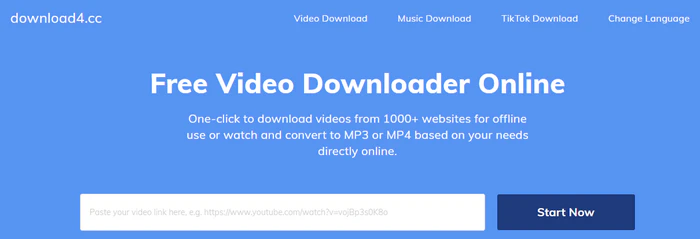
Step 3: Paste the copied URL into the search box on Download4.cc's homepage, then click "Download" or press Enter.
Step 4: Select MP4 and your preferred quality. Right-click the video on the playback page and select "Save Video As" to download.
3.3 Snapfrom.com
How to access: https://snapfrom.com/
Ratings:
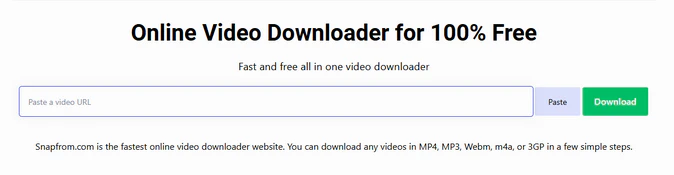
Snapfrom.com is a fast and reliable online MP4 download tool that offers high-quality downloads up to 8K resolution and supports multiple formats including MP4, 3GP, and WebM. After testing, this tool supports downloading videos from social media platforms (TikTok, Facebook, etc.) and video-sharing sites like YouTube and Vimeo. It may not support downloading movies from some paid streaming platforms.
✅ Pros
- Supports up to 8K MP4 downloads
- 100% free with no ads
- Fast parsing speed
🔴 Cons
- May not support streaming platforms like Netflix or Disney+
- Some rare video links may fail to parse
- No built-in video editing tools
💡 Tutorial: How to Download MP4 Movies via Snapfrom.com
Step 1: Open your browser and visit Snapfrom.com's official website.
Step 2: Go to the target platform, find the movie you want to download, click the "Share" button, and copy the URL.
Step 3: Paste the URL into the input box on Snapfrom's homepage, then click the "Download" button.
Step 4: Select MP4 and your desired resolution, then click the corresponding "Download" link. The video will start downloading automatically.
Want to download MP4 movies from more streaming platforms like Netflix? Try FlixiCam MP4 Movie Downloader! 👇
 DOWNLOAD WIN FOR FREE
 DOWNLOAD MAC FOR FREE
4. Mobile MP4 Download Apps
If you prefer to download MP4 licensed movies on your phone, try these mobile apps. They are easy to use and you can carry them on your phone.
4.1 1DM
How to access: https://1dm.freshdesk.com/ or Google Play Store
Ratings:
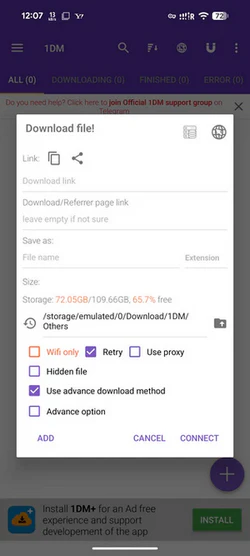
1DM is a mobile download manager that supports MP4 movie download from 1,000+ licensed websites. It offers high-speed downloads with breakpoint resume and batch download, perfect for users who need to download multiple movies at once. The app also supports downloading movies in various resolutions (up to 4K) and formats (MP4, MKV, MP3).
✅ Pros
- Supports SD card storage
- Fast download speed
- Supports breakpoint resume
🔴 Cons
- Free version has ads and speed limits
- Does not support certain streaming platforms
💡 Tutorial: How to Download MP4 Movies via 1DM
Step 1: Download and install 1DM from the Google Play Store or its official website.
Step 2: Copy the video URL, return to 1DM, and tap "Paste" to confirm.
Step 3: Select MP4 as the output format and your desired resolution (up to 4K), then choose the save path (internal storage or SD card).
Step 4: Tap "Start Download" to begin. You can pause/resume or cancel the download at any time.
Step 5: After completion, find the MP4 files in the app's "Library" or your phone's gallery, and play them offline.
4.2 4K Video Downloader for Android
How to access: Google Play Store
Ratings:
4K Video Downloader for Android is the phone version of the famous computer tool. It helps you download high-quality MP4 movies from video websites for archiving your own content. It can download videos up to 4K, so you can get clear HD videos on your phone. You can also download videos in the background and use other apps at the same time.
✅ Pros
- Safe to install (from Google Play)
- Supports up to 4K MP4 download
- Syncs with desktop version via cloud
🔴 Cons
- Free version has ads and no batch downloads
- 4K download requires a Pro subscription
- Limited to video-sharing platforms
- Does not support streaming platforms like Netflix
💡 Tutorial: How to Download MP4 Movies via 4K Video Downloader for Android
Step 1: Download and install 4K Video Downloader for Android from the Google Play Store.
Step 2: Open your phone's browser, go to the video platform, find the target movie, and copy its URL.
Step 3: Launch the app, and the URL will be automatically. Select MP4 as the format and your desired resolution (up to 4K), then click "Download".
For iOS users, we recommend using FlixiCam's cloud sync for cross-device access. 👇
DOWNLOAD WIN FOR FREE
DOWNLOAD MAC FOR FREE
5. Browser Extensions for Quick MP4 Movie Download
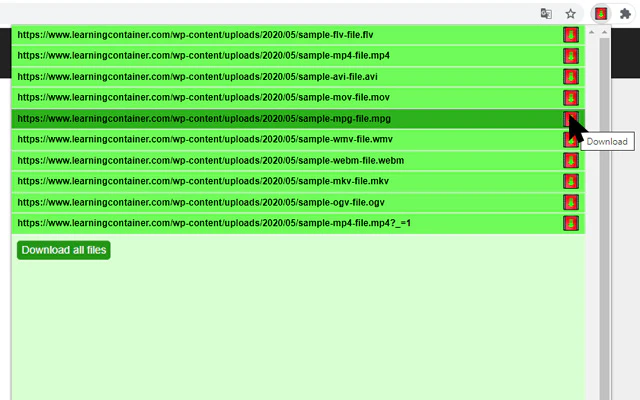
Browser extensions are the fastest way to download MP4 movies you have the right to view. They can automatically detect videos on the current page and allow one-click download, without switching between tabs or copying links. Below are 2 recommended extensions:
5.1 Video DownloadHelper (Firefox/Chrome)
How to access: Chrome Web Store (for Chrome) or Firefox Add-ons (for Firefox)
Ratings:
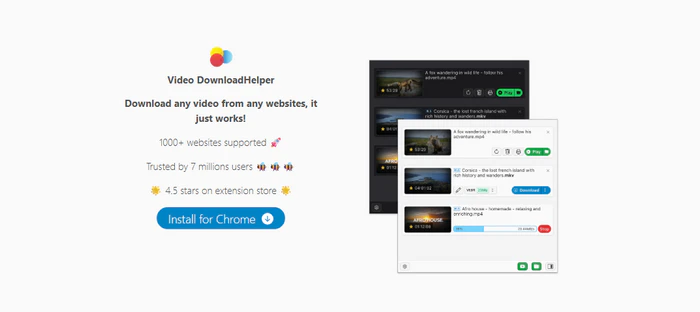
Video DownloadHelper is a popular tool that works with Chrome and Firefox browsers. It helps you download MP4 movies quickly for offline viewing. It can automatically find all movies on the current web page, and shows you download choices with just one click.
✅ Pros
- Automatic movie detection
- One-click download
- Supports batch download and video merging
🔴 Cons
- Free version has occasional ads
- Some platform movies (e.g., Netflix) cannot be detected
💡 Tutorial: How to Download MP4 Movies via Video DownloadHelper
Step 1: Open your browser and go to the official extension store.
Step 2: Search for "Video DownloadHelper" and click "Add to Chrome" or "Add to Firefox" to install it.
Step 3: After installation, the extension icon will appear in the browser's toolbar (gray when no video is detected, colored when videos are detected).
Step 4: Open a webpage with the MP4 movie you want to download and play the video. The extension icon will turn colored. Click it to see the list of downloadable movies.
Step 5: Select the MP4 format and desired resolution, then click the download icon next to it. The movie will start downloading automatically.
5.2 Flash Video Downloader
How to access: Chrome Web Store (for Chrome) or Firefox Add-ons (for Firefox)
Ratings:
Flash Video Downloader is a easy browser extension mainly for Chrome. It helps you download MP4 movies and Flash files from thousands of authorized websites like Facebook, Vimeo, YouTube, Youku, and iQiyi. It's very simple to use with no difficult settings, and it can also download Flash games and MP3 music, so it can do many different things for you.
✅ Pros
- Supports thousands of websites
- Downloads MP4, Flash games, and MP3
- Free to use
🔴 Cons
- Works best with Chrome; limited Firefox support
- Some modern websites (no Flash) may have detection issues
- Occasional ads
💡 Tutorial: How to Download MP4 Movies via Flash Video Downloader
Step 1: Open Chrome browser and go to the Chrome Web Store, search for "Flash Video Downloader". Click "Add to Chrome" to install the extension.
Step 2: Visit a webpage with the MP4 movie you want to download and play the movie.
Step 3: Click the FVD icon in the toolbar, and it will display all downloadable movies on the current page.
Step 4: Select the MP4 movie you want to download, choose the resolution, then click "Download".
FAQs About FAQ about MP4 Movie Download
1. Do all the recommended MP4 download tools support batch download for movies?
No. Most free online tools and mobile apps only let you download one movie at a time, without batch or playlist support. FlixiCam lets you download full playlists in batches at 10x faster speed, while preserving complete metadata including multi-language audio tracks and subtitles.
Grab Flixicam to download MP4 movies in just one go! 👇
2. Can I sync my MP4 downloads across different devices (e.g., laptop to phone)?
Yes. You can transfer MP4 files directly between devices via USB cable or local wireless sharing. Cloud services like Google Drive or Dropbox also work for syncing across your devices.
3. Is downloading movies in MP4 format illegal?
Whether it’s allowed depends on the type of content and your local laws. Using tools to save public‑domain films for personal, non‑commercial offline use is usually regarded as fair use in many regions. That said, we do not support downloading copyrighted movies without the owner’s approval. Be sure to follow the terms of service of the video platform you use.
4. Do free downloaders contain malware?
Some free or suspicious downloaders may come with malware, bundled software, or annoying ads. Always choose reputable tools and keep your antivirus updated. FlixiCam is 100% clean: no bundled software, no ads, safe and reliable for your movie downloading needs.
5. Will the downloaded MP4 files lose quality?
Most online downloaders heavily compress videos, which often results in obvious quality loss. However, FlixiCam supports high-quality output up to 1080p/8K, using advanced H.264/H.265 encoding to keep the original video quality intact.
✅ Pick The Right Tool to Fit Your Needs
Finding the best MP4 movie downloader is about matching your needs with a solution that's safe, legal, and sustainable. For occasional users, online MP4 movie downloaders may suffice. If you pursue better performance, desktop software like Flixicam provides faster speeds, more stable downloads, and a safer experience for regular use.
📢 Disclaimer
All tutorials here are for personal entertainment & education only. Please ensure you have a valid legal account on the relevant platforms. We do not support commercial distribution or piracy — always respect content creators' copyrights.
Ashley Wood | Senior Writer