How to Download Full Movies from YouTube in 2026 (Free & Pro Methods)
 Ashley Wood
- 25 September, 2026
- Blog
When you're on a long flight or commuting without internet, you probably want to download entire YouTube movies to watch offline. The problem is, not every YouTube download tool can handle long videos well. What you need is a stable one that preserves high video resolution and keeps the audio in sync exactly with the video. Luckily, we've tested and listed the best ways here to help you save long YouTube movies easily.
📢 Disclaimer: Please respect YouTube copyright - downloaded content is only for your personal offline use.
- Method 1. Official Way to Download YouTube Movies
- Method 2. Use FlixiCam YouTube Movie Downloader (Ultimate Way)
- Method 3. Use Free Desktop YouTube Video Downloaders
- Method 4. Use Free Online Web YouTube Downloaders
- Compare: Which Is The Best Way to Download Long YouTube Videos
- FAQs to Download YouTube Movies
Method 1. Official Way to Download YouTube Movies
YouTube has its own built-in library of movies and films. These are uploaded by YouTube itself, through Primetime channels, or even by other users.
While in the YouTube's movies section, you can download free full-length movies (with ads), or you can buy or rent movies to download and watch anytime.
1.1 Download YouTube Movies via YouTube Premium
For the free & ad-supported YouTube movies, if you want to download them to your phone or tablet and watch offline, you'll need a YouTube Premium account. Here's how:
Step 1. Make sure you have subscribed to YouTube Premium membership via youtube.com/premium.
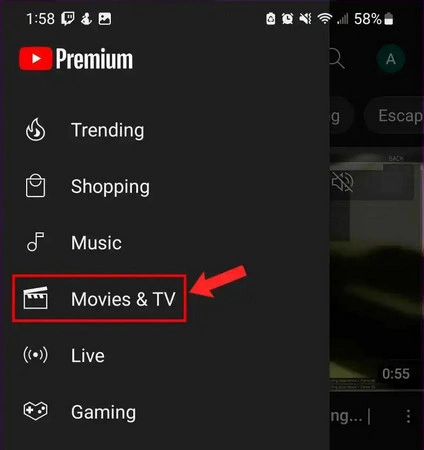
Step 2. Open YouTube app on mobile or tablet, go to the "Movies & TV" section, and choose your preferred full movie. Select the movie with the "Free with ads" tag.
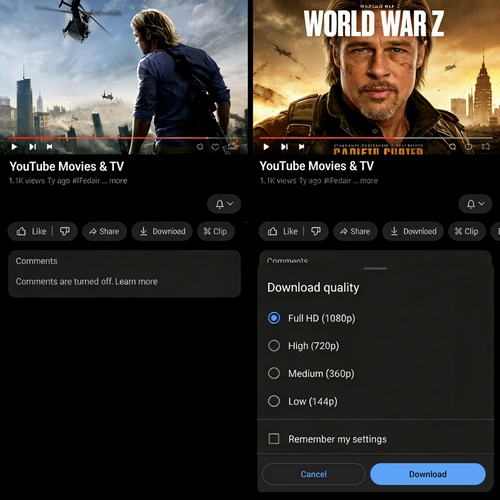
Step 3. Start playing the YouTube movie. Then you click the "Download" icon to start downloading YouTube movies.
1.2 Download YouTube Movies (Buy or Rent)
If you have bought or rented a movie on YouTube, you can download it offline without a Premium account.
For purchased YouTube movies, you can watch them permanently. For rented YouTube movies, you can usually start watching them within 30 days after borrowing, and finish them within 48 hours after starting playback.
Step 1. Go to YouTube's "Movies & TV" section, find the title with the tag "Buy or Rent", then make payment.
Step 2. On the YouTube app, go to "Library > Your movies and shows > Purchased". Here, you will find all purchased YouTube movies.
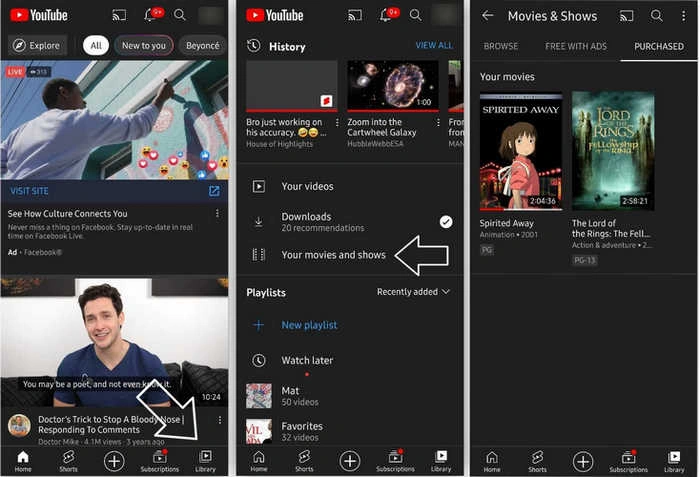
Step 3. Tap the purchased or rented YouTube items, and "Download".
- For YouTube TV shows, you need to download each episode individually.
- You can only download YouTube purchased movies on mobile or tablet devices.
- All downloaded YouTube movies are saved as cache files, not MP4 plain format. If you need YouTube MP4 movies, choose to use FlixiCam StreamOne.
📢 Note:
✅ Pros
- It's 100% legal and official.
- You can enjoy high-quality playback.
- If you have Premium, you can enjoy extra benefits like background playback and ad-free YouTube Music.
🔴 Cons
- If you cancel, you can't watch downloaded YouTube movies.
- Movie downloads are locked inside the YouTube app (not MP4 files).
- Only works on mobile or tablet YouTube app.
Method 2. Use FlixiCam YouTube Movie Downloader (Ultimate Way)
If you want to watch YouTube movies with more freedom, you can convert your legitimately purchased or rented YouTube movies as standalone MP4 or MKV files, with a specialized tool like FlixiCam YouTube Video Downloader.
Unlike other YouTube downloaders, FlixiCam features an advanced downloading engine, and can not only download YouTube social videos for totally free, but also convert your own YouTube movies into plain video files easily. After that, you can move them to USB drive or play them on your smart TV easily.
More than that, FlixiCam is an all-in-one video downloader: not just YouTube, it also supports downloading videos from TikTok, Twitter, Facebook, and over 1000+ platforms!
Main Features:
- Convert YouTube Movies to MP4 - Unlimited Video Conversion.
- Download Videos in MP4 or MKV from 1000+ sites.
- Customize Your Downloads by Selecting Video Quality, File Size, Bitrate, etc.
- Up to 8K Resolution is Supported.
- 10X Download Speed to Save Video.
- Support Batch-Download Mode.
Compatibility: Windows 10/11, macOS 11 and above.
Step 1. Open FlixiCam StreamOne, and select YouTube as the download source.
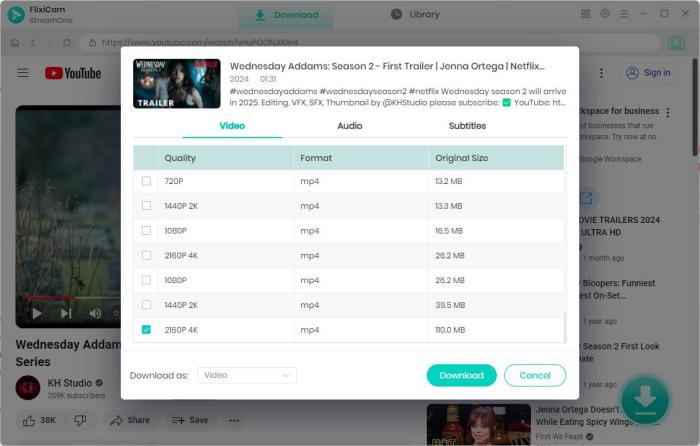
Step 2. Use its built-in browser and go to youtube.com/movies. Find the YouTube movies you want, and tap "Download" at the bottom right.
Step 3. Choose your favorite YouTube movie quality, subtitle and audio tracks, then again "Download".
✅ Pros
- Support both free and purchased/rented YouTube movies.
- Works for YouTube, Netflix, Amazon Prime, and over 1000+ sites.
- You can download long movies, even those over 2 hours.
- You can get the best possible video quality, and the audio stays perfectly synced with the video.
- You can play downloaded YouTube movies on any of your own devices.
🔴 Cons
- Only supports Windows or Mac computer.
- YouTube movie downloads require a paid license.
Method 3. Use Free Desktop YouTube Video Downloaders
Need a completely free tool? This Any Video Converter Freeware is made for you. It works to download user-uploaded movie videos on YouTube, like public domain films, trailers, or non-copyright-restricted content.
Step 1. Download and install Any Video Converter on Windows or Mac computer.
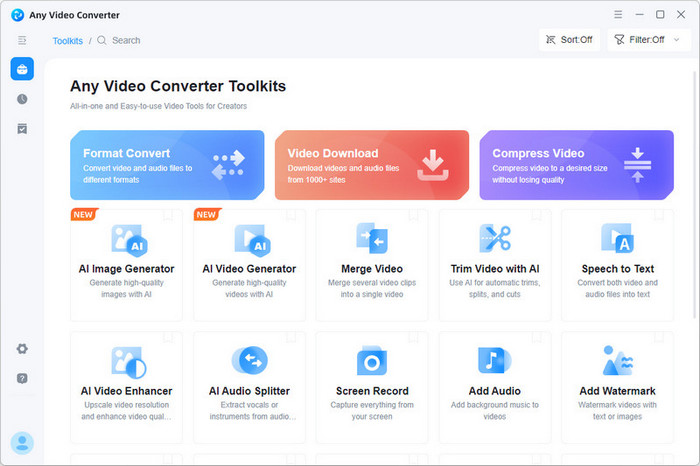
Step 2. Choose "Video Download" from toolbox, then paste the YouTube URLs into it.
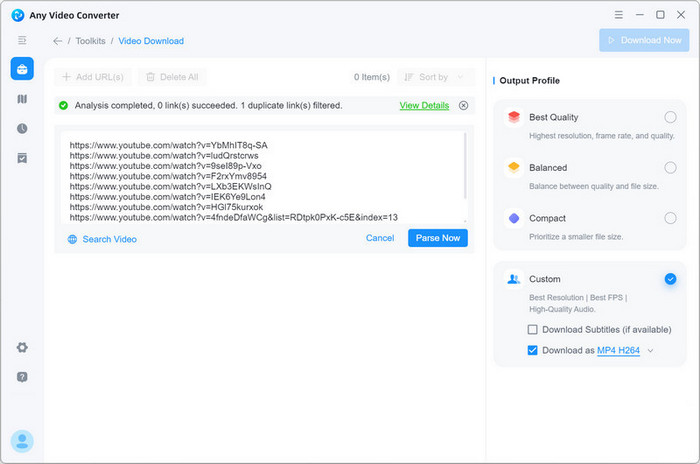
Step 3. Choose output quality, output format, etc. Then "Download Now".
✅ Pros
- If you download a YouTube video or two at a time, this freeware is the best.
- It provides other free tools, like video editing, video compressing, and so on.
🔴 Cons
- It doesn't support YouTube movies you've bought or rented.
- Only supports Windows or Mac computer.
Method 4. Use Free Online Web YouTube Downloaders
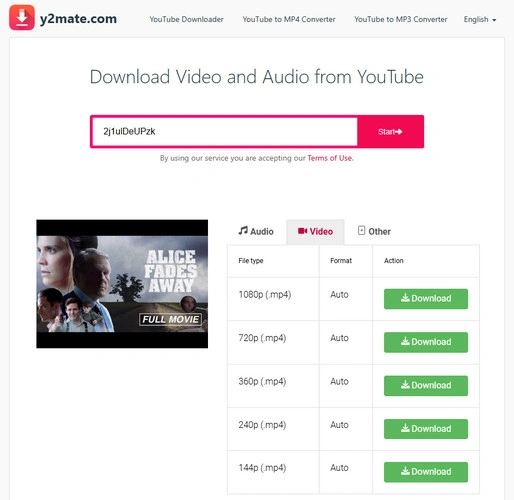
Don't want to install any extra apps? You may need a web-based YouTube downloader, like Y2Mate, a classic and frequently mentioned online free YouTube saver. It saves long YouTube videos to MP3 or MP4 at up to 1080p quality.
You can just copy & paste YouTube video link to it, choose download format & quality, then Download. Remember to use an ads-blocker when using this online video downloader.
⚠️ Warning: It is strongly recommended to avoid using this tool for regular downloads, as it always pops up ads, contains misleading "download" buttons, and may cause malware infection.
Compare: Which Is The Best Way to Download Long YouTube Videos
| Feature | FlixiCam YouTube Downloader 👍 | Official YouTube App | Any Video Converter Free | Online Web Downloader |
|---|---|---|---|---|
| Download free or purchased YouTube movies | ✅ | ✅ | ❌ | ❌ |
| (Only user-uploaded movies) | ❌ | ❌ | ✅ | ✅ |
| Download long movies | ✅ | ✅ | ✅ | ❌ |
| (May fail on large files) | ✅ | ✅ | ✅ | ❌ |
| Save permanent files | ✅ | ❌ | ✅ | ✅ |
| Safety | ✅ | ✅ | ✅ | ❌ |
| (High risk) | ✅ | ✅ | ✅ | ❌ |
| Cost | Free for user-uploaded, paid for purchased | Free with ads or buy/rent | Free for user-uploaded movies | Free for user-uploaded movies |
FlixiCam allows downloading both free and purchased YouTube movies, and it can also freely save user-uploaded videos as MP4/MKV files easily. If you want to download long YouTube videos for offline playback, this stable & safe YouTube download tool is perfect for you.
 DOWNLOAD WIN
 DOWNLOAD MAC
FAQs to Download YouTube Movies
Does YouTube provide movies & TV series for free?
Yes. YouTube does offer movies and TV series for free to watch, primarily through an ad-supported model. You can visit this in US, UK, and other regions. But for some new hits, you will need to buy or rent them.
Where to find free full movies on YouTube?
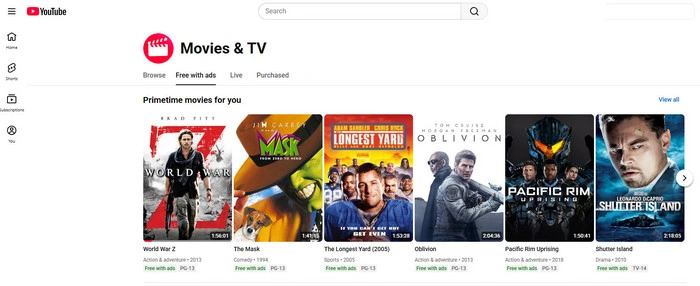
It's easy to find YouTube's movie library. You can go to youtube.com/movies on your browser, or just search YouTube Movies & TV on Google. Free full YouTube movies are always listed on channels like @FREEMOVIESYT.
Or on Movies & TV, you will find the "Free with ads" tab.
Can I play downloaded YouTube Movies on TV?
Yes. You can use FlixiCam to save YouTube movies or shows onto a USB drive, then insert it into a TV set for watching. Just be aware that the downloaded YouTube items are for your own use only.
Read Also: How to Cast Netflix to TV without WiFi? [Latest Guide in 2026
The End
In 2026, to download full YouTube movies, you have several options above. The official method is to download titles directly on YouTube app. And for more flexibility, you will need FlixiCam downloader to convert YouTube videos as MP4/MKV files, so that you can stream them on other devices.

The Best Tool to Convert YouTube Music
Want to enjoy your YouTube Music for offline playback? TuneMobie Music Converter is definitely worth a try. This tool can convert music from 17+ platforms (Spotify, Apple Music, YouTube Music, Amazon Music, etc.) to universal formats (MP3, M4A, FLAC, etc.) with original sound quality and complete ID3 tags kept. Learn More >>
📢 Disclaimer
All tutorials here are for personal entertainment & education only. Please ensure you have a valid legal account on the relevant platforms. We do not support commercial distribution or piracy — always respect content creators' copyrights.
Ashley Wood | Senior Writer
![12 Best MP4 Movie Downloader [2026]: Tools for Desktop, Mobile & Online](/img/blog/best-mp4-movie-downloader.webp)