Download YouTube Clip: Download Only the Part You Need (2026 Guide)
 Ashley Wood
- 29 September, 2026
- Blog
Have you ever watched a long YouTube video but only wanted to download a short 10-second or 1-minute clip from it? You're definitely not alone. In this guide, you'll learn the best ways to download and trim YouTube clips in 2026.
Disclaimer: Please respect YouTube copyright - downloaded content is only for your personal offline use.
Part 1. 3 Main Methods to Download YouTube Clips in 2026
1. Online YouTube Clip Downloaders
The follow websites are where you can paste a YouTube link, pick a start and end time, and then download just that clipped YouTube video part - right in your browser. You don't need to install anything. If you only download YouTube clips once in a while and want the simplest option without installing software, these YouTube clip online free downloaders are all you need.
Popular online free YouTube clip downloaders in 2026:
| Tool | Editor's Review |
| YT Cutter (ytcutter.com) | One of the most popular choices. Works with MP4, GIF, and audio. Pretty clean, and the free version has few watermarks. |
| YouTubeTrimmer.com | Simple and user-friendly. You can set start/end times and even loop the clip. Completely free, no sign-up needed. |
| SliceTube.io | Good for precise trimming and downloading clips directly. |
| ClipsCutter.com | A straightforward tool for cutting and downloading YouTube clips. |
| Sliceyt.com | Lightweight and simple. Some Reddit users like it for quick clips. |
✅ What's good about it
- Super easy and convenient to use.
- Works on PC, phone, or tablet.
- You don't have to download the whole video first; you can cut and grab just the YouTube video part you want.
🔴 What's not so good
- Many tools add watermarks if you're using the free version.
- Video quality often gets worse, especially above 1080p.
- You'll see lots of ads and pop-ups.
- Trimming isn't as precise as with desktop tools.
2. Mobile YouTube Clip Downloaders (Android APK & iPhone)
Is there YouTube Clip Downloader APK for Android or YouTube Clip Downloader for iOS device? The answer is no.
There's still no mature or reliable mobile app that lets you download just a specific YouTube clip. Popular YouTube downloader mobile apps like Seal, YTDLnis, NewPipe, VidMate, and Snaptube only let you download full YouTube videos.
So as a mobile user, you're left with three main alternative methods:
- Way 1: Use online web-based YouTube clip download tools, discussed above. (but quality and stability can be hit or miss)
- Way 2: Download the whole YouTube video first, then trim it yourself.
- Way 3: Manually screen record just the part directly from the YouTube app via your phone's screen recorder.
These solutions are fine for casual YouTube clip downloads. But if your main goal is to directly download clean, good-quality YouTube clips, you'd better do this on a desktop tool, which will be shown below.
10 Free Ways to Record YouTube Live Stream on Laptop/Mobile/Online Web
Wanna capture live stream on YouTube freely? Here's all you need to record YouTube Live on Windows, Mac, Android, iPhone, or online webpage. Learn More > >
3. Professional Desktop YouTube Clip Downloaders (Best for PC/Mac)
To capture exact YouTube clips precisely, you can use the FlixiCam's smart recording feature to record only the specific parts of YouTube you want.
FlixiCam is a powerful all-in-one desktop solution to download entire YouTube videos or parts of YouTube videos at high speed (up to 8X). To capture YouTube clips on this tool, you can just play the YouTube video in its built-in browser, drag to any part you want during playback, and record just that specific YouTube clip - no more downloading the whole video to trim.
 DOWNLOAD WIN
 DOWNLOAD MAC
Tips: For more YouTube video cutters, many users pair FlixiCam with Any Video Converter Free. The latter tool has a built-in trimming tool that lets you easily cut out unwanted YouTube video parts and export clean clips efficiently.
✅ What's good about it
- Great YouTube video quality (supports up to 4K or even 8K for downloads).
- Download the exact YouTube video portion to MP4.
- Fast downloading speed, with no watermarks.
- Save subtitles, multiple audio tracks, and tags.
- Much more stable.
🔴 What's not so good
- You have to install it on a PC or Mac.
- Some advanced features are only available in the paid version.
Part 2. Best Choice to Download YouTube Clips [No Watermark & HD]
FlixiCam is the best tool to download any YouTube content you need. It's a powerful yet easy-to-use desktop that works with YouTube and over 1,000 other streaming video sites. If you regularly need clean, high-quality YouTube clips, this tool is the most reliable option out there - especially when compared to online YouTube video cutter and downloader tools.
Main Features:
- Capture YouTube Clips to MP4/MKV.
- Download Streaming Videos from 1000+ sites.
- Customize Your Downloads by Selecting Video Quality, File Size, Bitrate, etc.
- Up to 8K Resolution is Supported.
- 10X Download Speed to Save Video.
- Support Batch-Download Mode.
Compatibility: Windows 10/11, macOS 11 and above.
Part 3. How to Download and Trim YouTube Clips
The following tutorial is to use FlixiCam to download exactly the YouTube clip in MP4 to computer and use Any Video Converter Free to trim YouTube videos easily.
Step 1. Copy the URL of the YouTube video you want to clip.
Step 2. Open FlixiCam, go to Record tab. Paste the YouTube video link into the address bar, and press Enter. The YouTube video will load right inside FlixiCam's built-in browser.
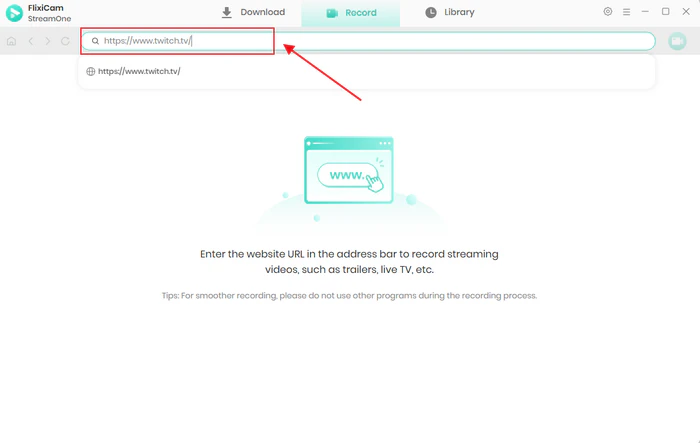
Step 3. Play the YouTube video in FlixiCam, then tab Start Record icon. Choose the output quality and format (MP4/MKV).
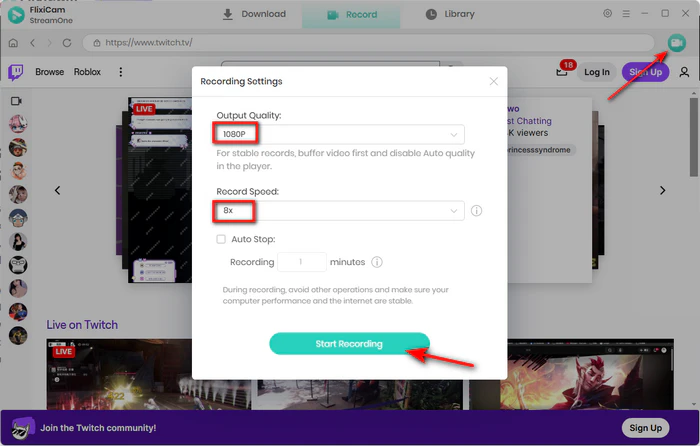
Step 4. You can drag the progress bar to grab the exact YouTube clips, and FlixiCam will automatically record and download for you. Or you can also set the start and end times for the exact YouTube segment you want.
Step 5. (Optional but Recommended): For even more precise trimming YouTube clips, download and open Any Video Converter Free and use its built-in clip tool:
Download Win
Download Mac
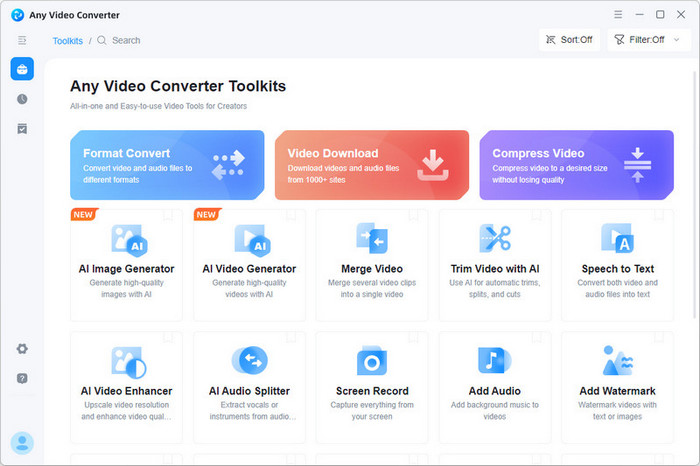
- Import the YouTube clip you just recorded from FlixiCam
- Go to the Clip or Trim section
- Set the exact Start Time and End Time using the precise timecodes
- Click Apply or Cut to remove any unwanted YouTube video parts
- Choose your final output format and quality, then click Convert
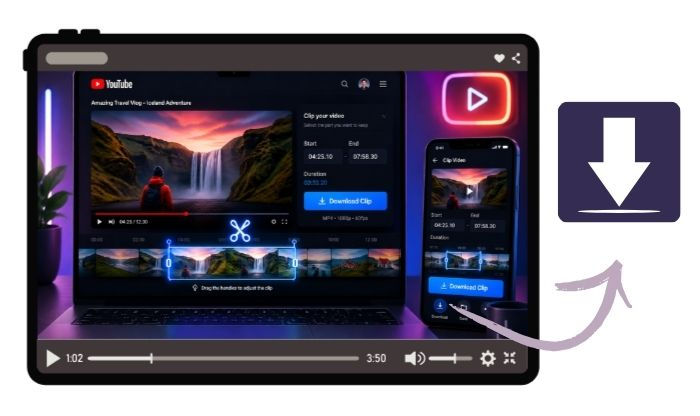
Free Download Part of YouTube Video - 100% Working
Want to just download a clip from a YouTube video? Get online YouTube trimmers, YouTube's Clip feature, and FlixiCam YouTube Clip Downloader here. Learn More > >
FAQs to Download YouTube Clips
Can I download a part of a YouTube video without downloading the whole thing?
Yes. You can use some online YouTube video cutters and downloaders to save parts of YouTube videos, like YT Cutter, YouTubeTrimmer, SliceTube, ClipsCutter, etc. But these online tools download your videos with watermark, and their sites contain lots of ads.
To download YouTube clips without watermark, and in high quality, it's still recommended to use FlixiCam YouTube Downloader, which supports not only downloading videos from 1000+ streaming platforms, but also capturing any part of the YouTube timeline.
FlixiCam allows downloading YouTube clips without watermark, and it can also freely save clips in HD quality easily. If you want to download YouTube clips for offline playback, this stable & safe YouTube download tool is perfect for you.
DOWNLOAD WIN
DOWNLOAD MAC
Is there a watermark-free YouTube clipper?
Many online YouTube clippers add watermarks and reduce quality. But delicate desktop YouTube downloader apps (e.g., FlixiCam YouTube Downloader based on yt-dlp) still output clean YouTube clips in HD quality.
Is there any YouTube clip downloader extension?
There's no YouTube clip downloader available on the Chrome Web Store, due to the policies and YouTube blocks.
How can I download MP3 audio from YouTube clips?
You can't directly save MP3 audio from YouTube clip. You can only save YouTube clip video MP4 files via FlixiCam or YT Cutter(online tool), then convert MP4 to MP3 manually.
Top 5 Safe Websites to Free Download YouTube to MP3
This passage has listed the top 5 websites where you can safely download YouTube into MP3 for free. Learn More > >
How to cut YouTube video without downloading?
Tools like YouTubeTrimmer.com, Flixier, Cutter.yt, Kapwing, or Clideo let you paste a YouTube link, set your start and end times, trim the video, and then either share the link or download the clipped portion. These tools do the trimming on their own servers, so you don't have to download the full original video yourself.
But some users said that online tools often have length limits, reduce video quality, or show lots of ads.
So for the best quality and longer clips, many people end up downloading the full video first (with FlixiCam YouTube downloader), then trimming it locally using software like CapCut, DaVinci Resolve, or FFmpeg.
The End
This guide will show you how to download YouTube clips for trimming in 2026. You'll learn about online free YouTube clip download tools, mobile limits, and desktop options. For the best results and no watermark output, using desktop software like FlixiCam YouTube Clip Downloader is a good choice.

The Best Tool to Convert YouTube Music
Want to enjoy your YouTube Music for offline playback? TuneMobie Music Converter is definitely worth a try. This tool can convert music from 17+ platforms (Spotify, Apple Music, YouTube Music, Amazon Music, etc.) to universal formats (MP3, M4A, FLAC, etc.) with original sound quality and complete ID3 tags kept. Learn More >>
📢 Disclaimer
All tutorials here are for personal entertainment & education only. Please ensure you have a valid legal account on the relevant platforms. We do not support commercial distribution or piracy — always respect content creators' copyrights.
Ashley Wood | Senior Writer