How to Stop Netflix Downloads from Expiring
 Ashley Wood
- 9 September, 2026
- Blog
Netflix’s offline downloads come with a frustrating limitation – they expire after a certain period, and some titles even disappear completely when licensing agreements change. This means your carefully curated offline library could vanish without warning. But what if you could keep your Netflix downloads permanently?
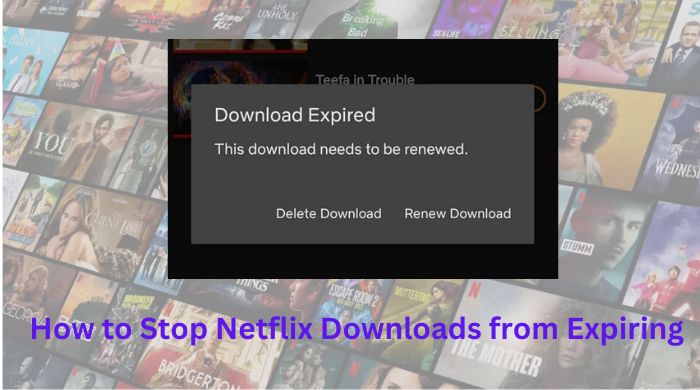
In this guide, we’ll reveal the simple solution to download Netflix videos that never expire, letting you enjoy them anytime, anywhere.
Part 1: How Long Do Netflix Downloads Last?
How long does Netflix downloads last? Typically 24 hours to 30 days. Below are detailed explanations:
1. Download Expiration Period:
When you download content from Netflix, it has an expiration date. This means that you have a limited amount of time to watch the downloaded content before it becomes inaccessible. The expiration period typically ranges from 48 hours to 30 days, it depends on the licensing agreements Netflix has with content providers.
2. Time Limit to Finish Watching:
Once you start watching a downloaded title on Netflix, you usually have a specific time limit to finish it. This limit varies based on the content and region. For instance, some movies may have a 48-hour viewing window, while TV show episodes may need to be finished within 24 hours. Once the time limit expires, the content will be automatically deleted from your device.
Part 2: Why Do Netflix Downloads Expire?
Netflix downloads expire due to a variety of reasons, mainly driven by licensing agreements, content management, and storage limitations:
Licensing Agreements
Netflix doesn't own all the content it streams; much of it is licensed from third-party studios. These licenses often come with restrictions, including how long content can be available offline. To comply with these agreements, Netflix sets expiration dates on downloads.
Content Availability
Some titles are only available on Netflix for a limited time. If a title is about to be removed from the platform, any associated downloads will expire to align with the streaming rights.
Storage Management
Expiring downloads helps users manage storage on their devices by automatically removing old files that might otherwise be forgotten.
Renewal of Content
Some content may require users to renew the download to maintain the licensing agreement or refresh the rights associated with that content.
Part 3: How to Check the Remaining Time of Downloaded Videos on Netflix?
If you want to know how much time is left for a Netflix downloads, you can generally find this information within the Netflix app itself. Here's a general guide on how to check the remaining time for a downloaded video on Netflix:
- Open the Netflix app on your device.
- Go to the "Downloads" section or a similar area where your downloaded videos are listed.
- Locate the video you want to check the remaining time for.
- Look for any indicator or countdown timer associated with the downloaded video. It might be displayed as a progress bar, a timer, or a specific expiration date/time.
- If there is no visible countdown or timer, you can try tapping on the video or accessing its settings/options to see if the remaining time is mentioned there.
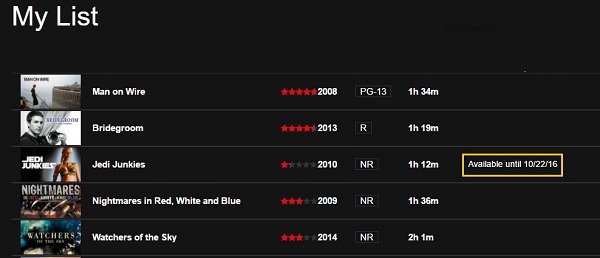
Keep in mind that the availability of such features may vary depending on the version of the Netflix app and your specific device. If you're having trouble finding the remaining time or need more accurate information, it's best to refer to the official Netflix support documentation or contact their customer support for assistance.
Part 4: How to Stop Netflix Downloads from Expiring
FlixiCam Netflix Video Downloader is a professional and user-friendly tool designed for Netflix subscribers who want to download movies, TV shows, and documentaries from Netflix for offline viewing. Compatible with Windows 10, 11 and macOS 11 and above, FlixiCam ensures a safe, fast, and hassle-free downloading experience.
 Download Win
 Download Mac
With FlixiCam, you can save Netflix videos in MP4 or MKV format with 1080p high quality, preserving multilingual audio tracks (including Dolby Atmos) and subtitles. The downloaded videos are stored locally on your device, never expire, and can be transferred to other devices for normal playback.
Key Features of FlixiCam Netflix Video Downloader
- ✅ Simple & Beginner-Friendly – Intuitive interface makes downloading Netflix content effortless.
- ✅ Multiple Formats – Download videos in MP4 or MKV for compatibility with various devices and players.
- ✅ High-Quality Downloads – Save Netflix videos in up to 1080p resolution for a premium viewing experience.
- ✅ Keep Original Audio & Subtitles – Preserve multilingual audio tracks (including Dolby Atmos) and subtitles.
- ✅ Retain Video Metadata – Maintains movie/show details like title, cover, and episode info.
- ✅ 10x Faster Download Speed – Optimized acceleration ensures quick downloads.
- ✅ Offline Playback Anytime, Anywhere – Downloaded videos never expire and can be watched without an internet connection.
- ✅ Transfer to Other Devices – Easily move downloaded videos to smartphones, tablets, or USB drives.
How to Stop Netflix Downloads from Expiring with FlixiCam
Step 1 Open Netflix Video Downloader
Download, install and launch FlixiCam Netflix Video Downloader
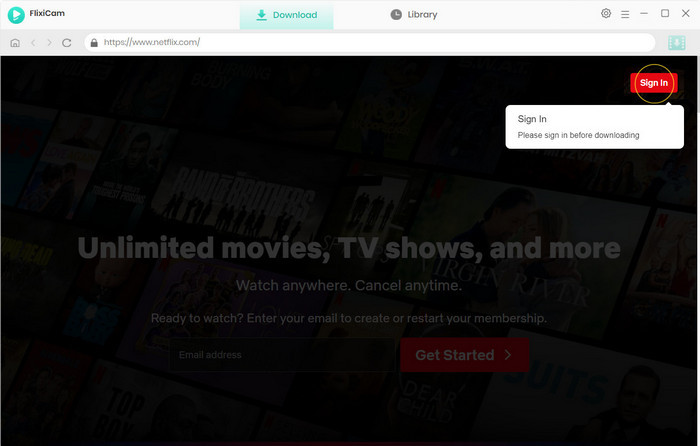
Step 2 Log in to Your Netflix Account
Sign in to your Netflix account (you must have an active subscription).
Step 3 Customize Output Settings
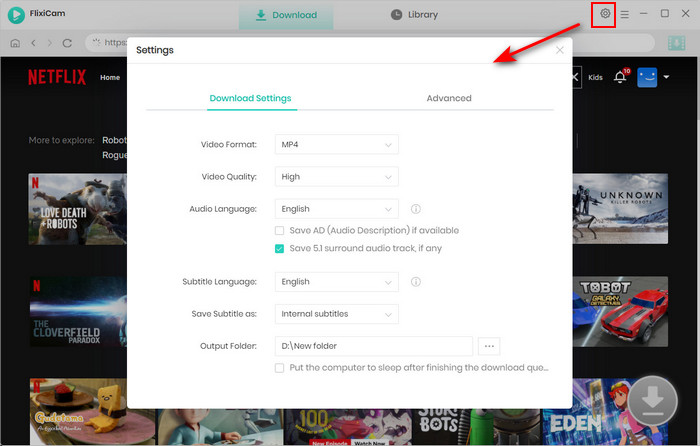
Click the Settings icon in the upper-right corner, and you can choose:
- Format: MP4 or MKV
- Quality: Up to 1080p
- Audio Tracks: Select preferred languages (supports Dolby Atmos)
- Subtitles: Choose embedded subtitles (multiple languages available)
- Metadata: Keep original title, cover, and episode info
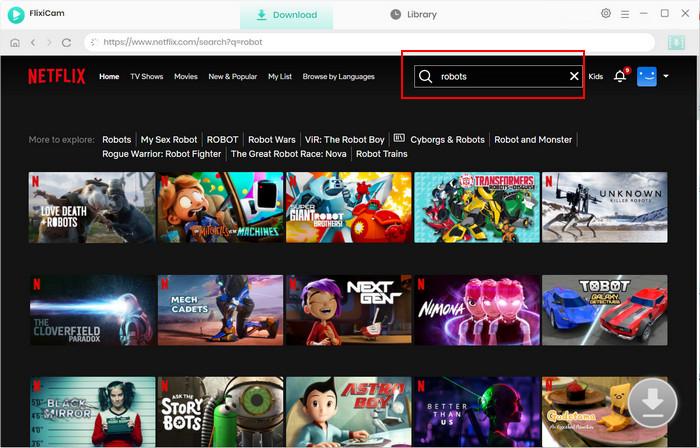
Step 4 Search for Netflix videos in FlixiCam
Search for the movie or TV show you want to download in FlixiCam.
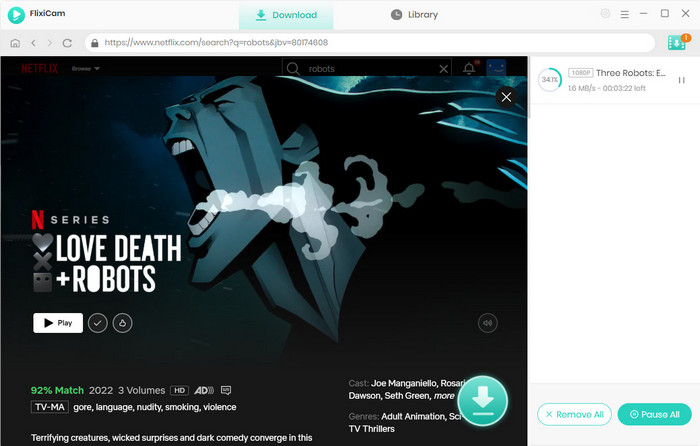
Step 5 Download Netflix Videos
Select the specific video, and click the Download icon. FlixiCam will process the video at 10x faster speed (depending on your internet connection).
Step 6 Enjoy Netflix Videos Forever
- Once downloaded, videos are saved locally forever on your device with no expiration worries.
- They never expire — watch offline anytime, anywhere.
- Transfer files to phones, tablets, or USB drives for playback on other devices.
Why Choose FlixiCam Netflix Video Downloader?
- ✅ Never expire – Downloads stay yours forever.
- ✅ Full HD 1080p – Retains high quality.
- ✅ Multilingual audio & subtitles – Perfect for language learners.
- ✅ 10x faster downloads – Saves time.
- ✅ Safe & ad-free – No malware or hidden fees.
FAQs about Netflix Downloads
Why did my Netflix downloads disappear?
There could be several reasons why your downloaded content disappeared from the Netflix app. One possible reason is that the content was removed from Netflix's library, either permanently or temporarily. If that's the case, you won't be able to access the content anymore, even if you had downloaded it, unless you use FlixiCam Netflix Video Downloader to save them on local drive.
Another possibility is that there was an issue with the Netflix app or your device that caused the downloads to be deleted. This could happen if there was a glitch in the app or if you cleared the cache or data of the app. It's also possible that the downloads were lost due to insufficient storage space on your device.
Can I recover my deleted Netflix downloads?
Unfortunately, once the downloaded content is gone, it's usually not possible to recover it. However, if the content is still available on Netflix, you can try downloading it again. Make sure that you have enough storage space on your device and that your internet connection is stable.
Why does my downloaded Netflix title say "Expired"?
Netflix enforces expiration dates on downloads due to licensing agreements with content providers. This means:
- Downloaded TV shows/movies expire after a certain period (even with an active subscription).
- You can watch them unlimited times before they expire.
Can I renew an expired download?
Yes, but with limitations:
- If the title is still available on Netflix, you can renew the download.
- If it's been removed from Netflix, you can't renew or re-download it.
- Some titles have download limits (set by studios)—if you hit the limit, you'll need to stream it online.
Why can't I download a title again?
You might see an error if:
- The studio restricts how many times a title can be downloaded/renewed.
- The title is no longer licensed on Netflix.
- Your device storage is full.
How Long Do Netflix Downloads Last?
It depends on the title and Netflix's agreements with content providers. Some downloads remain available for 30 days, while others have a shorter availability period. Once you start watching, many titles must be completed within 48 hours before they automatically expire. You can check how long a particular title will remain in the Downloads section of the Netflix app.
How can I watch expired downloads?
Only by streaming online — expired downloads can't be played offline. For permanent access:
- Use FlixiCam Netflix Video Downloader to save videos without expiration in 1080p.
- Keep subtitles, multi-language audio, and metadata.
To avoid losing favorites, download them with FlixiCam — no limits!
Why does Netflix show the message: "This title can only be downloaded 1 more time"?
This message means you're close to hitting the maximum download limit set by Netflix for that specific TV show or movie. Some titles have restrictions on how many times they can be downloaded per year on your account.
What happens if I use my last download?
If you proceed, you'll no longer be able to download the same title again for up to a year. To watch it afterward, you'll need an internet connection to stream instead.
Why does Netflix impose download limits?
These restrictions are part of licensing agreements with content providers. Studios enforce limits to prevent unlimited offline access and encourage streaming.
Wrapping Up
With FlixiCam Netflix Video Downloader, you can finally break free from Netflix's frustrating download limitations - no expiration dates, no surprise removals, no arbitrary download limits. Whether you want to build a personal media library or ensure uninterrupted offline viewing, this powerful tool provides the ultimate solution. By downloading Netflix videos to permanent MP4/MKV files, you're not just downloading videos for offline viewing; you're creating a personal collection that you can keep forever.
📢 Disclaimer
All tutorials here are for personal entertainment & education only. Please ensure you have a valid legal account on the relevant platforms. We do not support commercial distribution or piracy — always respect content creators' copyrights.
Ashley Wood | Senior Writer