How to Rip Music from YouTube: 6 Free & Easy Methods (2026)
 Ashley Wood
- 19 September, 2026
- Blog
Want to rip music from YouTube but not sure which method actually works? With so many free tools available, it’s hard to know which ones are truly useful. We tested a wide range of options and picked the tools that actually work — each one supports rip music from YouTube and lets you convert audio into high-quality formats like MP3, M4A, and WAV.
In this guide, you’ll discover the best ways to rip music from YouTube, including desktop downloaders, online converters, and screen recording methods, so you can choose the option that fits your needs best.
Disclaimer: Please respect YouTube copyright - downloaded content is only for your personal offline use.
Quick Answer: Best Ways to Rip Music from YouTube
| Method | Downloaded Format | Quality | Difficulty | Best For |
|---|---|---|---|---|
| Desktop Downloader | MP3, M4A, WAV, FLAC, OGG, OPUS, WebM | High | Easy | Best overall |
| Online Converter | MP3 (sometimes M4A) | Medium | Very easy | Quick downloads |
| Recording Method | MP3, M4A, WAV (after conversion) | Depends | Medium | Hard-to-download content |
Part 1. Rip Music from YouTube with Desktop Music Ripper (Recommended)
1. FlixiCam StreamOne
If you want a stable, high-quality way to rip music from YouTube without being interrupted by ads, a desktop downloader is the best choice. FlixiCam StreamOne is exactly that type of tool. It allows you to rip music from YouTube and convert it into MP3, M4A, or WebM, so you can enjoy your favorite songs on any device.
Unlike online downloaders that often limit free usage or force you to pay for multiple downloads, FlixiCam lets you download all YouTube music for free. But FlixiCam’s features don’t stop at audio. You can also download YouTube videos in up to 8K and convert them to MP4 or MKV, making it an all-in-one solution for high-quality YouTube downloads.
 DOWNLOAD WIN
 DOWNLOAD MAC
✅ What's good about it
- Supports downloading YouTube music in multiple formats, including MP3, M4A, and WebM.
- Completely free with no download limits.
- No ads or pop-ups, making the experience much smoother.
- Supports downloading YouTube videos in up to 8K quality.
🔴 What's not so good
- Only available on Windows and Mac.
- No mobile support for Android or iPhone users.
How to Rip Music from YouTube with FlixiCam StreamOne
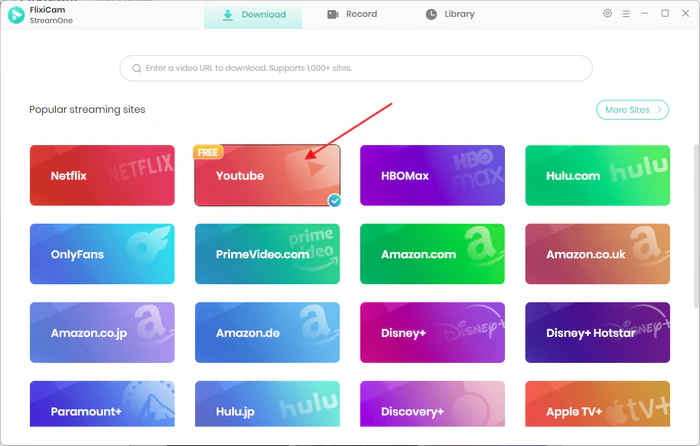
Step 1. Launch FlixiCam StreamOne and select YouTube by clicking the icon next to the address bar.
Step 2. Find the video you want by entering keywords in the search box, or simply paste the YouTube video URL directly into the address bar.
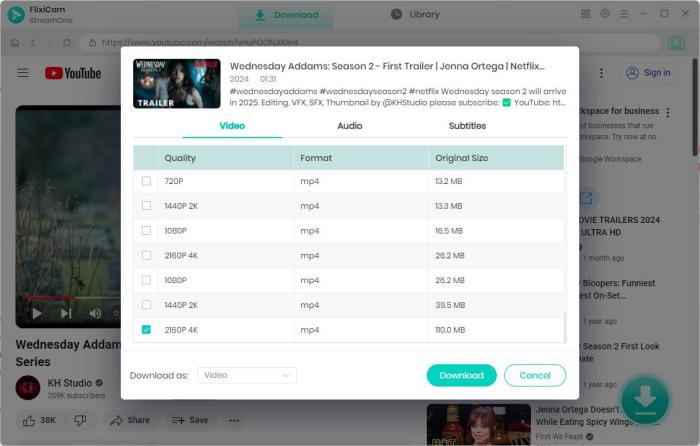
Step 3. Once the video loads, click the green Download button located in the bottom-right corner.
Step 4. In the pop-up window, choose Download as: Audio from the lower-left corner. You can then customize your audio settings, including format, bitrate, and original quality, before starting the download.
6 Best KeepVid Alternatives in 2026 (Free & Safe Sites Tested)
Looking for a KeepVid alternative? I tested 6 free and paid KeepVid alternatives in 2026, comparing quality, speed, formats, safety, and features. Learn More > >
2. Any Video Converter Free
Any Video Converter Free is another reliable program to rip music from YouTube. With its powerful features, all you need to do is copy the YouTube link, and Any Video Converter will automatically detect and start downloading the video.
If you want to get music in as many formats as possible, this is the program to try. Thanks to Any Video Converter’s strong conversion capabilities, you can easily convert YouTube videos to MP3, OGG, OPUS, FLAC, or WAV with just one click.
Download Win
Download Mac
✅ What's good about it
- Supports converting YouTube audio into multiple formats, including MP3, M4A, FLAC, OGG, OPUS, and WAV.
- Supports ripping audio at up to 320kbps for better sound quality.
- Great for users who want more format options and higher audio quality.
🔴 What's not so good
- You can't download audio directly — need to download the video first and manually convert it.
- There is no online version, so installation is required.
How to Rip Music from YouTube with Any Video Converter
Step 1. Open Any Video Converter and go to the Toolkits section, then select Video Download. Head over to YouTube and copy the link of the video you want to rip music from YouTube.
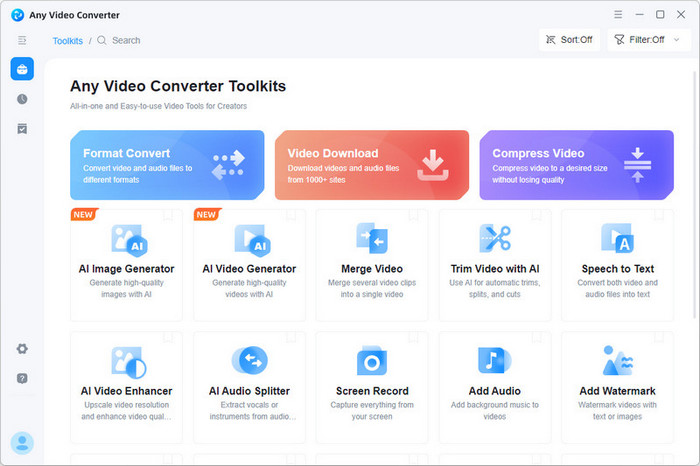
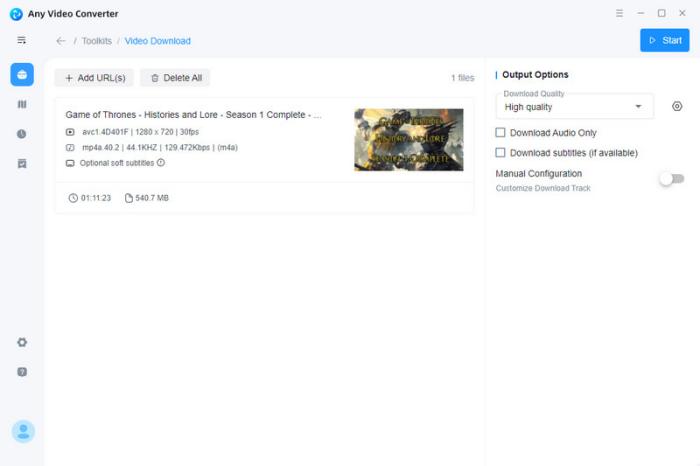
Step 2. Paste the link into Any Video Converter. The program will automatically analyze the URL and generate three download quality options for you.
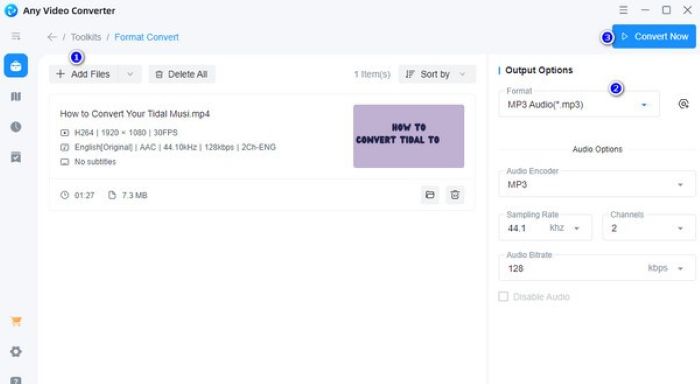
Step 3. Choose either High Quality or Balanced Quality based on your needs. Once the download is finished, go back to the Toolkits section and select Format Convert.
Step 4. Pick the audio format you want, such as MP3, M4A, FLAC, OGG, OPUS, or WAV, then click Convert Now in the upper-right corner. Your YouTube video will be converted into the music file you want, ready to play offline on any device.
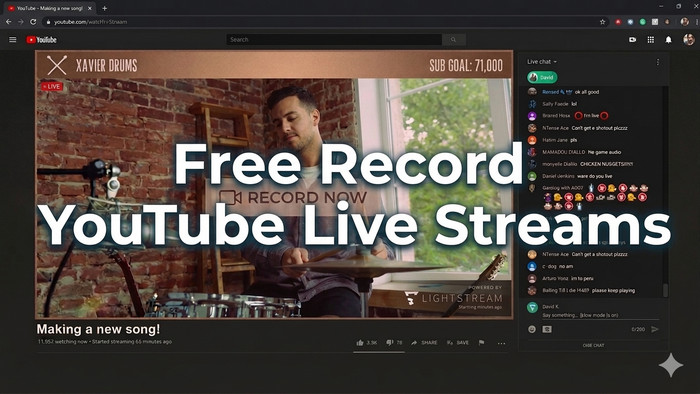
10 Free Ways to Record YouTube Live Stream on Laptop/Mobile/Online Web
Wanna capture live stream on YouTube freely? Here's all you need to record YouTube Live on Windows, Mac, Android, iPhone, or online webpage. Learn More > >
Part 2. Rip Music from YouTube with Online YouTube to MP3 Websites
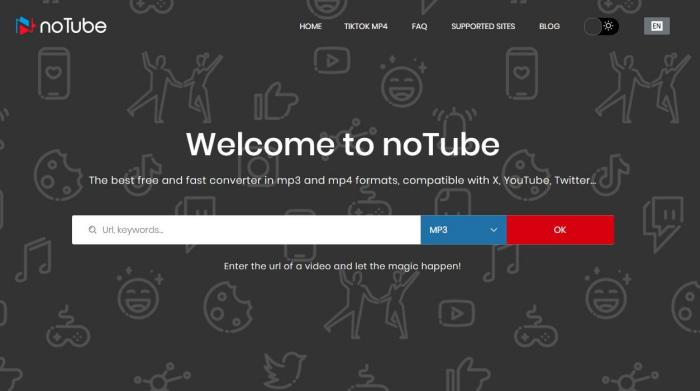
Notube
Notube is a quick and convenient option if I just want to rip music from YouTube without installing any software. All I need to do is copy and paste the YouTube link into the search bar, choose the format I want, and download the audio file in minutes. It supports multiple formats, including MP3, M4A, WAV, 3GP, and FLV, which gives me more flexibility.
What I like is that it’s completely free and super easy to use. Since it’s an online tool, I’ve noticed it can sometimes redirect me to unrelated downloads or pop-ups. So if you decide to use it, it’s a good idea to be careful and avoid downloading anything unrelated to keep your computer safe.
✅ What's good about it
- One-click ripping, making it quick and easy to use.
- No need to download or install desktop software.
🔴 What's not so good
- May redirect you to unrelated software downloads, which could affect your computer security.
- The Notube interface contains ads and pop-ups.
- No audio quality selection is available, and downloaded audio is usually limited to around 192kbps.
YTMP3
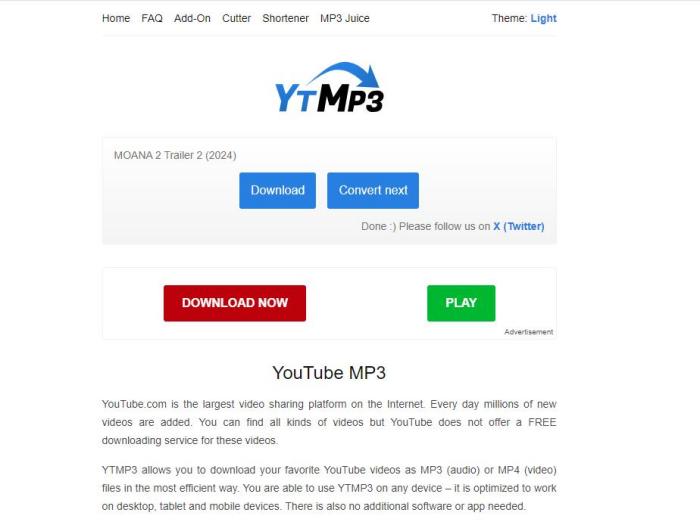
If I only need MP3 music, YTMP3 is usually one of the first tools I try to rip music from YouTube. It gives me different bitrate and audio quality options, and even shows the file size next to each choice, which makes it easier to pick the version I want. For better audio quality, it can go up to 320kbps, which is great if I want the music to sound as good as possible.
Another thing I like is that YTMP3 doesn’t just handle audio. With one click, I can also convert YouTube videos to MP4, making it a quick and easy option whenever I want to download both music and videos from YouTube.
✅ What's good about it
- Offers different bitrate and audio quality options, up to 320kbps.
- Shows the estimated file size next to each quality option, making it easier to choose.
- Also supports converting YouTube videos to MP4 for quick video downloads.
🔴 What's not so good
- Mainly focused on MP3 downloads, with fewer format options compared to desktop tools.
- The website may contain ads or pop-ups during the download process.
- No playlist or batch download support for multiple YouTube videos.
Is YTMP3 Safe? Safer YTMP3 Alternatives I Tested in 2026
Is YTMP3 safe? To help you find a safer option, we tested the best YTMP3 alternatives in 2026, comparing their safety, ads, and download quality. Learn More > >
Y2mate
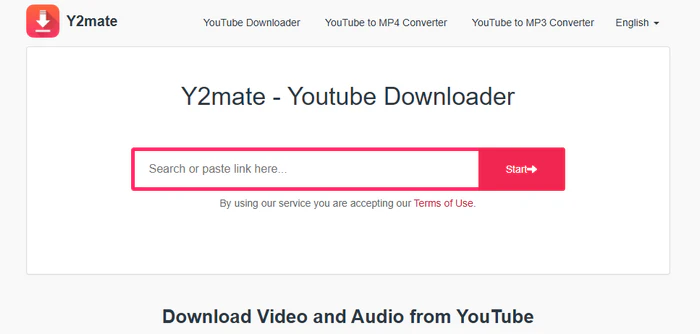
Y2Mate is a convenient option if I want to rip music from YouTube directly in a browser. It works smoothly on most major browsers, including Chrome, Firefox, Safari, and Microsoft Edge, which makes it especially handy when I’m using my phone or switching between devices. For quick audio downloads, it’s one of those tools that’s easy to access anytime.
In my experience, Y2Mate is better for short-term or casual use, especially if audio quality isn’t a big concern. The default output quality for both audio and video is usually on the lower side—typically around 128kbps for audio and 360p for video—so I probably wouldn’t choose it if I wanted the best sound quality.
✅ What's good about it
- Works directly in the browser with no software installation required.
- Compatible with most major browsers, including Chrome, Firefox, Safari, and Microsoft Edge.
- Works well on mobile devices, making it convenient for phone users.
🔴 What's not so good
- Default output quality is usually limited to around 128kbps audio and 360p video.
- Not ideal for users who want higher audio quality or HD video downloads.
- The website may include ads and pop-ups during use.
- No advanced features like batch conversion or playlist downloads.
Part 3. Rip Music from YouTube Video by Screen Recording Audios
If direct tools don’t work to rip music from YouTube, screen recording can be a quick backup option—especially for live streams or unavailable videos. I simply record the audio while the video is playing.
Whether you want to rip audio from YouTube on mobile devices like an iPhone or record music on your computer, screen recording can be a simple option. Most devices already come with built-in screen recording tools, including iPhones, Android phones, Windows PCs, and Macs, so you don’t need to install extra software to get started. For Windows users, you can simply press Windows + G to open the built-in screen recording tool and start recording.
However, since screen recording saves the content as a video file, you’ll need to use a video-to-audio converter afterward to turn it into the format you want, such as MP3. Since the audio is being recorded in real time, the process takes longer and the sound quality may not be as good as directly ripping audio from YouTube. Notifications or unstable internet can also affect the final result. From my experience, this is more of a last resort than a first choice.
✅ What's good about it
- Works even when you can't directly rip music from YouTube, such as for live streams or unavailable videos.
- No dedicated downloader required — built-in screen recording tool is enough.
- Available on PC, Mac, Android, and iPhone.
🔴 What's not so good
- Takes longer since audio must be recorded in real time.
- Audio quality may be lower compared to directly ripping YouTube audio.
- Background noise, notifications, or interruptions may affect the recording.
- Requires manual editing or trimming after recording in some cases.
Free Download Part of YouTube Video - 100% Working
Want to just download a clip from a YouTube video? Get online YouTube trimmers, YouTube's Clip feature, and FlixiCam YouTube Clip Downloader here. Learn More > >
FAQs about Ripping Music from YouTube
Is ripping music from YouTube safe?
Yes, ripping music from YouTube can be safe if you use trusted tools and avoid suspicious online ripper. Desktop downloaders like FlixiCam are usually more reliable because they have no ads and risks of pop-ups or unrelated downloads. If you use an online YouTube to MP3 websites, avoid clicking unknown buttons or downloading anything unrelated.
FlixiCam allows downloading YouTube clips without watermark, and it can also freely save clips in HD quality easily. If you want to download YouTube clips for offline playback, this stable & safe YouTube download tool is perfect for you.
DOWNLOAD WIN
DOWNLOAD MAC
What is the best format for YouTube music?
The best format depends on how you plan to use the music. MP3 is the best option for most people because it works on almost any device and is great for everyday listening. If you want better audio quality with smaller file sizes, M4A is a solid choice. For audiophiles or music editing, FLAC and WAV offer higher sound quality, but the files are much larger.
For most users, MP3 (320kbps) or M4A is usually the best choice when you rip music from YouTube.
Can I rip YouTube Music playlists?
Yes, but it depends on the tool you use. Some desktop YouTube Music downloaders let you rip entire YouTube Music playlists at once, which is much faster than downloading songs one by one. Many free online tools, however, only support single-video downloads or have playlist limits.
Can I rip music from YouTube for free?
Yes, there are many free ways to rip music from YouTube, including online converters, browser-based tools, and some desktop programs. Please note that free online converters are great for occasional downloads, but they may come with ads, slower speeds, or lower audio quality. If you download music frequently, using a desktop YouTube music downloader is usually a more stable and convenient choice.
Top 5 Safe Websites to Free Download YouTube to MP3
This passage has listed the top 5 websites where you can safely download YouTube into MP3 for free. Learn More > >
The End
No matter which method you choose to rip music from YouTube, the best option depends on your needs. If you want a faster, more stable experience with high-quality audio formats like MP3, M4A, and WAV, FlixiCam YouTube Downloader is still one of the easiest tools to try — especially if you want ad-free downloads.

The Best Tool to Convert YouTube Music
Want to enjoy your YouTube Music for offline playback? TuneMobie Music Converter is definitely worth a try. This tool can convert music from 17+ platforms (Spotify, Apple Music, YouTube Music, Amazon Music, etc.) to universal formats (MP3, M4A, FLAC, etc.) with original sound quality and complete ID3 tags kept. Learn More >>
📢 Disclaimer
All tutorials here are for personal entertainment & education only. Please ensure you have a valid legal account on the relevant platforms. We do not support commercial distribution or piracy — always respect content creators' copyrights.
Ashley Wood | Senior Writer