2026 Guide: How to Watch Peacock Offline Without Premium Plus
 Ashley Wood
- 7 September, 2026
- Blog
It hits harder when you realize you can only download your favorite Peacock shows or movies with the pricey Premium Plus plan. If you don't want to spend extra money just to watch Peacock offline, this guide is your perfect solution to watch Peacock offline without Premium Plus. We'll show you how to download Peacock shows using tools that work with your standard Select or Premium account. Keep reading!
1. Does Peacock Premium Allow Downloads?
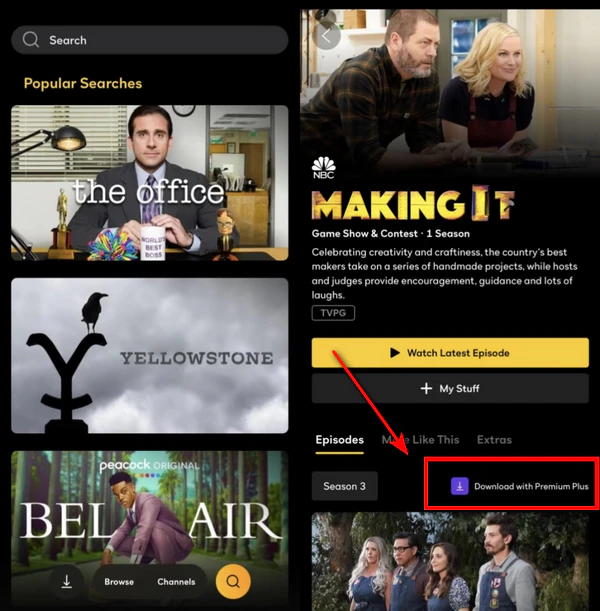
Can you download videos on Peacock Premium to watch offline? Nope — that feature isn't included. If you want to download Peacock shows and movies to your phone or tablet, you have to upgrade to Peacock Premium Plus.
Check Peacock's official support page for the full details.
Core Comparison: Peacock Subscription Tiers
Here's a quick table that lays out the main differences between Peacock's Select, Premium, and Premium Plus plans, so you can see what you actually need if you want to download Peacock shows and movies.
| Feature | Select | Premium | Premium Plus |
| Price | $7.99/month $79.99/year |
$10.99/month $109.99/year |
$16.99/month $169.99/year |
| Official Download | ❌ No | ❌ No | ✅ Yes |
| Films & Peacock Originals | ❌ No | ✅ Yes | ✅ Yes |
| Ad-Free | ❌ No | ❌ No | ✅ Yes |
| Live Sports & Events | ❌ No | ✅ Yes (Local NBC Live Excluded) |
✅ Yes |
| Current NBC Shows | Limited (Delayed) | ✅ Full Access (Next-Day) | ✅ Full Access (Next-Day) |
| Always-On Channels (50+) | ❌ No | ✅ Yes | ✅ Yes |
You May Be Interested: Peacock Official Plan Details | About Peacock Select Tier
How to Download Peacock Shows on Phone? (Premium Plus Required)
If you're already a Peacock Premium Plus subscriber, here's how to download Peacock episodes using the official method:
- Log in with your Peacock Premium Plus account. Note: Peacock downloads only work on mobile/tablet.
- Search for your target Peacock episode. Click on the download icon in the bottom right corner of the episode detail page.
- Go to Peacock's Downloads tab and select the saved episode for Peacock offline viewing.
Limitations of Peacock Premium Plus Downloads
While Premium Plus unlocks official downloads, the feature is far from flexible. Below are the limits that even paying Premium Plus members still run into:
Peacock Premium Plus Download Restrictions
- Device Limitations: Peacock downloads work only on iPhones, Android phones, or certain Fire tablets, laptops and desktops won't work.
- Download Limits: Max 25 downloads per Peacock account (across all devices); 10 downloads max per show.
- Expiration Rules: Unwatched Peacock downloads expire in 30 days; in-progress ones expire in 48 hours.
- Playback Restrictions: Peacock downloads only work within the Peacock app. You can't move them to other devices for playback.
- Hidden Account Limits: Logging out of your account removes all Peacock downloads.
Learn More: Peacock Help Center
2. Download Peacock (All Plans) to Laptop Using FlixiCam
Official offline viewing on Peacock is restricted, but viable alternatives exist. Third-party downloaders are the better pick if you want to download Peacock shows on your laptop, keep Peacock episodes forever, or skip the Premium Plus upgrade — they deliver reliable, high-quality downloads without Premium Plus.
FlixiCam Peacock Downloader stands out as the most reliable solution to watch Peacock offline without Premium Plus. This professional tool is designed to download Peacock movies and episodes in up to high-quality 1080p MP4/MKV format — with no expiration dates and no need for Premium Plus. You can transfer your Peacock MP4 downloads to any device, such as a USB drive, Media Player, VLC, or your smart TV.
What Make FlixiCam the Top Choice:
- No Premium Plus Required. Works with any Peacock subscription (Select or Premium).
- Download videos from over 1000 sites including Peacock, Netflix, Amazon Prime, HBO Max, Disney+, Hulu, YouTube and more in MP4/MKV format.
- Built-in Peacock web player for direct search & playback.
- Keep Peacock downloads forever for offline access.
- Support batch download Peacock videos in 5x speed.
- Transfer Peacock downloads to any devices such as TVs, tablets, USB drives, and more.
- Remove ads from downloads regardless of your plan.
- Comes with multilingual subtitles support for flexible viewing.
Compatibility: Windows 10/11, macOS 11 and above.
 Download Win
 Download Mac
Tutorial: Download Peacock Shows on Laptop with Flixicam
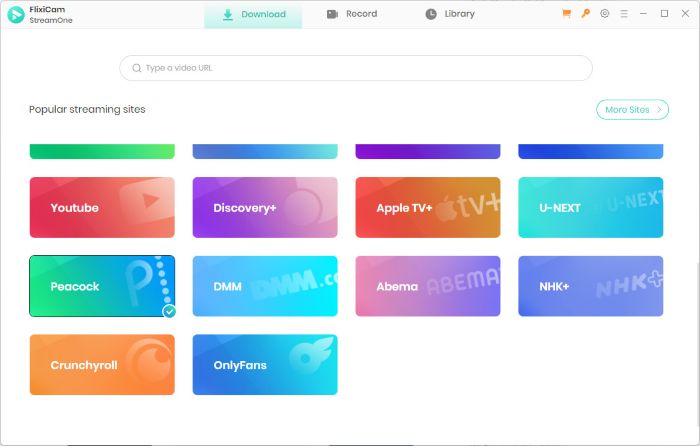
Step 1. Open FlixiCam Peacock Downloader
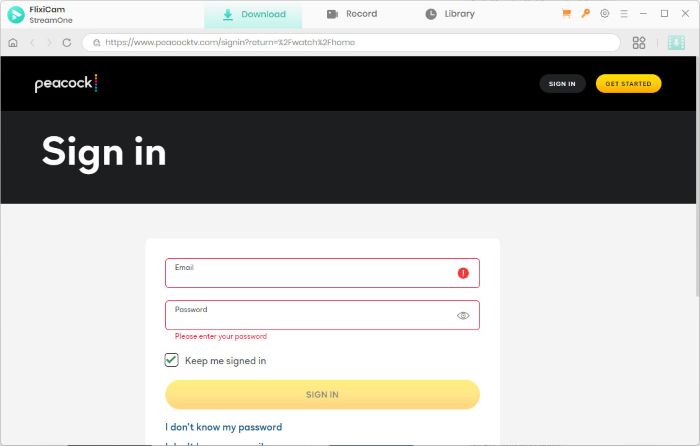
Run FlixiCam Peacock Downloader on your computer. Then log into your Peacock account to access the library of Peacock videos.
Step 2. Customize the Peacock downloading settings
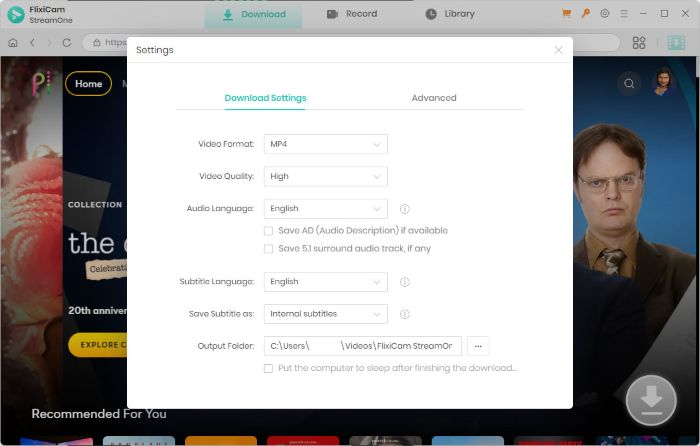
Click the settings icon in the upper right corner to personalize the output format, output language, output quality, etc. Here we select MP4 as the output format.
Step 3. Search the Peacock shows you want to download
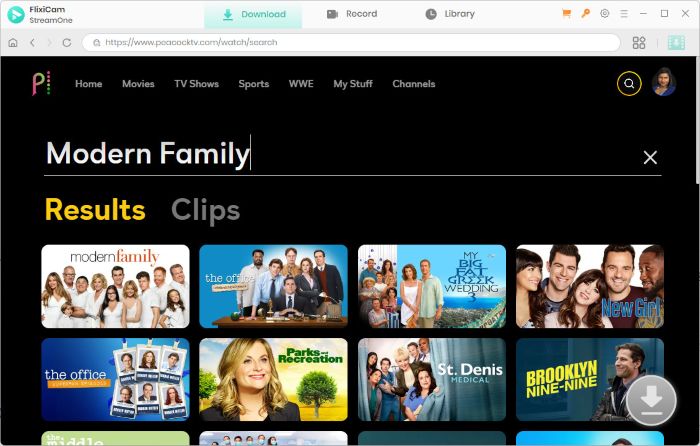
Simply enter the name or the keywords in the search bar, and all the relevant videos will be listed. Select the Peacock videos you want to download.
Step 4. Select the size, audio track and subtitle
Here you can select the quality (up to 1080P), audio tracks (including 5.1 audio) and others. Also you can choose more options in advanced settings.
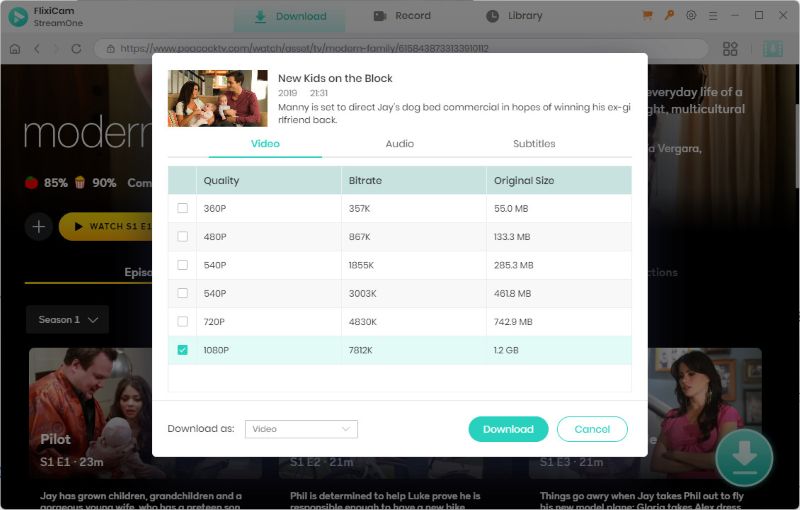
Step 5. Download Peacock movies and shows in 1080P
Click the download button and you will get high-quality 1080P Peacock videos without ads.
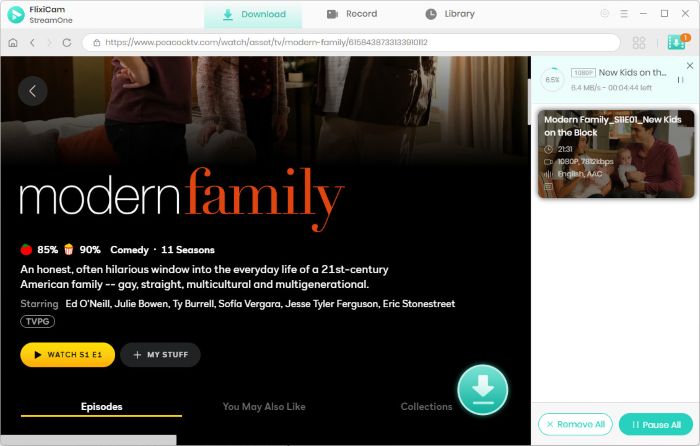
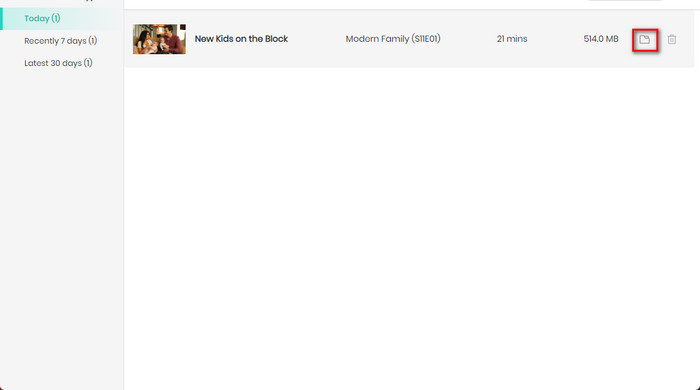
Step 6. Transfer Peacock downloads to Any Device
Once downloaded, you can check them in the Library and locate them on your computer. Plug your USB flash drive into your computer and copy the downloaded files to your USB stick.
3. Alternative Methods to Download Peacock Without Premium Plus
Other than third-party downloaders, there are two alternatives for downloading Peacock shows: screen recording and browser extensions. Let's explore them!
Screen Recording
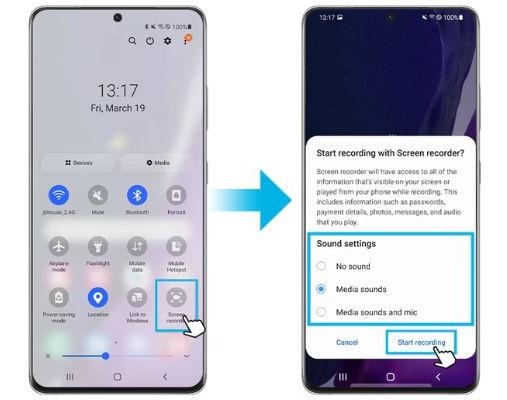
Screen recording is a simple way to capture Peacock videos as you stream it, allowing you to download Peacock episodes or movies for offline viewing — no Premium Plus required. Here's how it works:
How to Screen Record Peacock Shows
- Phone or tablet: Swipe down, tap the record icon (iOS Control Center or Android's Quick Settings), open Peacock on Wi-Fi, hit play on the episode — recording starts and saves the file.
- Laptop (Windows/Mac): Open OBS, QuickTime (Mac) or Game Bar (Windows), pick the browser window that has Peacock, press record, then play the show.
Cons
- Fuzzy/laggy playback; max 720p only.
- No ad skipping.
- No batch downloads; needs real-time monitoring.
- 1-hour episodes take over 2GB storage.
- Exclusive formats (e.g., MOV on Mac) don't work across devices.
Browser Extensions
Another choice is to use browser extensions to download Peacock streaming videos. These tools integrate with your web browser (like Chrome or Firefox) and attempt to extract video files from Peacock's streaming player.
How to Use Browser Extensions to Download Peacock Shows
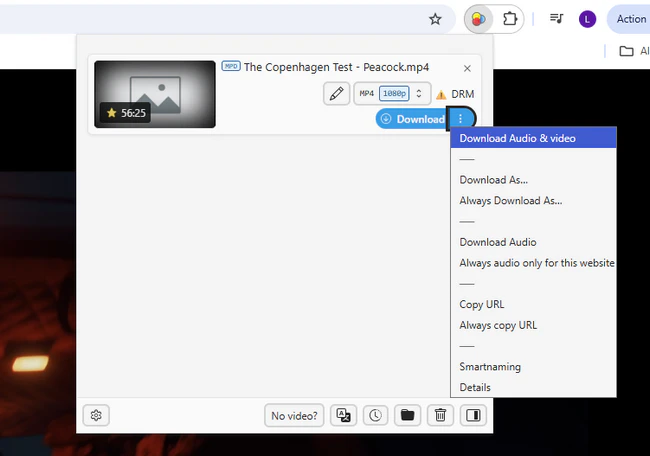
- Open your browser's extension shop, look for add-ons like Video DownloadHelper, 4K Video Downloader, or Flash Video Downloader, and install the extension to your browser.
- Visit Peacock's site, start the show or movie, and let the extension spot the stream.
- The extension will pop up a save button and give you an MP4 file.
Cons
- Frequent Peacock updates break extensions quickly, usually within weeks.
- Max 720p; audio/subtitles may be missing.
- Unverified extensions carry malware, track activity, or steal account info.
- No batch download; need to download episodes one by one.
4. Which Works Best to Download Peacock Offline?
Below is a detailed comparison of the methods we just talked about to download Peacock offline, to help you decide which aligns best with your needs.
| Feature | 👍 Flixicam Peacock Downloader | Peacock Premium Plus | Screen Recording | Browser Extensions |
| Premium Plus Required | ❌ | ✅ | ❌ | ❌ |
| Device Support | Windows/Mac + All Devices (MP4/MKV) | Mobile/Fire Tablets Only | All Devices | Desktop Browsers Only |
| Download Limit | Unlimited | 25 titles/account | 1 at a time (manual) | 1 at a time |
| Expiry Rule | No Expiry | 30d (unwatched); 48h (watched) |
No Expiry | No Expiry |
| Quality | Up to 1080p | Original | Up to 720p | Up to 720p |
| Ad-Free | ✅ | ✅ | ❌ | ❌ |
| Batch Download | ✅ | ❌ | ❌ | ❌ |
Compared to the other three methods, Flixicam Peacock Downloader is way better:
- No Premium Plus needed: Keep your current Peacock plan, no upgrades needed.
- Watch anywhere: Download Peacock as MP4 that works on any device.
- Unlimited downloads: Download as many videos as you want, no limits.
- Keep videos forever: No 30-day or 48-hour expiry limits.
- Better viewing: 1080p HD quality, ad-free, with multiple audio options.
- Saves time: Batch downloads cut out all manual work.
- 100% safe: No viruses or account risks — trusted by 100,000+ users.
5. FAQs About Downloading Peacock Without Premium Plus
1. Can I download Peacock on my laptop without Premium Plus?
Yes! Peacock's official download feature only works on mobile devices and requires Premium Plus, but third-party tools like Flixicam Peacock Downloader let you download Peacock shows directly to Windows or macOS devices, so you can watch them offline on your laptop or transfer them to other devices.
2. Will Flixicam work with my standard Premium Peacock account?
Absolutely. Flixicam is designed to work with any Peacock subscription tier. You don't need to upgrade to Premium Plus to download Peacock offline.
3. Can I download Peacock live sports or events with Flixicam?
Flixicam's Record Mode allows you to directly record live sports or events while they're streaming. Alternatively, you can use Flixicam to download them for offline viewing directly once they're available as on-demand replays in Peacock.
4. Does Flixicam remove ads from Peacock downloads?
Yes. Even if you're on an ad-supported plan, Flixicam automatically removes ads from downloaded videos. You can enjoy ad-free Peacock shows and movies offline without paying for Premium Plus.
5. Are subtitles included in Peacock downloads?
It depends. Peacock Premium Plus offers subtitles only within the app, with no option to edit or share them. FlixiCam saves all available subtitle languages as editable files, usable across devices.
Conclusion
Need to watch your favorite Peacock shows and movies offline without Premium Plus? It doesn't have to be a big hassle! Screen recording and browser extensions can work as quick fixes, but they're always stuck with limitations. If you want a trusted, long-term way to download Peacock shows and watch them on any device, Flixicam Peacock Downloader is the best choice.
📢 Disclaimer
All tutorials here are for personal entertainment & education only. Please ensure you have a valid legal account on the relevant platforms. We do not support commercial distribution or piracy — always respect content creators' copyrights.
Ashley Wood | Senior Writer