Top 9 Methods to Watch TikTok Without App in 2026
 Ashley Wood
- 21 September, 2026
- Blog
If you're looking for ways to watch TikTok without the app, check out this guide! We've rounded up 9 reliable methods to let you enjoy TikTok videos and even help you download TikTok clips for offline viewing.
You May Be Interested: Best Free 10 YouTube Downloaders

1. Google Search: Watch Specific TikTok Videos Fast
If you're looking for a particular TikTok video (e.g., a viral dance, a cooking tutorial, or a clip from a specific creator), Google Search is the fastest way to watch TikTok without app. No more wasting time browsing through feeds — it links you directly to the TikTok videos.
Pros
- Better for targeted searches.
- No need to navigate TikTok's interface — direct access.
- Works on any device with a browser.
Cons
- Not ideal for discovering new & trending videos.
- Some videos may be region-locked or removed.
How to Watch Specific TikTok Videos via Google Search
Step 1: Open your browser and go to www.google.com.
Step 2: Type specific keywords into the search bar — combine elements like creator username, video topic, hashtag, or catchphrase (e.g., "viral TikTok cat dance #fyp", "how to make slime TikTok").
Step 3: Press "Enter" and scroll through the search results. Look for links labeled "TikTok" or with the TikTok logo.
Step 4: Click the link — it will redirect you to TikTok's web version where the video will play instantly.
Add "site:tiktok.com" to your search query (e.g., "viral gardening hack site:tiktok.com") to filter results and only show links from TikTok's official web version.

2. Free TikTok Downloaders: Download TikTok Videos Without AppFree
Watching TikTok without app is great, but downloading TikTok videos for offline viewing lets you enjoy them anytime even without internet. These trusted TikTok downloaders let you download TikTok videos without the app, no watermarks, and no login.
2.1 SSSTIK (Free & Online)
SSSTIK is a web-based TikTok downloader that works on any browser. It supports HD downloads and works with TikTok links from web versions or third-party viewers. You can download unlimited TikTok videos with zero limits, get your clips 100% watermark-free, and pick between HD MP4 video or MP3 audio formats.
Pros
- Free to use.
- No software installation needed.
- Supports both HD MP4 video and MP3 audio downloads.
Cons
- Contains pop-up ads.
- Only works with pre-copied TikTok URLs; no built-in browsing function.
- Some region-locked TikTok videos may fail to download.
How to Download TikTok Videos via SSSTIK
Step 1: Go to www.ssstik.io in your browser.
Step 2: Copy the TikTok video URL (from web version or Google Search link).
Step 3: Paste the URL into the SSSTIK search bar.
Step 4: Choose your preferred format (MP3/MP4) and click "Download".
Step 5: The TikTok video will save to your device.

2.2 FlixiCam TikTok Downloader (Free & Desktop) 👍
FlixiCam TikTok Downloader is a free desktop tool designed to download TikTok videos to MP4 or MKV formats, working on Windows and macOS. It comes with a built-in TikTok web player, allowing you to browse, search, and watch TikTok videos directly in the tool — no TikTok account login required. It's perfect for users who want to watch TikTok without app and download TikTok clips without watermarks.
What Make FlixiCam the Top Choice:
- Free to use with no hidden or extra charges.
- Download videos from over 1000 sites including TikTok, YouTube, Netflix, Amazon Prime, HBO Max, Disney+, Hulu, Peacock and more in MP4/MKV format.
- Built-in TikTok web player for direct search & playback.
- Keep TikTok downloads forever for offline access.
- Transfer TikTok MP4 files to any devices such as TVs, tablets, USB drives, and more.
- Supports high-quality TikTok downloads up to 1080p.
Compatibility: Windows 10/11, macOS 11 and above.
Tutorial: How to Download TikTok Videos via FlixiCam
Step 1: Install and launch Flixicam TikTok Downloader. Choose TikTok as the download site and browse videos in the built-in TikTok browser.
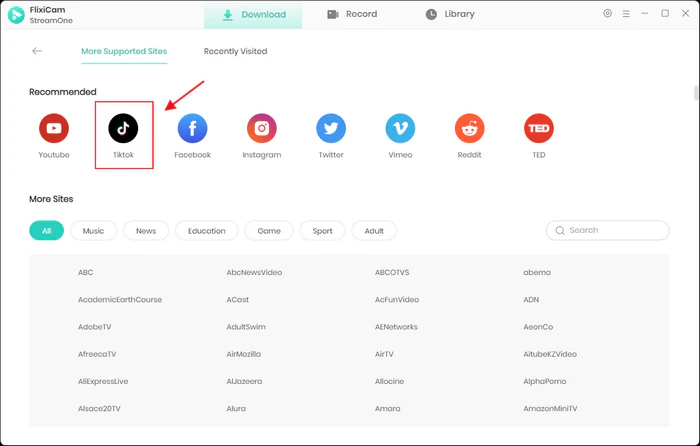
Step 2: Click the "+" button in the bottom right corner to import TikTok videos you want to download.
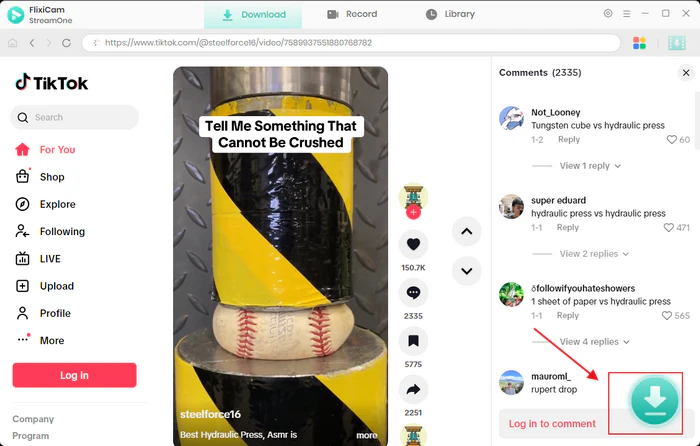
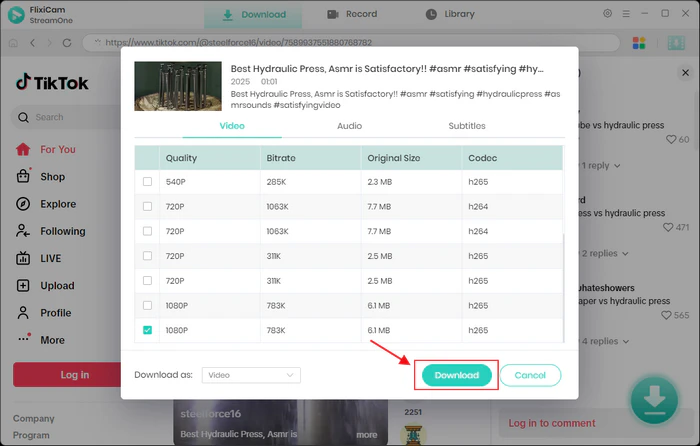
Step 3: Select output format (MP4/MKV), quality (up to 1080p), and audio/subtitle tracks. Hit the "Download" button to get MP4/MKV TikTok videos.
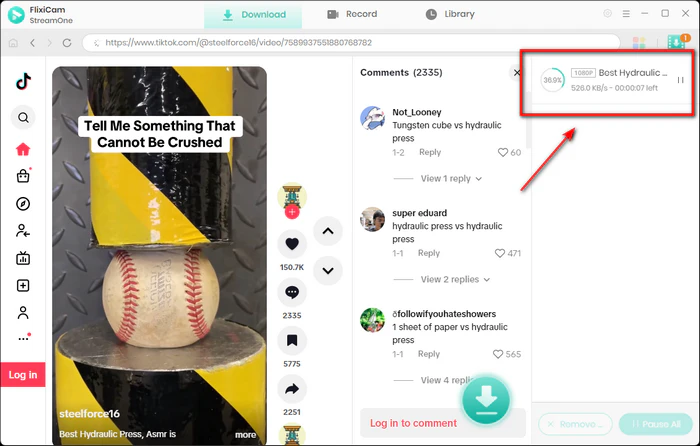
Step 4: Check the right side of the program. You'll see the real-time download progress for each video. Flixicam boosts your download speed up to 5x.
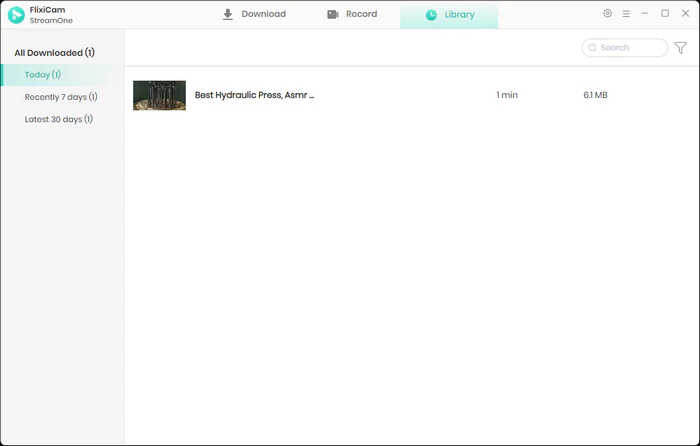
Step 5: After the process finishes, you can find TikTok MP4 videos in the Library tab.
⚠️Note: Always use TikTok downloader tools for personal use only. Respect copyright laws — don't reupload or share downloaded videos without the creator's permission.
3. View TikTok Videos on Other Social Platforms
Many TikTok creators repost their videos on other social media to reach wider audiences — meaning you can watch TikTok without app by browsing platforms you already use.
Where to Find TikTok Videos?
- YouTube Shorts: Search for "TikTok compilation" or the creator's username — many influencers upload their TikTok videos here.
- Instagram Reels: Look for the "Reels" tab on Instagram; creators often cross-post TikTok videos as Reels.
- X (Formerly Twitter): Use the "Media" tab in search to find TikTok videos shared by users or creators.
- Facebook Reels: Search for TikTok hashtags or creator names in Facebook's video section.
Pros
- No new tools or browsers needed.
- Discover curated compilations (e.g., "Best TikTok Dances 2024").
- No login required for most platforms.
Cons
- Not all TikTok videos is reposted.
- Less personalized than TikTok's native feed.
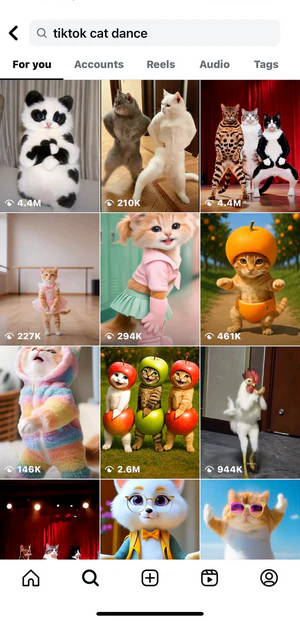
Example Workflow: How to View TikTok Videos on Instagram
Step 1: Open Instagram and go to the "Reels" tab.
Step 2: Use the search bar to type a TikTok creator's username (e.g., @tiktokcreator) or a trending hashtag (e.g., #TikTokTrends).
Step 3: Scroll through Reels — you'll find many reposted TikTok videos ready to watch.
4. Use TikTok Official Web Version
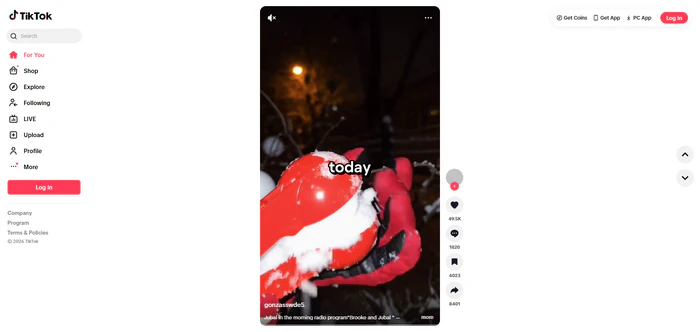
The safest way to watch TikTok without app is directly through TikTok's web platform — no downloads, no third-party risks, and full access to public TikTok videos. It works on any device with a browser (Chrome, Safari, Firefox, etc.).
Pros
- No security risks (official platform).
- Supports live streaming and trending videos.
- Works on mobile, desktop, and even game consoles (Xbox/PlayStation browsers).
Cons
- Limited personalization (no "For You" feed).
- Can't like, comment, or follow creators without logging in.
How to Watch Tiktok Using Official Web Version
Step 1: Open your browser and go to www.tiktok.com.
Step 2: When a pop-up asks you to "Get the app" or "Log in", click "Not now" (mobile) or "Continue as guest" (desktop) to skip.
Step 3: Browse the "For You" feed, use the search bar to find creators/hashtags, or click the "LIVE" tab to watch live streams anonymously.
Step 4: To view a shared video: Copy the TikTok link, paste it into your browser's address bar, and delete everything after the "?" (e.g., change https://www.tiktok.com/@user/video/123?_t=xxx&_r=1 to https://www.tiktok.com/@user/video/123). Hit enter — you'll watch the video instantly.
5. Third-Party TikTok Viewers
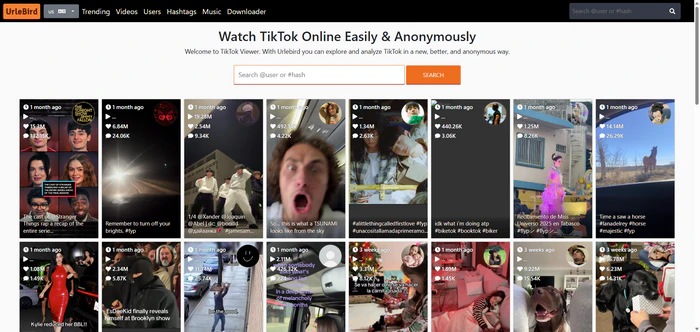
If you want to watch TikTok without app and access deleted videos or browse anonymously, third-party TikTok viewers are a great option. These web-based tools grab public TikTok videos, letting you search by username, hashtag, or keyword — no account required.
Top Reliable Viewers:
- UrleBird: Free online platform for anonymous TikTok video browsing without a TikTok account. Search by username, hashtag, or trend.
- Anonymous Viewer: View Instagram/TikTok profiles, stories, and posts privately — no account needed, no trace left.
- TikyToky: Curates trending TikTok videos and lets you filter by category (dance, comedy, cooking).
Pros
- Anonymous viewing (creators won't see your activity).
- Access deleted videos (if cached by the tool).
- No login or app installation.
Cons
- Potential security risks.
- Some sites have ads.
- May not support live streams.
Example Workflow: How to Watch TikTok Using UrleBird
Step 1: Visit www.urlebird.com in your browser.
Step 2: Enter a TikTok username, hashtag (e.g., #fyp), or keyword in the search bar.
Step 3: Click "Search" — all related videos will load instantly. Click any video to watch.
6. TikTok TV App: Watch TikTok on Big Screens
If you prefer watching TikTok on a TV for better visibility or group viewing, the TikTok TV App lets you watch TikTok without app on your smart TV — no mobile installation required. It's available on most major TV platforms.
You May Be Interested: How to Watch Netflix on Samsung TV
Pros
- Large-screen viewing (great for parties or family time).
- Access to trending videos and live streams.
Cons
- Only available on smart TVs (not compatible with older models).
- Limited interaction features (no liking/commenting without logging in).
How to Watch TikTok on TV App
Step 1: On your smart TV, open the app store (e.g., Samsung TV Plus, LG Content Store, Roku Channel Store).
Step 2: Search for "TikTok TV" and download the app.
Step 3: Launch the app — you'll see a QR code on the screen.
Step 4: Use your phone's camera to scan the QR code (no TikTok mobile app needed).
Step 5: Follow the on-screen prompts to "Continue as Guest" and start browsing videos on your TV.
Learn More: Cast TikTok to a TV
📍Want to keep your favorite TikTok videos handy to play on your TV? Grab FlixiCam TikTok Downloader!👇
 DOWNLOAD WIN FOR FREE
 DOWNLOAD MAC FOR FREE
7. TikTok Chrome Extensions (For Desktop Users)
If you primarily use a computer, Chrome extensions let you watch TikTok without app in a dedicated, app-like interface. These extensions integrate TikTok's web version into your browser for quick access.
Top Chrome Extensions:
- TikTok for Desktop: Mimics the mobile app's layout, supports full-screen viewing, and lets you download TikTok videos.
- Social Media Downloader: Multi-purpose extension for watching and downloading TikTok, Instagram, and YouTube Shorts.
Pros
- App-like experience on desktop.
- Quick access; no need to type the web address every time.
- Some extensions support basic downloading.
Cons
- Limited to Chrome browsers.
- Third-party extensions may have privacy risks.
How to Watch TikTok Videos via Chrome Extensions
Step 1: Open Chrome and go to the Chrome Web Store.
Step 2: Search for "TikTok for Desktop" and click "Add to Chrome".
Step 3: Confirm the installation — an icon will appear in your browser toolbar.
Step 4: Click the icon to open a mobile-like window with TikTok's web version. Browse, search, and watch TikTok videos without app.
8. Watch TikTok Videos on Blogs & News Sites
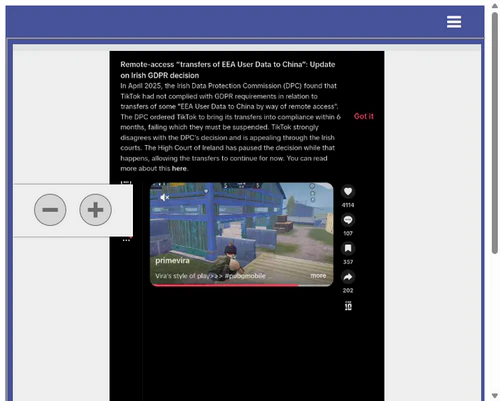
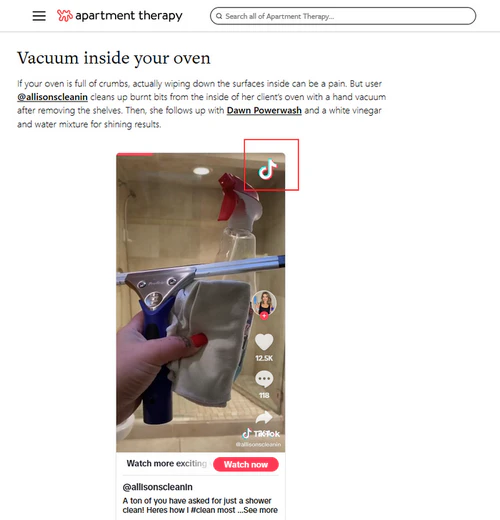
You've probably seen TikTok videos in blog posts, news articles, or online forums before — this is another way to watch TikTok without the app. Publishers often add TikTok videos to make their stories more interesting, and you can play them right there without leaving the page.
Example Scenarios:
- A lifestyle article with TikTok cleaning & organization hacks.
For instance: 7 Brilliant Cleaning Hacks We Learned on TikTok - A news site sharing a viral TikTok from a protest or event.
- A Reddit thread linking to an embedded TikTok comedy clip.
Pros
- Watch videos right with the related articles.
- No login or app needed.
Cons
- Only watch publisher-added videos, no search option.
- Video quality varies by host site.
How to Watch TikTok Videos on Blogs & News Sites
Step 1: Browse websites you regularly visit (e.g., lifestyle blogs, tech news sites).
Step 2: Look for embedded TikTok players — they usually have the TikTok logo and a "Play" button.
Step 3: Click "Play" to watch the video directly in the article. If the video doesn't play, click the "Open in TikTok" link, it will take you to TikTok's web version, no app required.
9. TikTok Alternative Platforms (For Banned Regions)
In countries where TikTok is banned (e.g., India, Pakistan), alternative apps host millions of TikTok-style videos — many of which are reposted from TikTok. These platforms let you watch TikTok videos without app.
Top TikTok Alternative Platforms:
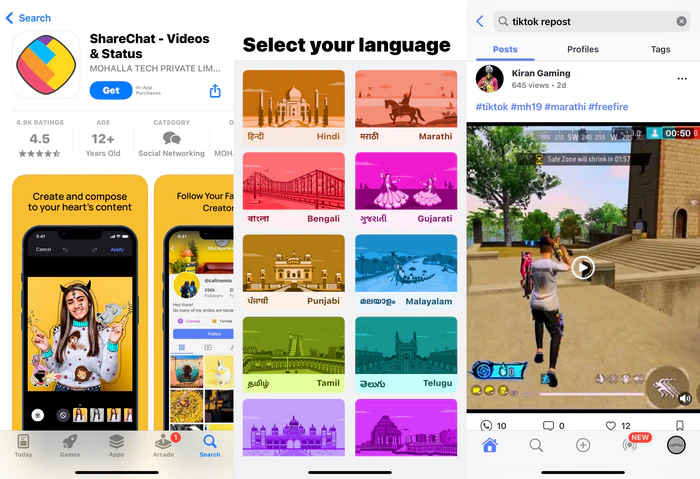
- ShareChat: Popular in India, with short videos, including many reposted TikTok clips.
- MX TakaTak: Features trending short videos, including TikTok reposts and original videos.
- Roposo: Focuses on regional videos but also hosts TikTok-style videos.
- Triller: Global platform with TikTok-like short videos, including creator reposts.
Pros
- Hosts millions of TikTok reposts and original TikTok-style videos.
- Guest browsing available.
- Supports offline downloads.
Cons
- Not all TikTok videos are reposted.
- Occasional ads.
- Regional videos focus — most clips are in local languages (Hindi, Urdu).
Example Workflow: How to Watching TikTok-Style Videos on ShareChat
Step 1: Install ShareChat app from your device's app store (switch App Store region if needed for iOS).
Step 2: Select "Browse as Guest" to start watching, or sign up with a social media account.
Step 3: Use the search bar (try keywords like "TikTok Repost") or "Trending" tab to find reposted TikTok videos and TikTok-style videos.
FAQs About Watching TikTok Without App
1. Can I watch TikTok without app on Android/iOS?
Yes! Use your mobile browser (Chrome, Safari) to access TikTok's web version, Google Search, or third-party viewers. On iOS, tap "Request Desktop Site" in Safari settings to watch live streams.
2. How do I watch deleted TikTok videos without app?
Use third-party viewers like UrleBird — these tools cache videos, so deleted videos may still be available. For downloaded deleted videos, use a TikTok downloader like Flixicam to download TikTok clips before they're removed.
Grab Flixicam now and never miss your favorite TikTok clips again! 👇
3. Do I need an account to watch TikTok without app?
No. All methods in this guide let you watch TikTok without an account. You'll only need an account if you want to like, comment, or follow creators.
4. Is it legal to use a TikTok downloader?
Yes, as long as you download TikTok videos for personal use. Avoid reuploading, sharing, or monetizing downloaded videos without the creator's permission.
5. Can I watch TikTok via Google Search without app?
Absolutely! Google Search directs you to TikTok's web-based video player, so you can watch clips directly in your browser without installing the app.
Final Thoughts
Watching TikTok without app is a flexible, secure way to enjoy short videos without sacrificing storage, privacy, or device space. Now you have all the tools to watch TikTok without app — dive in, discover trending videos, and download your favorite videos hassle-free. Happy viewing!
📢 Disclaimer
All tutorials here are for personal entertainment & education only. Please ensure you have a valid legal account on the relevant platforms. We do not support commercial distribution or piracy — always respect content creators' copyrights.
Ashley Wood | Senior Writer