Tested: 5 Best Netflix Downloaders for PC, Mac, Android & iPhone
 Ashley Wood
- 24 September, 2026
- Blog
Quick Answer:
After testing several Netflix downloaders for PC, Mac, Android, and iPhone based on download success rate, safety, and user ratings, we found that FlixiCam Netflix Video Downloader offers the best overall performance. It supports 1080p downloads and MP4/MKV formats, making it our top recommendation for PC and Mac.
If you want to see our tested results for Netflix downloaders on PC and Mac, go to Part 1. Check out the Netflix downloader for Android and iPhone review in Part 2
Finding a reliable Netflix downloader isn’t easy, so we tested some of the most popular tools on the market to see which ones actually work. We compared their features, video quality, free trial options, download success rates, and Trustpilot ratings. After extensive testing, we selected the 5 best Netflix downloaders for PC, Mac, Android, and iPhone. If you’re looking for a reliable way to download videos from Netflix for offline viewing, this in-depth review will help you quickly find the right tool.
📢 Disclaimer: This article is for informational purposes only. The tools listed here are designed to help users access content for personal offline viewing. Please ensure you comply with the terms of service of the streaming platforms and local copyright regulations when using any third-party software.
Can You Download Netflix Videos for Free?
Yes, you can download movies and TV shows for offline viewing directly through the Netflix app at no extra cost if you have a Netflix subscription. The download feature is available on supported mobile devices such as Android phones and tablets, iPhone, iPad, and Chromebook.
The official download feature comes with a few restrictions. Currently, Netflix does not allow users to download videos through Windows PCs, and it still does not provide an official app for macOS. As a result, downloading Netflix movies or shows directly on a Windows PC or Mac for offline viewing is not supported.
If you're looking for the best Netflix downloader for PC or Mac, you've come to the right place. We tested several tools and selected the best Netflix downloader for users who want to download Netflix movies and shows and watch them offline without using the Netflix app.
✅📺 Looking for a Netflix downloader with a free trial? Try FlixiCam Netflix Video Downloader — a powerful tool that lets you test unlimited downloads during the trial. This tool is intended for personal offline viewing only. 👇
 DOWNLOAD WIN FOR FREE
 DOWNLOAD MAC FOR FREE
4 Best Netflix Downloaders for PC/Mac
#1) FlixiCam Netflix Video Downloader
FlixiCam Netflix Video Downloader is a tool specifically designed for downloading videos from Netflix. Unlike many tools that heavily restrict downloads, FlixiCam allows you to download the first five minutes of any Netflix movie or TV show without limiting the number of titles.
Compared with many other tools in the same category, FlixiCam stands out for its stable performance and fast download speeds. It supports batch downloading Netflix movies and TV series in up to 1080p, so you can download multiple episodes at once. With hardware acceleration, the download speed can reach up to 10x faster, meaning a single TV episode can often be saved in around 10 minutes, noticeably faster than many competing tools.
| Name | FlixiCam Netflix Video Downloader |
| Support Website | Netflix |
| Quality | 1080p, Dolby audio, 5.1 surround sound. |
| Download Format | MP4, MKV, MP3 |
| Free Trial | The first 5 minutes of each video (up to 1080p) |
| TrustPilot Rating | 4.8 |
| Download Success Rate | 98.5% |
| Pros 👍 | ✅ Save Netflix movies in 1080p as MP4/MKV files ✅ Support Dolby 5.1 audio downloads ✅ Batch download titles at 10x speed ✅ Remove all ads automatically ✅ Built-in browser for previewing and downloading videos ✅ Available on both Windows PC and Mac |
| Cons 👎 | ❌ The free trial only allows downloading the first 5 minutes of each video ❌ No mobile app available for Android or iPhone |
How to Download Netflix Movies and Shows
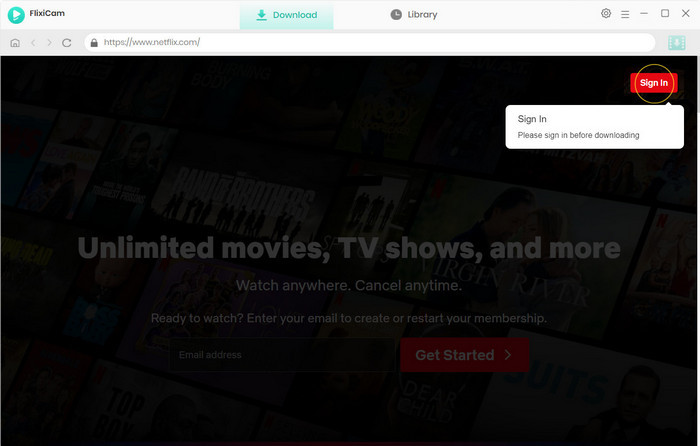
Step 1: Download and install the latest version of the program. Once the installation is complete, launch the app on your PC or Mac.
Step 2: Sign in with your Netflix account to access Netflix's full library. Then browse or search for the movie or TV show you want to download.
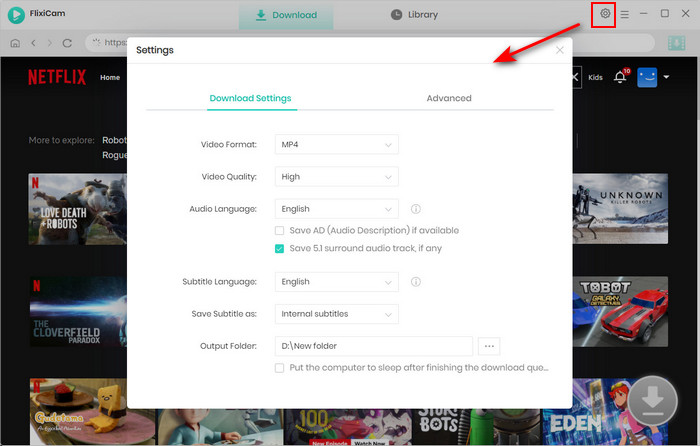
Step 3: Click the Settings icon in the top-right corner to open General Settings, and set the output format to MP4.
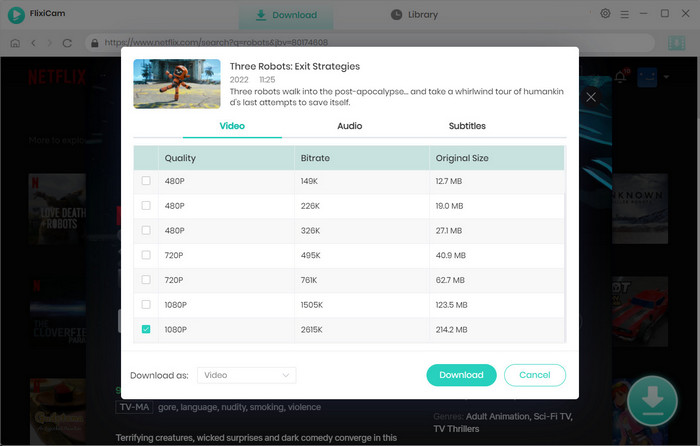
Step 4: Select the video you want and click the Download icon to open the Advanced Download Settings. Here you can choose the season and episodes, adjust the video quality (up to 1080p) with different bitrates, and select your preferred audio tracks and subtitles.
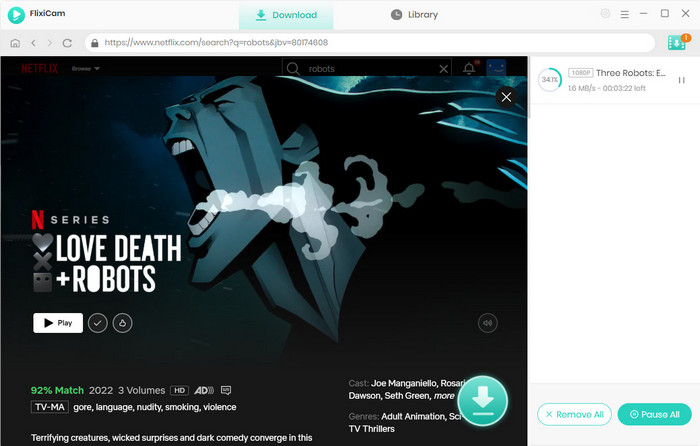
Step 5: You can click Download to start saving the selected Netflix videos to MP4 or MKV format for offline viewing.
#2) SameMovie Netflix Video Downloader
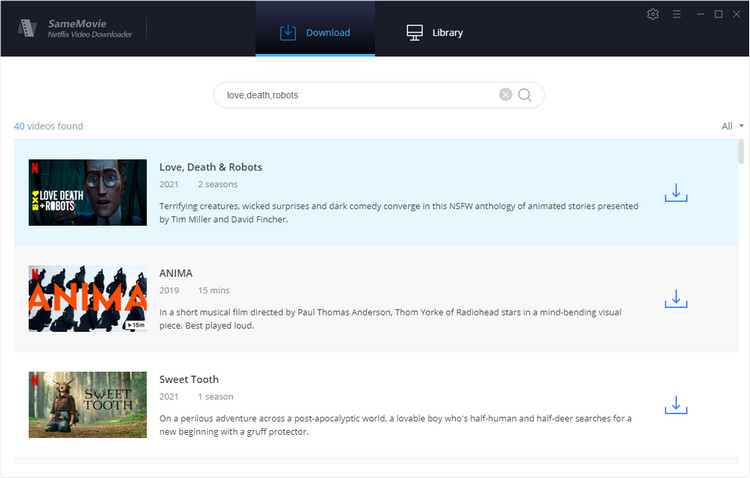
SameMovie Netflix Video Downloader is a powerful tool designed to help you download videos from Netflix and save them as local files on your computer. With its simple interface, you only need to copy and paste the Netflix video URL into the program, and it will quickly analyze and download the content to your PC or Mac.
The software supports saving Netflix movies and TV shows in MP4 or MKV format with resolutions up to 1080p. It also includes batch download support, so you can download entire series or multiple episodes in one go. In addition, SameMovie lets you select multilingual audio tracks and subtitle languages, giving you more flexibility when watching Netflix content offline.
| Name | SameMovie Netflix Video Downloader |
| Support Website | Netflix |
| Quality | 1080p, original audio, 5.1 surround sound. |
| Download Format | MP4, MKV |
| Free Trial | 5 minutes of each video |
| TrustPilot Rating | 4.0 |
| Download Success Rate | 97.9% |
| Pros 👍 | ✅ Keep HD video with original audio tracks ✅ Save videos in H.264 and H.265 video codecs ✅ Offer three subtitle modes ✅ Multi-Language UI |
| Cons 👎 | ❌ Need a valid Netflix subscription ❌ Does not support downloading from web browser directly |
2026 Guide: 4 Easy Ways to Download Netflix Movies on Mac
This guide introduces 4 easy ways to download Netflix movies for offline viewing on Mac. Learn More > >
#3) FreeGrabApp Netflix Downloader
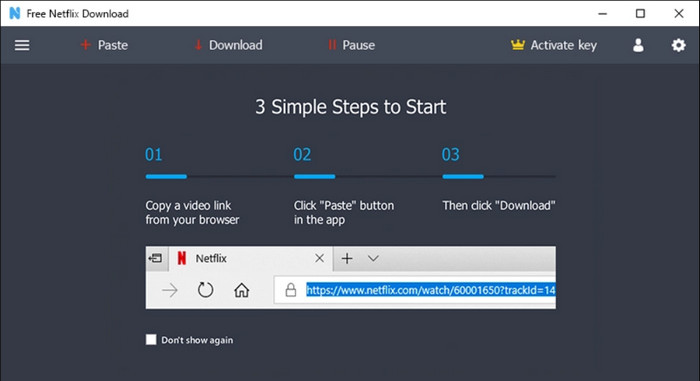
If you’re looking for a simple and easy-to-use Netflix video downloader for PC, FreeGrabApp Netflix Downloader is another option worth considering. The software allows users to download videos from Netflix in up to 1080p resolution, while also preserving 5.1 surround sound for a better viewing experience.
Although the price is relatively affordable compared to some other Netflix downloaders, there are also mixed user reviews online. Some users have reported issues such as the software not working, difficulty reaching customer support, and no way to cancel subscriptions. Because of this, it’s a good idea to test the free version first before deciding whether it meets your needs.
| Name | FreeGrabApp Netflix Downloader |
| Support Website | Netflix and 10+ platforms |
| Quality | 1080p, 5.1 surround sound. |
| Download Format | MP4 |
| Free Trial | only 240p Netflix videos |
| TrustPilot Rating | 2.5 |
| Download Success Rate | 60.4% |
| Pros 👍 |
✅ Support 10+ popular platforms ✅ Offer a batch-download mode ✅ Simple UI |
| Cons 👎 | ❌ Offer MP4 format only ❌ Only for Windows PC ❌ Unresponsive customer support ❌ The software may not work properly ❌ difficulty canceling subscriptions |
#4) KeepStreams
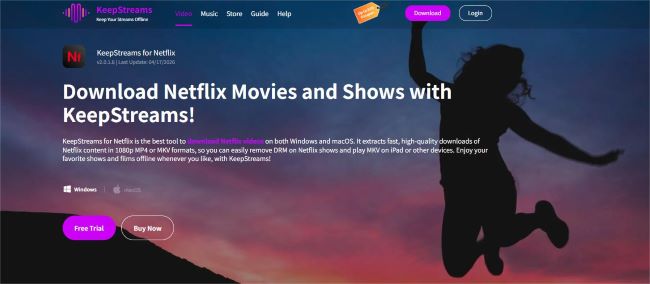
KeepStreams Netflix Downloader is also a Netflix movie downloader for PC that allows users to download videos from Netflix. It offers a free trial where you can download up to three full-length videos, giving you enough time to evaluate download speed, video quality, and overall stability. In terms of customer support, KeepStreams provides relatively longer response coverage compared to many other downloaders, typically replying within 48 hours.
However, based on user reviews on platforms like Trustpilot, there are also some concerns to consider. The software only offers a 7-day refund policy, and once this period expires, obtaining a refund becomes difficult. Some users have also reported situations where refunds were denied even when the product did not work as expected, despite the “satisfaction guarantee” claims. It’s recommended to fully test the trial version before deciding whether to purchase the software.
| Name | KeepStreams |
| Support Website | Netflix |
| Quality | 1080p, Dolby Atmos. |
| Download Format | MP4, MKV |
| Free Trial | 3 full-length Netflix videos for 30 days |
| TrustPilot Rating | 3.3 |
| Download Success Rate | 95.6% |
| Pros 👍 |
✅ Support downloading Netflix videos in up to 1080p ✅ Offer a scheduled download mode ✅ Extract audio to SRT file |
| Cons 👎 |
❌ Only offer a 7-day refund policy ❌ 48-hour customer support ❌ Refund requests may be denied despite the “satisfaction guarantee” |
Netflix Downloader for Android and iPhone
Playon Cloud
If you’re looking for a solution that works on Android or iPhone, PlayOn Cloud can be an alternative. PlayOn Cloud uses a cloud DVR recording method, so it records the video on its servers in real time and converts it into an MP4 file for download. For example, a 1-hour movie requires about 1 hour to record before it becomes available for download.
If you’re considering PlayOn Cloud, it’s worth checking Trustpilot reviews first. About 87% of ratings are 1 star, and some users report not receiving customer support replies within 48 hours, despite the company’s advertised response time.
| Name | Playon Cloud |
| Support Website | Netflix, Hulu, Prime Video, Disney+, Max and more |
| Quality | 1080p |
| Download Format | MP4 |
| Free Trial | ❌None |
| TrustPilot Rating | 2.3 |
| Download Success Rate | 58.4% |
| Pros 👍 |
✅ Downloaded Netflix videos are stored in the cloud instead of being saved locally ✅ Available as an app for Android and iPhone devices |
| Cons 👎 | ❌ Videos are recorded in real time, so the process takes as long as the video itself ❌ The monthly plan only includes about 85 hours of 1080p downloads ❌ Additional credits must be purchased once the monthly download limit is reached |

FAQs about Free Netflix Downloaders
Is there a possible way to get Netflix for free?
Yes, there are a few legitimate ways to get Netflix for free, but they are limited and depend on availability in your region. Some mobile carriers or internet providers may include a free Netflix subscription as part of their promotional plans.
How to get Netflix without paying money?
Netflix is a paid subscription service, so you can’t legally use Netflix without paying. A valid plan is required if you want to access Netflix's content. However, there are a few legitimate ways to watch Netflix without paying directly in some cases:
- 1. Some mobile carriers or internet providers include a Netflix subscription in their bundled plans.
- 2. Shared family or household plans may reduce individual cost.
Does Netflix no longer allow downloads on PC?
Yes. According to the latest policy of Netflix, downloading movies and TV shows for offline viewing on a PC is no longer supported. Users can only download content on supported mobile devices through the official Netflix app, while PC platforms no longer offer a download feature for offline playback.
Can I download Netflix movies on my laptop to watch offline?
Netflix does not support downloading videos for offline viewing on laptops, including both Windows laptops and MacBooks. As a result, users who want offline playback on a computer often look for third-party solutions.
For example, FlixiCam Netflix Video Downloader allows users to download Netflix movies and TV shows in up to 1080p quality and save them as MP4 or MKV files for offline viewing on a computer. However, it is important to note that such tools are intended for personal use only and should not be used for commercial purposes or in ways that violate Netflix’s terms of service.
Conclusion
Because everyone’s needs are different, you can choose a Netflix downloader based on your personal preferences. However, a tool with a high download success rate is especially important, as it can save you a significant amount of time and provide a much smoother experience.
If you want to download videos on PC or Mac, we recommend FlixiCam Netflix Video Downloader, which stands out with a 98.5% download success rate, making it one of the most reliable options among all the tools we tested.
Ashley Wood | Senior Writer