How to Watch Netflix on a Plane on Laptop for Offline Viewing
 Ashley Wood
- 24 September, 2026
- Blog
Tired of boredom on long flights because you can't watch Netflix offline? Want to download Netflix videos easily and watch it on a plane without annoying ads? Don't worry! This guide has you covered.
We'll show you the simplest ways to download Netflix for in-flight viewing. Whether you're using a phone, tablet, or laptop, you'll learn how to skip the Wi-Fi struggle and enjoy uninterrupted Netflix on a plane. Let's get started!
First off, let’s tackle a common question travelers often ask: Can you stream Netflix online during a flight?
The answer is Yes - if the aircraft provides a stable, streaming-capable Wi-Fi connection, you can watch directly through the Netflix app. However, in-flight Wi-Fi often comes with limitations: it’s frequently unreliable, slow, or carries extra costs, which makes offline viewing the far more practical alternative for most travelers.
1. Netflix's Official Method to Download Videos for Plane Viewing
Netflix's built-in download feature is the most straightforward way to watch Netflix on a plane without Wi-Fi. It works on select devices and lets you download Netflix shows and movies directly in the app.
1. Eligible Devices for Netflix Official Downloads
Not all devices support Netflix's download function. To use it, you'll need one of the following:
Netflix Officially Supported Devices for Downloads:
- Android phones or tablets (running Android 4.4.2 or later)
- iPhones or iPads (iOS 9.0 or later)
- Amazon Fire tablets (Fire OS 4.0 or later)
- Google Chromebooks (with Google Play Store installed, Chrome OS 53 or later)
📍 Notably, Windows computers and MacBooks don't support official Netflix downloads. If your device is a Windows PC or MacBook, you can skip directly to Part 3. Get FlixiCam for hassle-free desktop Netflix downloads!👇
 DOWNLOAD WIN FOR FREE
 DOWNLOAD MAC FOR FREE
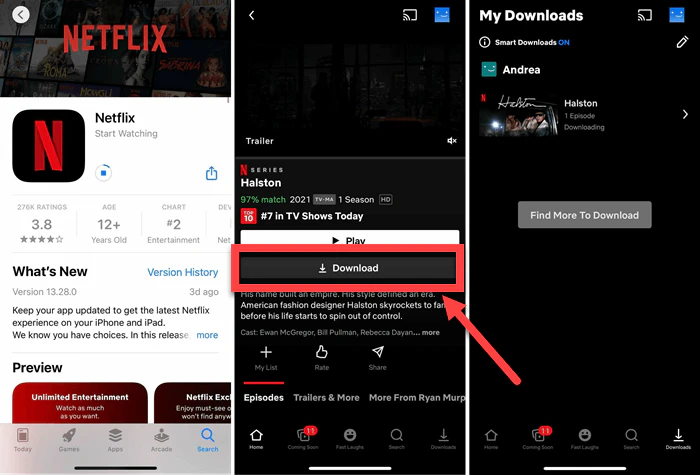
2. Step-by-Step Guide to Download Netflix Officially
Follow these steps to download Netflix videos for offline viewing on a plane:
1. Open the Netflix app and log into your account.
2. Look for the downward arrow icon next to titles, or go to "My Netflix > Downloads > See What You Can Download" (mobile) or "Downloads > Find More to Download" (Chromebook).
3. For movies, tap "Download". For TV shows, select the download icon next to individual episodes or "Download Season" to save the entire season.
4. Once offline, open the Netflix app, go to the "Downloads" tab, and select the downloaded Netflix videos you want to watch.
2. Limitations of Netflix's Official Download Feature
While the official method works for basic needs, it comes with significant restrictions that can ruin your in-flight viewing experience. Here are the key limitations:
1. Netflix Download Device Restrictions
As mentioned, Windows PCs and MacBooks are excluded from official downloads. If you prefer watching on a larger laptop screen during long flights, the official feature leaves you out.
2. Netflix Download Limits & Expiration Rules
Ad-supported plans only allow 15 Netflix downloads per device per month, while ad-free plans limit you to 100 active downloads total.
Most Netflix downloads expire within 7–30 days of being saved. Once you start watching a title, you typically have just 48 hours to finish it before it expires.
Expired downloads require reconnection to Wi-Fi to renew, which is impossible mid-flight.
3. Netflix Download Subscription Ties & Ad Interruptions
If you cancel your Netflix subscription, all downloaded Netflix videos is deleted immediately.
Basic ad-supported plan users can't escape ads, even with downloaded Netflix videos.
4. Netflix Download Portability Limitations
You can't transfer the official Netflix downloads to other devices. For example, if you download a show on your phone, you can't move it to your laptop or tablet for better viewing on the plane.
5. Netflix Download Geographical Restrictions
Downloaded Netflix videos are tied to the region where you saved it. If you're traveling internationally, you may get an error message saying "Download Not Available in This Country" even if you downloaded the title at home.
3. The Ultimate Solution: Flixicam Netflix Downloader for Ad-Free In-Flight Viewing
To get around Netflix’s official restrictions and watch Netflix on a plane smoothly, Flixicam Netflix Downloader is your ideal tool. It fixes all the downsides of the official method, while letting you download high-quality Netflix videos that you can take anywhere.
FlixiCam Netflix Downloader is a simple, pro tool that lets you download Netflix movies, TV shows, and originals straight to your Windows PC or Mac. It downloads Netflix videos as MP4 or MKV files, so you can watch it on any device - no Netflix app needed. Whether you're on a plane, train, or in a remote spot, FlixiCam makes sure your go-to shows and movies are always ready to watch.
What Make FlixiCam the Top Choice:
- Built-in Netflix web player for direct search & playback.
- Saves HD video (up to 1080 p) in MP4 or MKV universal format.
- Stores downloads locally without expiration for permanent access.
- Support batch download Netflix videos in 10x speed.
- Enables playback of downloaded Netflix videos on any device.
- Comes with multilingual subtitles support for flexible viewing.
- Ad-free Netflix downloads (Basic/ad-supported plans included).
Compatibility: Windows 10/11, macOS 11 and above.
📍 If you're looking for a tool to download any streaming video (including Netflix, Disney+, Amazon Prime Video, Hulu, HBO Max, Paramount+, Peacock, Apple TV+ …) to MP4, Flixicam Stream One is the top pick.
Tutorial: How to Use Flixicam to Download Netflix for Plane Viewing
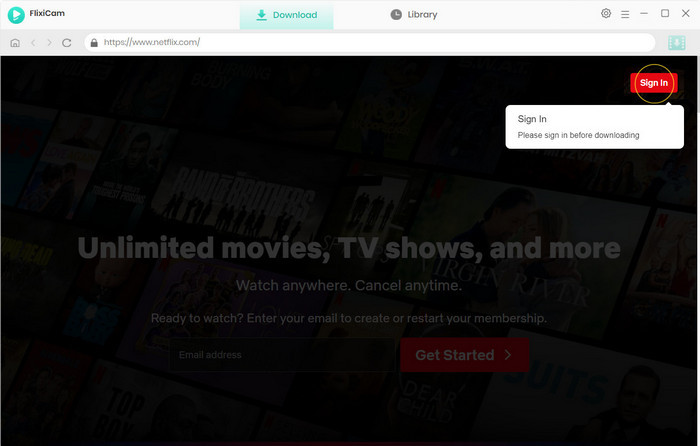
Step 1.Run FlixiCam on a PC and Log into Netflix Account
It is recommended to download FlixiCam before downloading Netflix titles with it. After launching FlixiCam on your computer, tap on "Sign In" to log into your Netflix account.
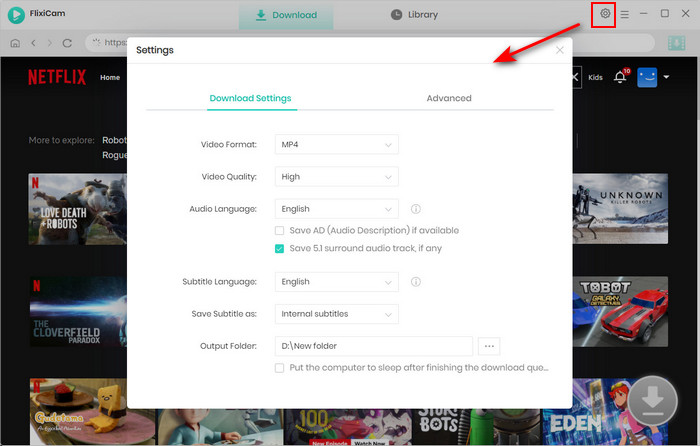
Step 2.Customize the Output Settings
Please click the gear icon in the top-right corner to access the General settings and select output parameters. MP4 or MKV format can be chosen for the output format. You can also choose the video quality (High, Medium, Low), output folder, and languages of audio tracks and subtitles. You can set the output path to the USB drive in this step.
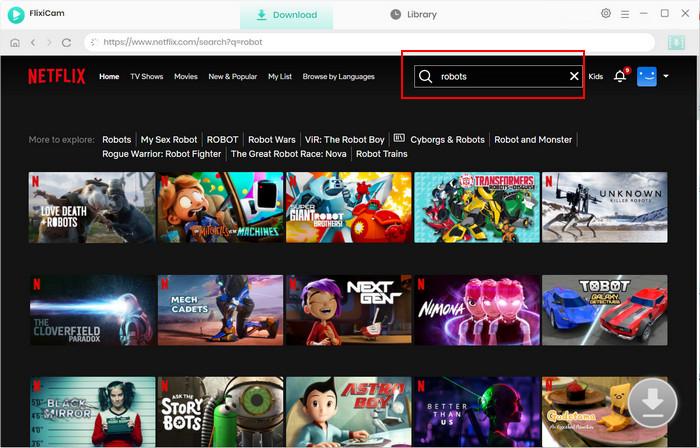
Step 3.Add Videos on FlixiCam
To find the videos you want to download, you can directly enter the video's name in the search box on FlixiCam. The results will soon be listed.
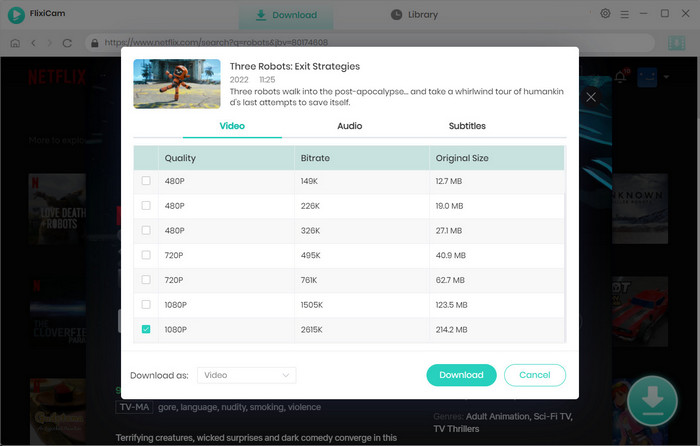
Step 4.Select Audio Track and Subtitle
You can customize the audio and subtitle tracks here. To download a TV show, directly click on the green Download icon, and you can choose the seasons and titles first. Then you can click the "Advanced Download" at the bottom left. A window will pop up, allowing you to select the show's title, seasons, and audio track.
To download a Netflix movie, simply click the green Download icon, and you can customize the output parameters.
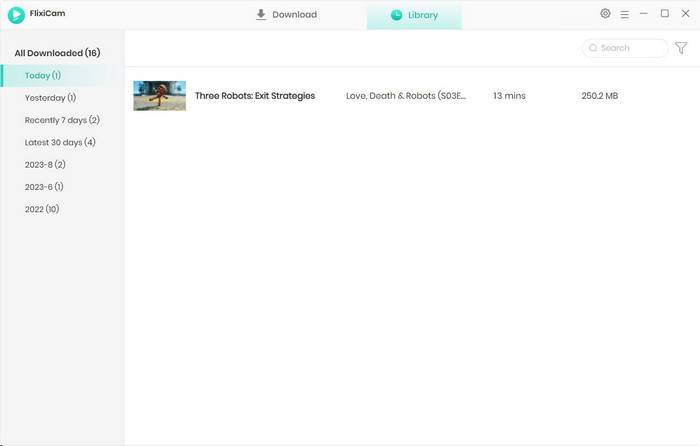
Step 5.Start to Download Netflix Videos
Just click the download button after finishing the settings. Once the Netflix video download is complete, you can access it locally by choosing Library or by looking in the destination folder.
Step 6.Transfer or play Netflix MP4 downloads directly
Watch the downloaded MP4/MKV files directly on your laptop, or transfer them to your phone/tablet via USB for on-the-go viewing.
Flixicam Netflix Downloader: Perfect for Plane Trips
| Key Advantages | Details |
|---|---|
| Universal Device Support | Download Netflix on Windows/Mac, and easily transfer to your TV, tablet or phone. MP4/MKV works with all players (no Netflix app), small files save storage. |
| Permanent Offline Access | Keep Netflix downloads forever, even if you cancel Netflix. No online verification needed, works offline anytime. |
| Ad-Free for All Netflix Plans | Basic (ad-supported), Standard or Premium - Flixicam removes Netflix ads, unlimited downloads with no rules. |
| Support HD Quality | Original 1080P HD video, paired with original audio & subtitles. |
| Battery-Saving Playback | No battery-draining Netflix app, watch longer on one charge (great for long flights). |
| Batch Downloads for Travel | Download Netflix entire seasons or multiple movies at once at 10x speed. |
4. FAQs About Watching Netflix on a Plane
Can I use the official Netflix download feature on a Windows laptop?
No, Windows PCs and MacBooks don't support Netflix's official download function. Flixicam works on Windows and Mac, letting you download Netflix videos easily for in-flight viewing.
Why do my official Netflix downloads expire mid-trip?
Official downloads typically expire 7–30 days after saving, and 48 hours after starting playback. Flixicam fixes this issue with permanent Netflix downloads that never expire, perfect for long flights and trips.
Grab FlixiCam to enjoy unrestricted offline viewing 👇
Will I still see ads in Flixicam downloads if I have a Netflix ad-supported plan?
No, Flixicam automatically removes ads from Netflix downloaded videos, regardless of your Netflix subscription plan.
Why can't I play my official Netflix download in another country?
Netflix official downloads are tied to the region where you saved them, and geographical restrictions may block playback abroad. Flixicam overcomes these geo-limits, so your Netflix downloads work anywhere in the world for uninterrupted in-flight viewing.
Can I transfer Flixicam downloaded MP4 to multiple devices?
Yes, Flixicam's MP4/MKV files are portable. You can transfer them to phones, tablets, smart TVs, or other devices via USB or cloud storage.
Conclusion
Watching Netflix on a plane doesn't have to be a hassle. While Netflix's official download feature works for basic needs, its restrictions make it far from perfect for travelers. Flixicam Netflix Downloader solves these problems by delivering permanent, portable MP4/MKV files that work on any device, with no ads or geographical restrictions. It's the ultimate tool for anyone who wants to watch Netflix on a plane without compromises.
📢 Disclaimer
All tutorials here are for personal entertainment & education only. Please ensure you have a valid legal account on the relevant platforms. We do not support commercial distribution or piracy — always respect content creators' copyrights.
Ashley Wood | Senior Writer