 DOWNLOAD Win
 DOWNLOAD Mac
Can I Watch Netflix Downloads after the Subscription Ends?
 Ashley Wood
- 9 September, 2026
- Blog
In general, the answer is No. Why can't I still watch Netflix after subscription ends? First off, downloaded titles are only visible on Netflix app. But you are not allowed to log into Netflix app after your subscription is over, and you can’t even locate a whole downloaded content, for that Netflix videos are all encoded in a proprietary format, downloaded titles will be divided into several unknown data files.
Secondly, there are several limits added to the downloaded videos. Netflix states, you have a limited amount of time to watch the downloaded videos before it expires. The amount of time depends on individual licenses and can vary by title. Some titles will expire 48 hours after you first press play. So evidently, some downloads will be no longer available even though during the subscription, let alone when you leave the service.
However, you are in luck. Things changed thanks to the coming out of a powerful Netflix Video Downloader – FlixiCam. Read on, below we will walk you through the steps of downloading Netflix videos in common MP4 format with FlixiCam. After that, you can still watch downloaded netflix movies without subscription.
1. What happens after cancelling Netflix membership?
- If you cancel your Netflix subscription early, your account will be closed automatically at the end of your current billing period, rather than being closed immediately.
- You still have access to watch Netflix videos online and offline for the remainder of your billing period.
- Once your subscription is over, all your downloads will no longer be able to be accessed, even though you've stored them on your devices during the subscription.
- You can’t even access Netflix's main interface without a valid Netflix account.
- Netflix will keep your Viewing Activity for 10 months after your account closes.
2. Can We Watch Downloaded Netflix Videos After Subscription Ends?
Not really. Some people want to locate the Netflix downloaded files and play them elsewhere after subscription ends. But it is a pity that Netflix encodes all videos in its exclusive format, thereby confining its members to watching this content on the Netflix app only, not on other players. In this case, the key way to watch Netflix download after subscription ends is downloading or recording Netflix videos as normal files during the subscription period with the help of some video recording tools. Read on, we are going to walk you through the full process of downloading Netflix videos as MP4 or MKV files to keep them playable permanently.
Tips: How to Cancel Netflix Subscription?
There could be various reasons why you may want to cancel the Netflix subscription, such as financial constraints, lack of time to watch content. The process is pretty straightforward. You can refer to this guide to do so. Learn More >>
3. Best Tool to Watch Downloaded Netflix Videos After subscription Ends - FlixiCam
Learn more about FlixiCam >>
To make your Netflix downloads transferrable and playable on more devices, FlixiCam gives you a hand to help you download Netflix videos in MP4 format!
Though there are numerous recording tools that can also help you record Netflix video for watching freely, FlixiCam is endowed with a smart yet easy-to-use downloading core, stable performance, broad compatibility, HD output video quality second to none. By applying this smart tool, you can easily download Netflix videos as MP4 or MKV files to local drive, and then enjoy them at any time. The following is the detailed tutorial to guide you to download movies and TV shows from Netflix with FlixiCam. Please download FlixiCam program first before getting started.
Tutorial: How to Download Netflix Video with FlixiCam
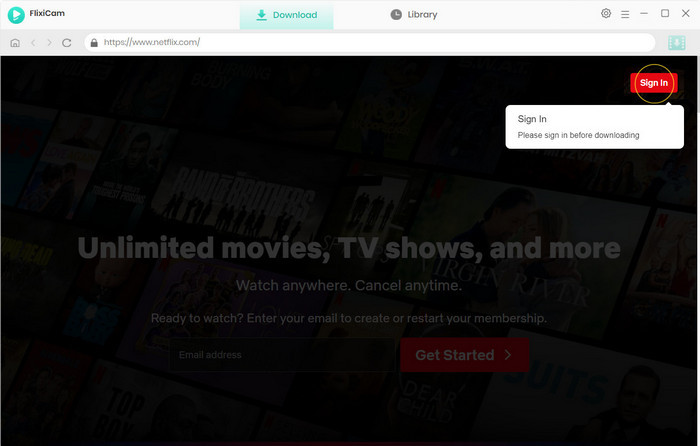
Step 1. Run FlixiCam and Log in to Netflix Account
Upon launching FlixiCam on your computer, you'll encounter a concise and user-friendly interface, as depicted below. To continue, simply follow the indicated instructions and click on the "Sign in" button. This will cause a login window to appear, prompting you to log into your Netflix account.
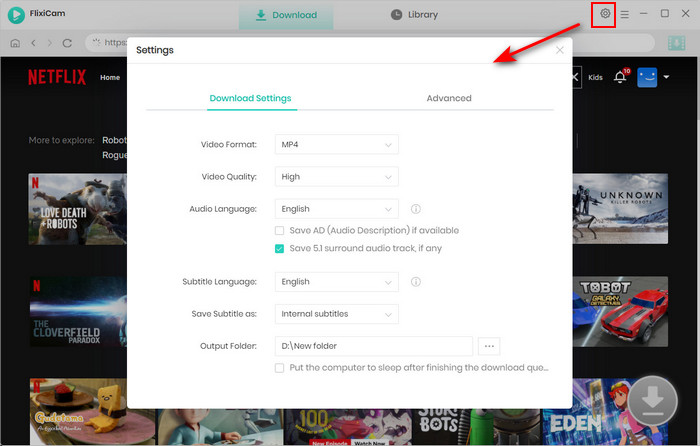
Step 2. Customize the Output Settings
Click the Setting button on the upper right corner to adjust the basic parameters. Here you can choose outpit format, select output quality, audio and subtitles language and more.
Step 3. Search Videos on FlixiCam
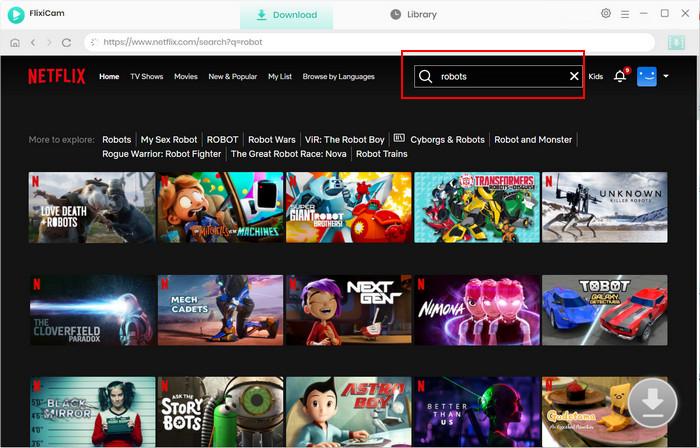
FlixiCam is designed to work harmoniously with the Netflix website. By entering the name of the video, the program will promptly display a list of either that specific video or all the related videos.
Step 4. Select Audio Track and Subtitle
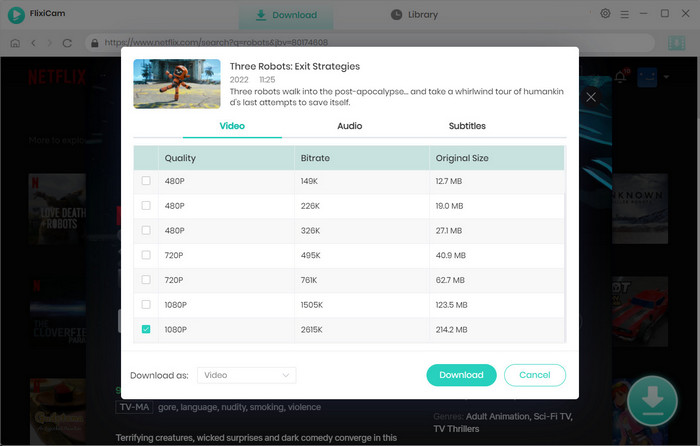
To download a video, just give it a click. The gray Download icon at the bottom right will then change color to green. Tap on the green icon and you'll be able to customize the season, titles, video quality, audio track, and subtitles.
Step 5. Download Netflix Videos
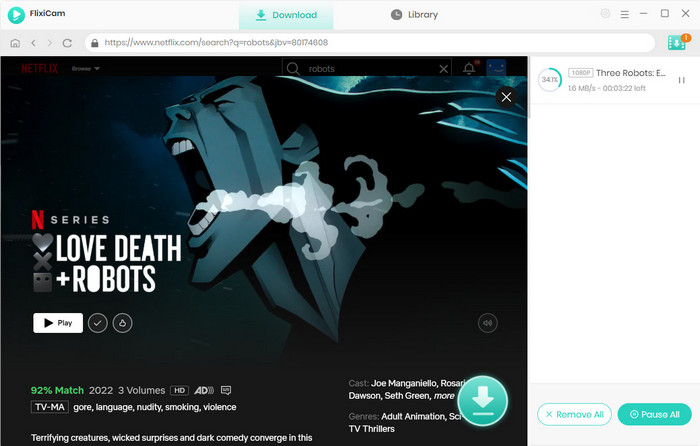
Now, please click the Download icon, the program will start downloading the Netflix videos. Once downloaded, you can click on Library to find the well-downloaded Netflix videos on local drive.

4. Can I Leave and Rejoin Netflix?
Yes, you have the flexibility to leave and rejoin Netflix as per your preference. Netflix offers a subscription-based service, allowing users to cancel their membership at any time. If you decide to leave Netflix, you can simply cancel your subscription before the next billing cycle. When you're ready to rejoin, you can sign up again and resume enjoying Netflix's vast library of movies, TV shows, and other content.
5. What will Happen If I Rejoin Netflix?
If you decide to rejoin Netflix within 10 months, you will regain access to all the features and content available on the platform. Upon rejoining, you will have the opportunity to explore Netflix's extensive library of movies, TV shows, documentaries, and more. You can also customize your viewing preferences and continue watching from where you left off. Keep in mind that your viewing history and personalized recommendations may be reset if you create a new account.
Conclusion
As a handy tool for downloading Netflix videos, FlixiCam will never let you down. With it, you can download any movies or TV Shows from Netflix and save them on your devices forever. FlixiCam helps you get rid of those limits of Netflix with ease, now simply download it and have a try!

StreamOne All-in-one Recorder
If you not only subscribe to Netflix, but also use Disney+, Hulu and more? Try StreamOne All-in-one Recorder. It can help you capture and save content from many popular streaming services like Netflix, Prime Video, Max, YouTube. The video quality can be up to 8K. Learn More >>
📢 Disclaimer
All tutorials here are for personal entertainment & education only. Please ensure you have a valid legal account on the relevant platforms. We do not support commercial distribution or piracy — always respect content creators' copyrights.
Ashley Wood | Senior Writer