Is YTMP3 Safe? Safer YTMP3 Alternatives I Tested in 2026
 Ashley Wood
- 26 September, 2026
- Blog
Is YTMP3 safe to use? Unfortunately, due to pop-up ads, redirects, clone websites, and constantly changing domains, it is difficult to guarantee its safety.
The good news is that there are now plenty of better YTMP3 alternatives available — from ad-free desktop YouTube to MP3 downloaders with higher audio quality to simple online MP3 converters that work instantly in your browser.
What Is YTMP3?
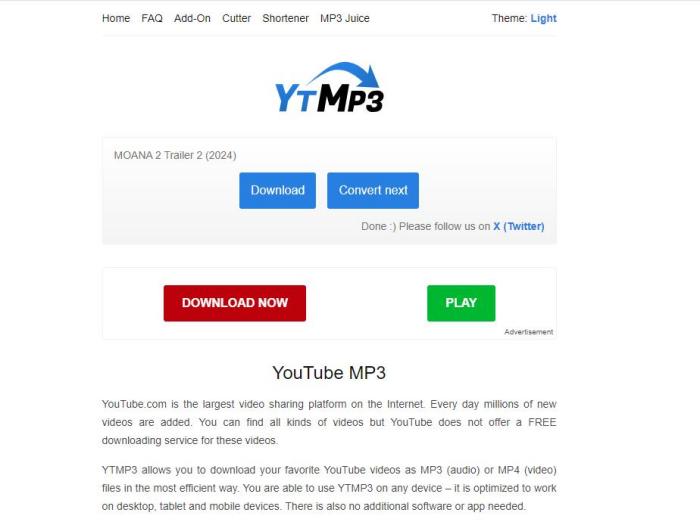
YTMP3 is a free online YouTube to MP3 converter that allows users to convert YouTube videos into MP3 audio files. It is widely used by people who want to save music, podcasts, or other audio content from YouTube without installing any software.
YTMP3 works entirely in any web browsers, and the process of downloading MP3 files is very straightforward. You only need to copy and paste a YouTube video URL into the website, choose a format (MP3 or MP4), and start the conversion process. Since it is a browser-based tool, no installation is required, making it a convenient option for quick downloads on both desktop and mobile devices.
Is YTMP3 Safe?
YTMP3 is not completely safe or fully reliable. While many users use it without issues, the platform still comes with certain risks. Since YTMP3 is a free online converter, it often relies on ads, which may lead to pop-ups, redirects, or misleading download buttons. In addition, free online converters can be unstable or stop working unexpectedly. If you want a more detailed analysis of YTMP3’s safety, check out the sections below.
Does YTMP3 Have Malware?
If you are worried about whether files downloaded from YTMP3 contain malware, the good news is that MP3 or MP4 files downloaded through YTMP3 are generally safe and usually do not contain viruses. In most cases, the downloaded media file itself is not the main risk. However, that does not mean YTMP3 is completely malware-free.
The official YTMP3 website is not generally considered malware, but risks can come from fake clone sites, misleading ads, and redirects. Since YTMP3 is widely used, many copycat websites imitate the original and may include fake download buttons or prompts to install unnecessary software. To stay safe, verify the website URL and only download MP3 or MP4 files not unknown software.
Is YTMP3 Safe on Mobile?
Both Android and iPhone users can access YTMP3 directly through a browser without installing an app, but mobile devices often come with extra risks and limitations.
For Android users, the biggest concern is pop-up ads, redirects, and misleading download buttons. Some YTMP3 pages may open new tabs automatically or prompt users to download unknown apps or APK files. Since Android allows third-party downloads more easily, users should be careful not to install anything other than the intended MP3 or MP4 file.
For iPhone users, YTMP3 may feel safer due to Apple’s stricter system restrictions, but problems can still occur. Users may experience browser redirects, excessive ads, failed downloads, or compatibility issues with Safari. In some cases, downloaded files may not appear directly in the Music app and instead save to the Files app, which can be confused.
Pros and Cons of YTMP3
✅ Pros of YTMP3
- Free to use with no registration required.
- No installation needed, works directly in your browser.
- Fast YouTube to MP3 conversion for quick downloads.
- Supports downloading high-quality MP3 files.
- Works on both desktop and mobile devices.
🔴 Cons of YTMP3
- Contains intrusive ads and pop-ups.
- Risk of fake clone websites.
- Redirects may lead to unsafe pages.
- No batch conversion for multiple videos.
- No YouTube playlist support.
- Website may become unavailable sometimes.
- Limited download options and features.
How to Rip Music from YouTube: 6 Free & Easy Methods (2026)
Want to rip music from YouTube easily? Discover 6 free and working methods in 2026 to download YouTube music in MP3, M4A, WAV, and more. Learn More > >
Safer Alternatives to YTMP3 YouTube to MP3 Converter in 2026
If you're tired of YTMP3 pop-ups, redirect ads, and constantly changing domains, there are now many safer and more reliable alternatives worth considering. Below, we’ll explore some of the best YTMP3 alternatives, including both desktop and online options, to help you find the one that fits your needs best.
#1) FlixiCam StreamOne
FlixiCam StreamOne is one of the safest alternatives to YTMP3, especially for users who want a smoother and more secure downloading experience. Unlike many free online converters, it comes with no pop-ups, intrusive ads, or misleading redirects, so you can use it without worrying about accidentally clicking suspicious links or malware.
It also allows users to quickly convert YouTube videos into popular audio formats such as MP3, M4A, and WebM in up to 320kbps. If you prefer downloading YouTube videos instead of audio, FlixiCam can easily handle that as well. It lets you save videos in up to 8K resolution, making it a great choice for users who care about video quality. Best of all, these features are completely free to use, and no account registration is required to start converting or downloading content.
| OS | Windows/Mac |
| Support Website | YouTube and 1000+ more sites, including Netflix, Netflix, Amazon Prime, Disney+, Hulu, Crunchyroll, Paramount+, and more |
| Quality | 8K/4K/2K/1080p (for YouTube), 1080p, Dolby audio, 5.1 surround sound. |
| Download Format | MP3, M4A, WebM, MP4, MKV |
| Price | Free for YouTube |
| Safety Review | 4.8 /5 |
| Download Experience | Stable, fast, and ad-free |
| Pros 👍 | ✅ Download up to 320kbps YouTube audio files ✅ Download up to 8K YouTube videos ✅ Preserves original audio tracks and subtitles ✅ Batch download audio or videos at 10x speed ✅ Supports Dolby 5.1 and Atmos surround sound ✅ Built-in browser for previewing YouTube content ✅ Available on both Windows PC and Mac ✅ 100% clean with no ads or malware |
| Cons 👎 | ❌ No browser extension |
How to Download YouTube as MP3 with FlixiCam StreamOne
Step 1. Open FlixiCam StreamOne and switch to YouTube mode by clicking the platform icon beside the address bar.
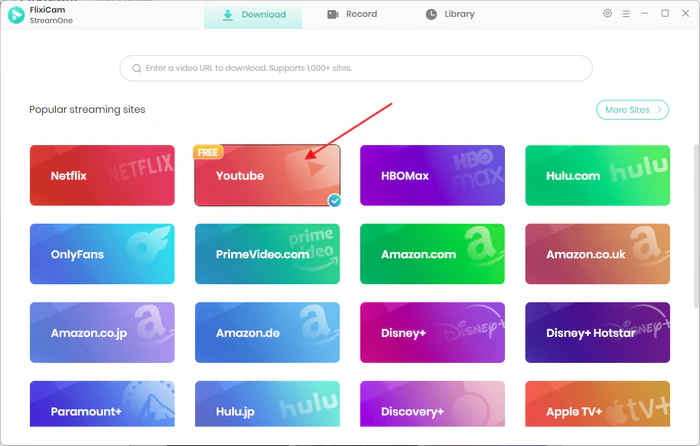
Step 2. Search for the YouTube video you want using keywords, or paste the video URL directly into the address field for quick access.
Step 3. After the video finishes loading, click the green Download button in the bottom-right corner to continue.
Step 4. In the download window, select "Download as: Audio (MP3)" as the output type. Before downloading, you can adjust settings such as audio format, bitrate, and original sound quality based on your preferences.
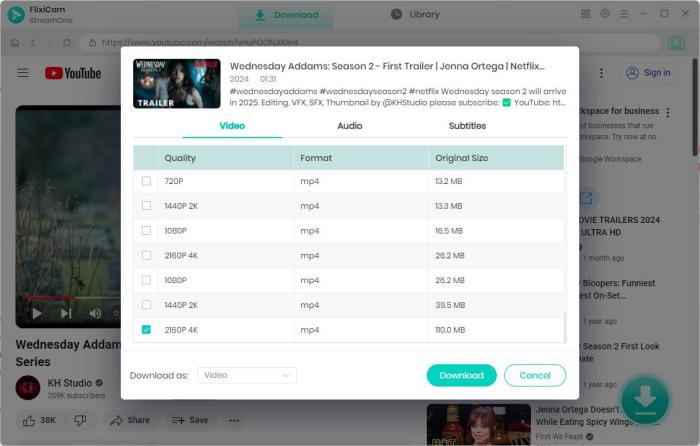
I tested FlixiCam StreamOne by downloading multiple YouTube videos in both MP3 and video formats. Overall, the experience was smooth and straightforward. The conversion speed was impressively fast. Downloading a 10-minute MP3 audio file took only about 30 seconds during my testing, and the entire process felt stable without interruptions. I also appreciated the ability to customize settings such as audio format, bitrate, and output quality before downloading.
 DOWNLOAD WIN FOR FREE
 DOWNLOAD MAC FOR FREE
6 Best KeepVid Alternatives in 2026 (Free & Safe Sites Tested)
Looking for a KeepVid alternative? I tested 6 free and paid KeepVid alternatives in 2026, comparing quality, speed, formats, safety, and features. Learn More > >
#2) Any Video Converter Free
Any Video Converter Free is another solid YouTube to MP3 converter. In my testing, the setup process was fairly straightforward — simply paste a YouTube URL, and the software automatically detects the video and prepares it for download.
One thing that stands out is its audio format flexibility. Besides standard MP3 downloads, it also supports formats like FLAC, WAV, OGG, and OPUS, which may be useful for users who want different audio quality options or file types for specific devices.
Compared with browser-based converters, the downloading experience feels more stable. However, since it is desktop software, the interface can feel a bit more complex than simple online tools for first-time users.
| OS | Windows / Mac |
| Support Website | YouTube, Facebook, Vimeo, Dailymotion, and 100+ websites |
| Audio Quality | Up to lossless audio quality supported |
| Download Format | MP3, M4A, FLAC, WAV, OGG, OPUS, AAC |
| Price | Free (Paid version for more features) |
| Safety Review | 4.7 / 5 |
| Download Experience | Stable desktop-based downloader |
| Pros 👍 |
✅ Supports downloading YouTube audio in multiple formats ✅ Batch conversion supported ✅ Free to use with no registration required ✅ Safer than browser-based converters |
| Cons 👎 |
❌ Extra steps required to download and manually convert videos to MP3 ❌ Some advanced features require paid version ❌ Desktop software installation required |
How to Download MP3 from YouTube with Any Video Converter
Step 1. Open Any Video Converter and go to the Toolkits section, then select Video Download. Next, open YouTube and copy the URL of the video you want to convert to MP3.
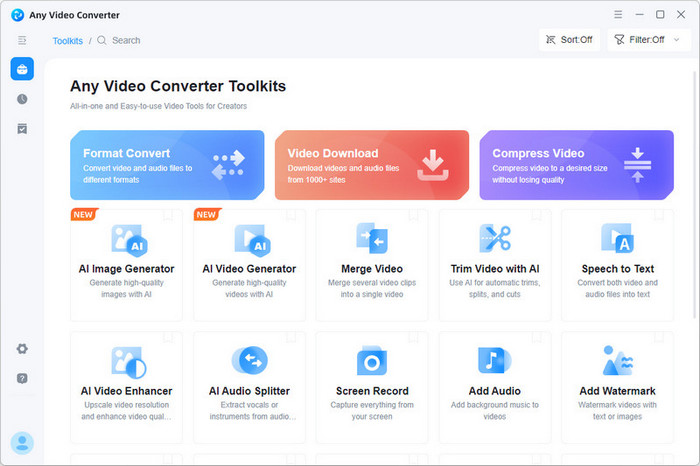
Step 2. Paste the YouTube link into Any Video Converter. The software will automatically analyze the URL and display several download quality options. Choose your preferred quality and start downloading the video.
Step 3. Once the download is complete, return to the Toolkits section and click Format Convert. Import the downloaded YouTube video file into the converter.
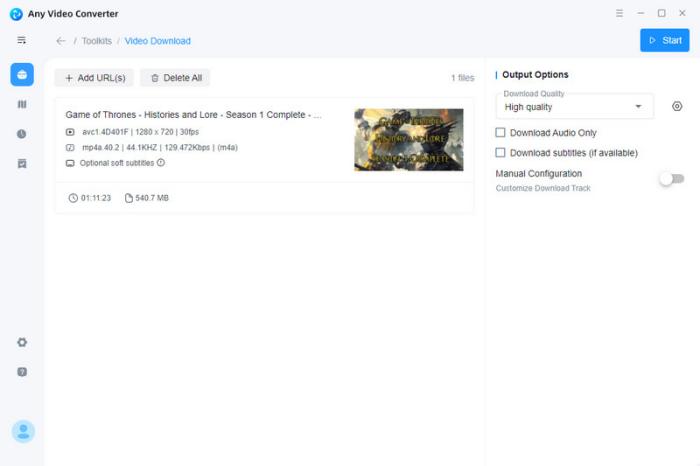
Step 4. Select MP3 as the output format. You can also adjust audio settings if needed. Finally, click Convert Now in the upper-right corner to convert the YouTube video into an MP3 file for offline listening.
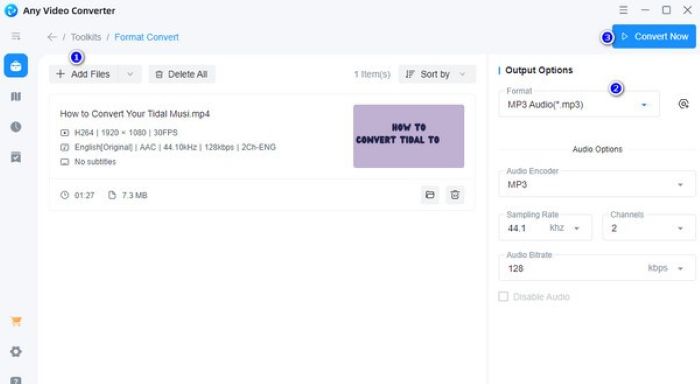
I tested Any Video Converter Free by downloading several YouTube videos and converting them to MP3 format. Overall, the process was relatively stable, but it is not as direct as online converters because it requires a two-step workflow (download first, then convert). The conversion quality was good, and I could choose different audio formats such as MP3 and WAV. However, I noticed that beginners may need a bit of time to get familiar with the interface.
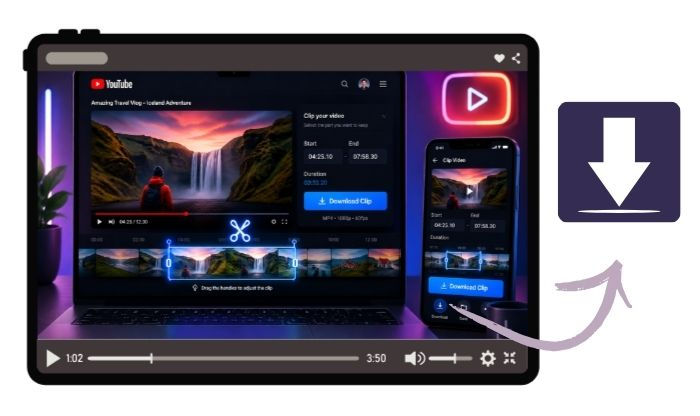
Free Download Part of YouTube Video - 100% Working
Want to just download a clip from a YouTube video? Get online YouTube trimmers, YouTube's Clip feature, and FlixiCam YouTube Clip Downloader here. Learn More > >
#3) YT5s
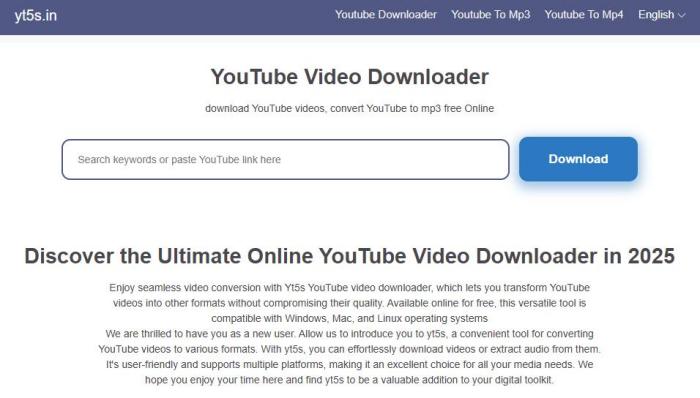
YT5s is a simple online YouTube to MP3 and MP4 converter that works as an alternative to YTMP3. In my testing, the process was very straightforward — you only need to paste a YouTube URL, and the tool quickly analyzes the video and prepares it for conversion.
In addition, YT5s also supports keyword-based video search, allowing users to find YouTube videos directly by entering keywords instead of pasting a URL. Users can then identify the correct video based on the thumbnail and title, and convert it into an MP3 file with ease. However, this feature is highly dependent on internet speed, and the search process may become slower on unstable connections.
YT5s typically provides multiple video quality options ranging from 360p to 1080p, depending on the source video. For audio conversion, it mainly offers different MP3 quality settings, allowing users to choose the output quality based on their preferences.
| OS | Any device (Windows / Mac / Android / iPhone via browser) |
| Support Website | YouTube (main support), plus other limited video platforms depending on availability |
| Audio Quality | Standard to high-quality MP3 (depending on source video) |
| Download Format | MP3, MP4 |
| Price | Free |
| Safety Review | 3.8 / 5 (varies depending on ads and redirects) |
| Download Experience | Browser-based online converter with search & URL support |
| Pros 👍 |
✅ No installation required, works directly in browser ✅ Supports both MP3 and MP4 downloads ✅ Can convert via URL or keyword search ✅ Works on mobile and desktop devices |
| Cons 👎 |
❌ Contains ads and potential redirect pages ❌ Search feature depends heavily on internet speed ❌ Limited advanced audio settings compared to desktop tools ❌ Stability may vary due to domain changes or server load |
How to Convert YouTube to MP3 files with YT5s
Step 1. Open YT5s in your browser. On the homepage, you will see a search bar where you can either paste a YouTube video URL or enter keywords to find the video you want to convert to MP3.
Step 2. Paste the YouTube link or select a video from the search results. YT5s will automatically analyze the video and generate available download options for both MP3 and MP4 formats.
Step 3. Choose MP3 format and select your preferred audio quality. After that, click the download button to start converting and saving the audio file to your device.
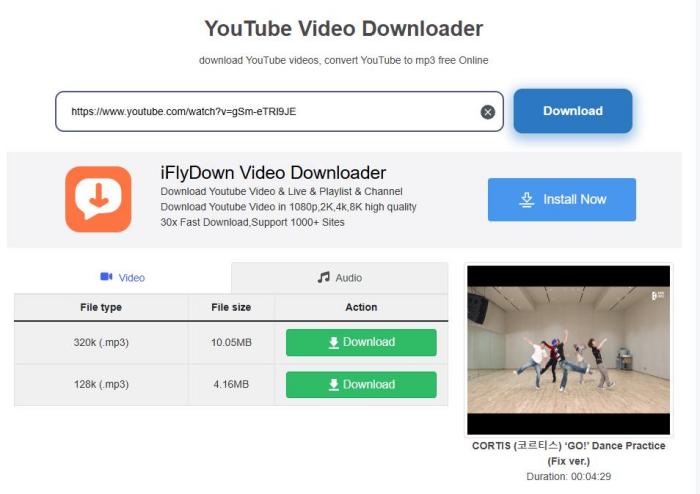
Step 4. Wait for the conversion process to complete. Once finished, your MP3 file will be ready for offline playback on any device.
Overall, the experience is relatively smooth, with a simple interface that allows users to paste a video link and start converting in a few steps. However, it should be noted that although 1080p video quality is advertised, the actual downloaded resolution may not always reach full 1080p HD in some cases.
Top 5 Safe Websites to Free Download YouTube to MP3
This passage has listed the top 5 websites where you can safely download YouTube into MP3 for free. Learn More > >
FAQs about YTMP3 Converter
Is YTMP3 Legal?
There are several free alternatives to StreamFab depending on your needs. Popular options include yt-dlp, and browser-based extensions such as Video DownloadHelper. These tools are often free and can download videos from many websites, but they usually don't support DRM-protected streaming services as reliably as paid tools.
Is YTMP3 Safe According to Reddit?
According to Reddit discussions, opinions on YTMP3 safety are mixed. Some users report using YTMP3 for years without issues, while others warn about misleading downloads or suspicious redirects. The general Reddit consensus is that YTMP3 is not completely unsafe, but caution is necessary — always double-check the website URL, avoid installing anything, and consider using an ad blocker for extra protection.
What Reddit Users Say About YTMP3
“I’ve used YTMP3 for years and never had any viruses.”
“The MP3 files are usually fine, but the site has a lot of ads.”
“The biggest risk is clicking fake download buttons or redirects.”
“It was a lot safer a few years ago but now you get redirected to malicious sites”
Conclusion
Ultimately, the best YTMP3 alternative comes down to your priorities, whether you prefer a safer desktop downloader or a quick online converter.
If you're looking for a reliable YouTube to MP3 converter, FlixiCam StreamOne is a solid option. Unlike YTMP3, this desktop downloader offers a cleaner experience with no pop-ups or redirect ads. It supports downloading YouTube MP3 audio in up to 320kbps quality and MP4 videos in up to 8K resolution, making it a reliable choice for both music and video downloads.